MyAssistant
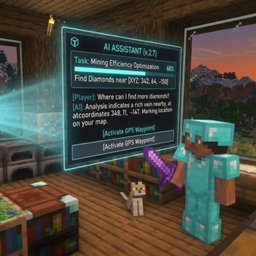
Meet your AI companion for Fabric! Chat with it, locate structures up to 1,600 blocks away, and request handy items every 3 days—scaling up to 16 late-game resources over time.
介绍
# 🤖 AI Assistant (Fabric)
Welcome to your ultimate Minecraft companion! This mod introduces an intelligent **AI Assistant** designed to enhance your survival experience, help you navigate the world, and keep you company during your long mining sessions. command with /ai [message] or push to talk with press N [default keybind] to talk with him
—
## ✨ Features
### 💬 Interactive Chat Companion
* Never feel alone in your singleplayer world again!
* Talk and chat with your AI friend directly through the in-game interface.
### 📦 Handy Item Requests (Every 3 Days)
* Need a helping hand? You can request survival items from your AI once every **3 in-game days**.
* **Late-game Progression:** Starting from the 2nd request onwards, the AI can grant powerful late-game resources! *(Balanced with a maximum limit of 16 items per request).*
### 🧭 Advanced Structure Locator (1,600-Block Radius)
* Stop wandering aimlessly looking for structures!
* The AI can instantly scan and pinpoint the exact coordinates of any world structures (Villages, Nether Fortresses, Strongholds, etc.) within a **1,600-block radius**.
—
## 🛠️ Installation & Requirements
* **Modloader:** Fabric
—
## 🔑 Configuration & AI Setup
To make the AI Assistant work, you need to provide a **Groq API Key**. Follow these simple steps:
1. **Launch the game once** with the mod installed to generate the configuration files.
2. Navigate to your Minecraft directory and open the config folder: `config/myassistant/groq_key.txt`.
3. Open `groq_key.txt`, paste your **Groq API Key** on the very first line, and **save the file**.
4. Restart your game (or close and re-open), and you are ready to play!
## 📝 License & Permissions
* Feel free to include this mod in any **modpacks**!
常见问题
MyAssistant 支持哪些 Minecraft 版本?
MyAssistant 支持 Minecraft Java 版 1.21.1,可用的加载器:Fabric。下载时注意选择和你游戏版本一致的文件。
MyAssistant 怎么安装?
先用 PCL2 或 HMCL 启动器安装对应版本的 Fabric,再把下载的 .jar 文件放进游戏目录的 mods 文件夹,重新启动游戏即可。开启了版本隔离的,mods 文件夹在 versions/版本名 下面。
评论
登录后评论和评分