
MusicMenu
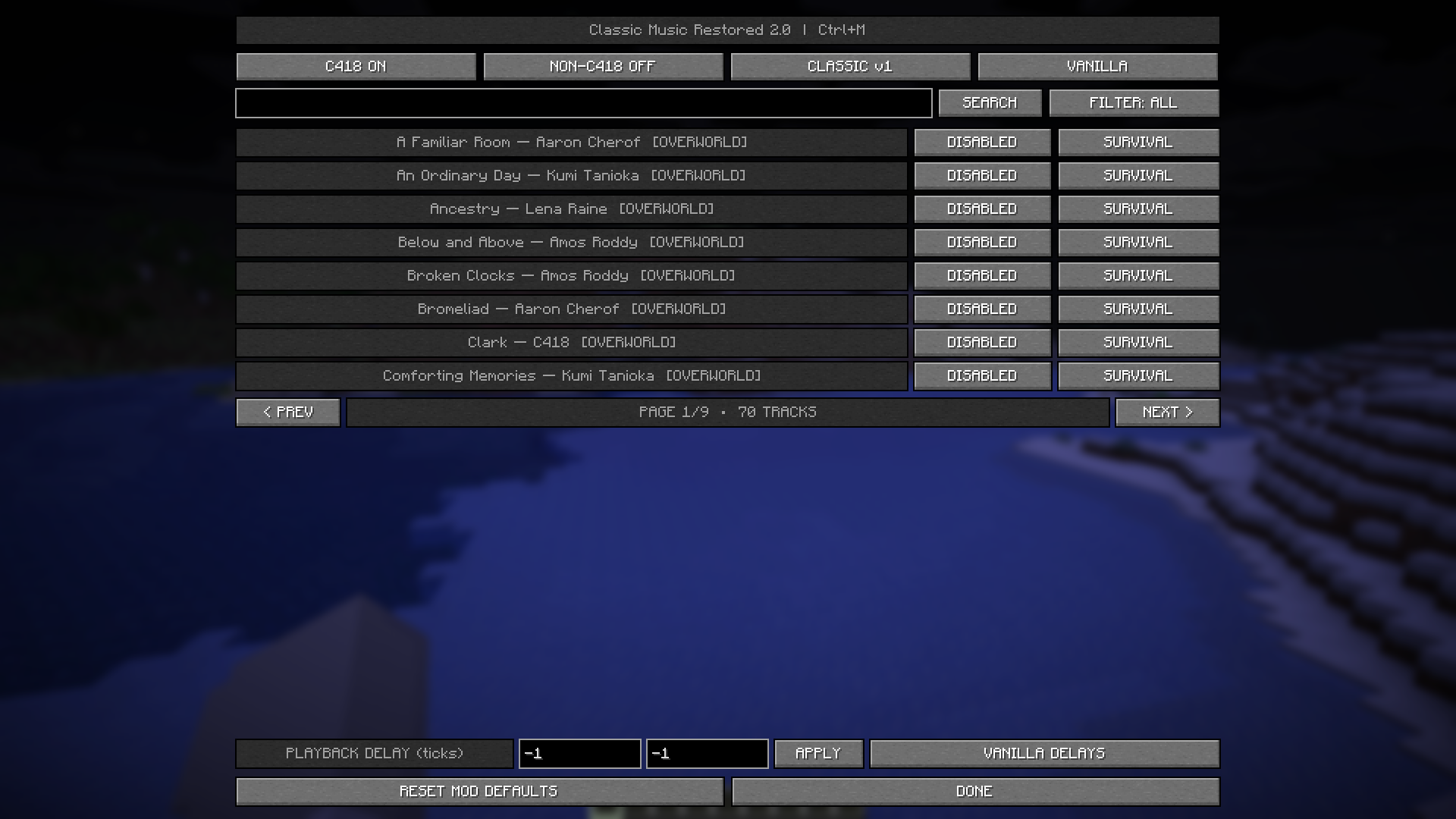
A menu where you can enable or disable every song in the game. You can also select which game mode you want each track to play in and customize the minimum and maximum delay, in ticks, between tracks.
截图

介绍
A brand-new music manager is introduced, featuring all the songs in the game. By pressing Ctrl + M, players can enable or disable any track they want and choose the game mode in which each track can play, making it possible to listen to originally Creative Mode-exclusive tracks in Survival Mode.
Players can also customize the minimum and maximum delay between songs, giving them control over how often Minecraft’s music plays.
With this mod, you won’t have to keep waiting and hoping for your favorite song to play, just select it and make it part of your Minecraft experience.
常见问题
MusicMenu 支持哪些 Minecraft 版本?
MusicMenu 支持 Minecraft Java 版 26.2,可用的加载器:Fabric。下载时注意选择和你游戏版本一致的文件。
MusicMenu 怎么安装?
先用 PCL2 或 HMCL 启动器安装对应版本的 Fabric,再把下载的 .jar 文件放进游戏目录的 mods 文件夹,重新启动游戏即可。开启了版本隔离的,mods 文件夹在 versions/版本名 下面。运行环境:仅客户端。
评论
登录后评论和评分