
MusicDisplay
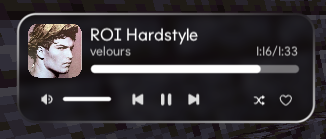
This mod displays the currently playing music on Spotify. You can easily adjust the volume, pause the song, and more.
截图
介绍
MusicDisplay
Version 2.5 is now available, supporting Minecraft version 26.1.x! Check the changelog here.
Take full control of your music without ever leaving the game! This mod seamlessly integrates Spotify into your Minecraft client, offering a sleek overlay and easy access to playback controls.
Features
- Full Playback Control: Pause, resume, skip, or rewind tracks directly from the game.
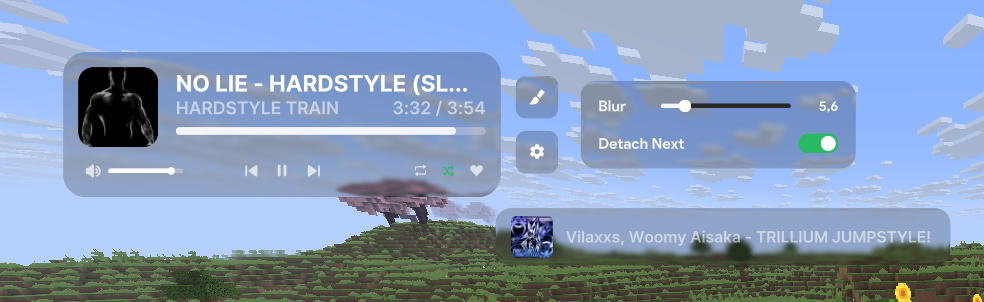
- Live Overlay: Displays the current song title, artist, album art, and a real-time progress bar.
- Search Spotify: You can search for your song or playlist directly from the GUI!
- Volume Management: Adjust Spotify volume instantly without Alt-Tabbing.
- Interactive Controls:
- Play/Pause
- Previous / Next Track
- Shuffle Toggle
- Loop Toggle
- Like/Save Songs
- State Synchronization: Automatically syncs with changes made on other devices (e.g., your phone).
- Custom API Keys: Use your own Spotify Client ID and Secret for full privacy and control.
How to Use
1. Initial Setup
To connect the mod to your Spotify account:
- Open the client GUI in the game (default key: Right Shift).
- Click the Setup Spotify button at the bottom of the panel. This will launch a local setup server and automatically open the setup page in your web browser (
http://127.0.0.1:8888/setup). - Follow the instructions on the web page:
- Log in to the Spotify Developer Dashboard.
- Create a new application.
- Edit the app settings and add
http://127.0.0.1:8888/callbackas a Redirect URI. - Copy your Client ID and Client Secret.
- Enter your Client ID and Client Secret in the web form and click Connect Spotify Account.
- Approve the authorization in your browser. Once completed, you can close the browser tab and return to the game!
2. State & Control
Enable the Spotify module in your client’s GUI. Your music will start syncing instantly!
Configuration
Configuration files are stored locally at: .minecraft/config/spotify-config.json
Keybinds
- Right Shift – Opens the Client GUI
Requirements
- Spotify Account (Premium is required).
- Minecraft Java Edition (Fabric).
- Java 25 or higher.
Preview

Showcase
常见问题
MusicDisplay 支持哪些 Minecraft 版本?
MusicDisplay 支持 Minecraft Java 版 1.21.4–26.2,共 6 个版本,可用的加载器:Fabric。下载时注意选择和你游戏版本一致的文件。
MusicDisplay 怎么安装?
先用 PCL2 或 HMCL 启动器安装对应版本的 Fabric,再把下载的 .jar 文件放进游戏目录的 mods 文件夹,重新启动游戏即可。开启了版本隔离的,mods 文件夹在 versions/版本名 下面。运行环境:仅客户端。
unnsense 的其他作品
查看全部 → MusicDisplay
This mod displays the currently playing music on Spotify. You can easily adjust the volume, pause the song, and more.

Better Zoom
Better Zoom is a lightweight, ultra-smooth, and modern client-side mod for Minecraft 26+ built on the Fabric loader.

Freelook
Freelook is a lightweight, client-side only Fabric mod for Minecraft 26.x that allows you to decouple your camera rotation from your player's body orientation.

ViaSlidy
This mod allows you to quickly change your minecraft version via slider ingame!
评论
登录后评论和评分