
Music Interface
A modern in-game music player for Minecraft with playlists, favorites, album covers and full control over custom music libraries.
截图

介绍
🎵 Music Interface
Turn Minecraft’s music into a complete customizable music experience.







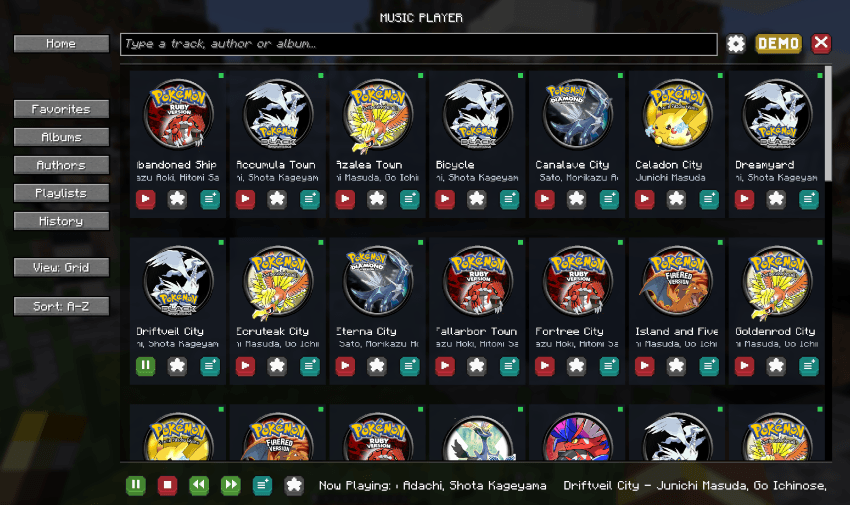
About
Music Interface is a complete in-game music player and intelligent music system for Minecraft.
Browse your music library, create playlists, build a playback queue, discover personalized mixes and let tracks automatically adapt to your world through contextual rules.
Music is provided through standard Minecraft resource packs, making Music Interface ideal for players, modpacks and creators who want their own complete soundtrack.
Highlights
- 🎵 Modern Music Player: Browse tracks, albums and artists with cover artwork, search, grid/list views and full playback controls.
- ❤️ Favorites & Playlists: Build your own collections, reorder tracks and play them in order or shuffle mode.
- 🔗 Playlist Sharing: Export, share and import playlists directly between players.
- 📋 Playback Queue: Use Play Next, build a persistent queue, drag tracks into order and save queues as playlists.
- 📻 Track Radio: Start an ongoing radio session based around any track.
- ✨ Made For You: Dynamic mixes including For You, On Repeat, Rediscover and music based on your current context.
- 👤 Listening Profile: Track plays, skips, replays, listening time and preferences across artists, albums, music packs and world contexts.
- 🌍 Context-Aware Music: Music packs can react to dimensions, biomes, biome tags, time, weather and combat.
- 🔄 Smooth Playback: Crossfades, track-specific fades, cooldowns, weighting and configurable automatic playback.
- 🏠 Main Menu Music: Custom libraries can also automatically provide music directly from the title screen.
- 🔔 Now Playing Toast: Configurable track notifications with multiple positions and animation styles.
- 🎮 Cobblemon Support: Optional battle-aware playback lets Music Interface pause or provide contextual battle music.
- 📦 Multi-Pack Support: Combine multiple music resource packs with Minecraft’s normal resource-pack priority system.
- 🛠️ Pack Tools: Generate a ready-to-edit template pack and use built-in diagnostics to find invalid tracks, duplicates and pack issues.
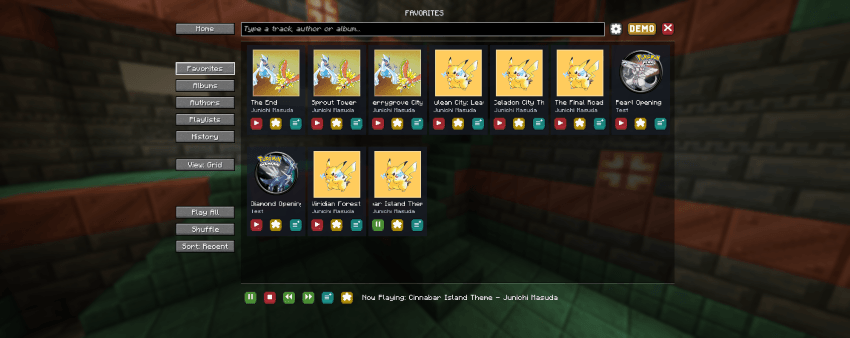
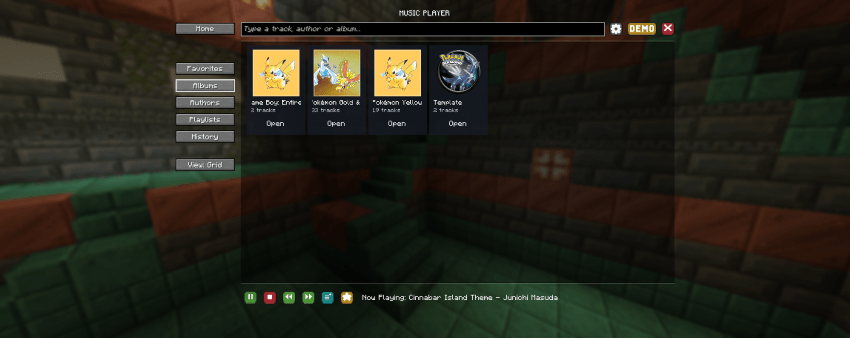
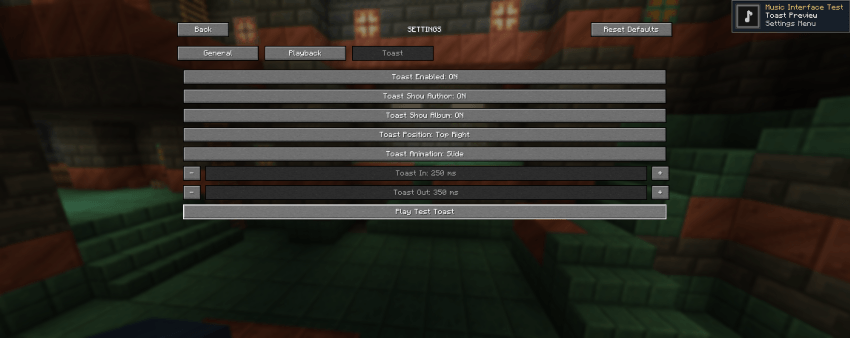
Custom Music Packs
Music Interface uses standard Minecraft resource packs for custom music.
A music pack can define:
- Audio tracks
- Track titles
- Artists
- Albums
- Cover artwork
- Genres, moods and tags
- Playback weight and volume
- Fade settings and cooldowns
- Context rules for biomes, dimensions, time, weather and combat
Multiple music packs can be enabled at the same time and are automatically merged according to Minecraft’s resource-pack priority.
A built-in template generator is available to make creating new music packs easier.
Fully Configurable
Control how Music Interface interacts with Minecraft’s normal music system.
Configure custom and vanilla music coexistence, automatic playback delays, crossfades, menu music, track visibility, history size, interface layout, toast behavior and more.
Cloth Config is optionally supported for in-game configuration.
Requirements
Minecraft: 1.21.1
Loaders: Fabric & NeoForge
Java: 21
Architectury API: Required
Fabric API: Required on Fabric
Cloth Config: Optional
Support the Project
Enjoying Music Interface?
Support future updates and upcoming Our Story projects through Patreon.


For support, music pack creation, suggestions or bug reports, join the Our Story community on Discord.
Game Hosting
Need a server for your Minecraft adventures?
Host your server with BisectHosting and use code OURSTORY for 25% OFF.

Every purchase helps support the development of Our Story projects.
Created by LevelsFR × Our Story
CurseForge •
Modrinth •
Discord •
Patreon
常见问题
Music Interface 支持哪些 Minecraft 版本?
Music Interface 支持 Minecraft Java 版 1.21.1–26.3,共 9 个版本,可用的加载器:Fabric / NeoForge。下载时注意选择和你游戏版本一致的文件。
Music Interface 怎么安装?
先用 PCL2 或 HMCL 启动器安装对应版本的 Fabric / NeoForge,再把下载的 .jar 文件放进游戏目录的 mods 文件夹,重新启动游戏即可。开启了版本隔离的,mods 文件夹在 versions/版本名 下面。运行环境:客户端和服务端都要装。
LevelsFR 的其他作品
查看全部 →
Catch Indicator [Cobblemon Addon]
添加清晰的游戏内提示,显示宝可梦是尚未见过还是已经捕获。

Our Story: FTB Quest & Mod Theme
来自《Our Story》系列的现代 FTB 模组 UI。设计简洁,自定义图标,支持多语言。

Cobblemon Rustling Spots
Rustling Spots adds dynamic, world-driven “rustling spots” across the Overworld.

Cobblemon Rustling Spots
Rustling Spots adds dynamic, world-driven “rustling spots” across the Overworld.
评论
登录后评论和评分