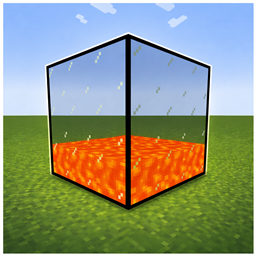
Multiblock Fluid Tank
A Multiblock Fluid Tank with three differen sizes. Tanks can have any form or size.
介绍
Multiblock Fluid Tanks
Multiblock Fluid Tanks adds simple yet powerful fluid storage to your world. Place tanks next to each other and they automatically connect forming a single, shared storage network of any shape or size.
Features
Three tank sizes — Small, Medium and Large, each with a different fluid capacity
Automatic multiblock — Tanks connect in any direction (up, down, north, south, east, west), forming networks of any shape and size
Shared fluid storage — All connected tanks of the same tier act as one large tank, fluid is distributed evenly from bottom to top
Fluid conflict prevention — Tanks with different fluids cannot be connected, keeping your storage safe
Bucket support — Fill and empty tanks directly with buckets
Light emission — Tanks glow based on the fluid inside (e.g. lava)
GUI — Right-click any tank to see the fluid type, total capacity, network size and flow rate
How to use
- Craft a tank and place it down
- Place more tanks of the same tier next to it — they connect automatically
- Fill them using a bucket, a pipe or any other fluid handler
- Right-click to open the GUI and inspect your network
Compatibility
NeoForge
1.21.1, 1.20.1
I have added some more Versions but they are Beta for now.
常见问题
Multiblock Fluid Tank 支持哪些 Minecraft 版本?
Multiblock Fluid Tank 支持 Minecraft Java 版 1.20.1–1.21.11,共 11 个版本,可用的加载器:Forge / NeoForge。下载时注意选择和你游戏版本一致的文件。
Multiblock Fluid Tank 怎么安装?
先用 PCL2 或 HMCL 启动器安装对应版本的 Forge / NeoForge,再把下载的 .jar 文件放进游戏目录的 mods 文件夹,重新启动游戏即可。开启了版本隔离的,mods 文件夹在 versions/版本名 下面。
评论
登录后评论和评分