
介绍
Saves breaking progress when you stop mining. You can pause and continue later, let another player continue from where you left off, or work together to break the same block faster. Damaged blocks regenerate over time! Configurable settings!
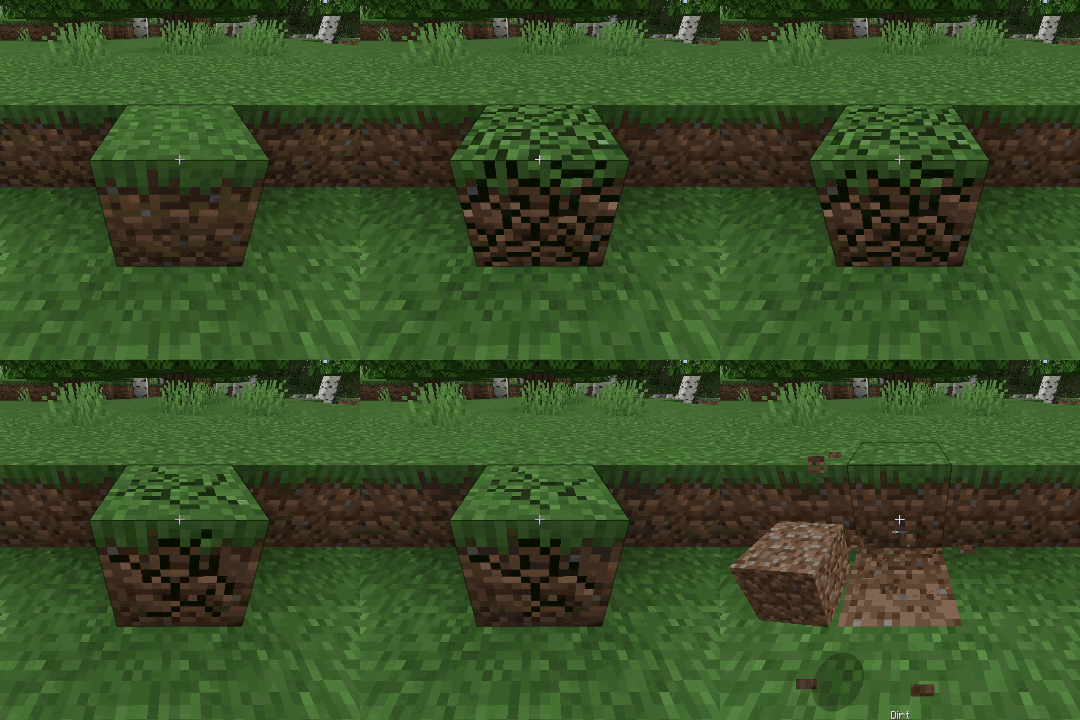
Changes how block breaking works by saving your mining progress
instead of resetting it as soon as you stop.
You can stop mining, switch tools, walk away, and continue mining from where you left off. Each block keeps its own damage, and the cracks stay visible so you can see how close it is to breaking.
Damaged blocks slowly repair themselves after a configurable delay.
Multiple players can also mine the same block at the same time. The first player mines at normal speed, and each extra player adds 50% more mining speed by (default).
Default Config (multi-mine.txt):
 "RegenDelay":100, - how long after you stop mining before regeneration starts.
 "RegenAmount":0.1, - how much mining progress is restored each regeneration step.
 "RegenCooldown":50, - how often regeneration happens after it starts.
 "PlayerMultiplier":0.5 - how much extra mining speed each additional player contributes.
20 ticks = 1 second
常见问题
Multi Mine Fabric 支持哪些 Minecraft 版本?
Multi Mine Fabric 支持 Minecraft Java 版 1.21–1.21.1,共 2 个版本,可用的加载器:Fabric / Quilt。下载时注意选择和你游戏版本一致的文件。
Multi Mine Fabric 怎么安装?
先用 PCL2 或 HMCL 启动器安装对应版本的 Fabric / Quilt,再把下载的 .jar 文件放进游戏目录的 mods 文件夹,重新启动游戏即可。开启了版本隔离的,mods 文件夹在 versions/版本名 下面。
navzary 的其他作品
查看全部 →
Better OneBlock [One Block]
扩展原版 One Block 体验。未来还将加入欢乐恶魂等更多内容!

Fresh Hearts – Health Bar
改进生命值栏的心形纹理:重制了极限模式、伤害吸收、中毒、凋零、冻结、坐骑和受伤状态的纹理。还有 HUD 快捷栏!

Vanilla Food Hunger Bar
将食物/饥饿图标恢复为默认的原版图标,需置于其他资源包之上。HUD 快捷栏!

Better OneBlock – Title
专为更好的空岛整合包打造!
评论
登录后评论和评分