Multi Key Bindings
Allows players to create multiple keybindings for the same action/function.
截图


介绍
Multi Key Bindings
Github • Modrinth • CurseForge
Allows players to create multiple keybindings for the same action/function and add modifiers to their binds.
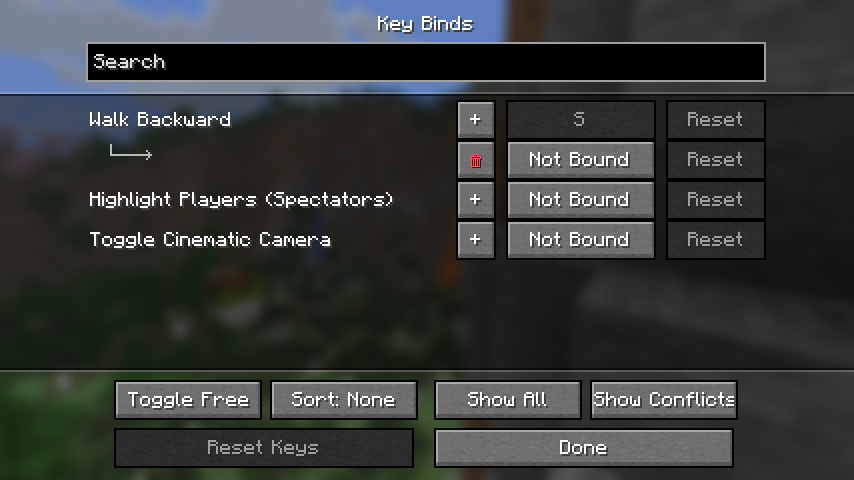
This mod adds extra functionality to the native key binds screen. Simply click the “+” button next to any key binding and a new binding for the selected action should appear.
This mod also adds support for modifier keys (left/right) shift, control, and alt, as well as the ability to bind keys to flipping the sticky toggle mode of toggle actions (auto jump, sticky sneak, sticky sprint, etc).

Versions and Compatibility
Created for Minecraft versions 1.20+
_As of MKB version 1.3.0, there is support for key bind modifiers (e.g. Shift+K)._
_As of MKB version 1.1.0, this is now compatible with Controlling, so you can search and sort all your key bindings in the same screen._
_Note that there are niche limitations: e.g. if you set action “Open Inventory” to a mouse button, pressing that mouse button cannot close the inventory as a key would. Similarly, if binding a key to “Pick Block”, you will not be able to drag to duplicate a block the way you would be able to with a mouse bind._
常见问题
Multi Key Bindings 支持哪些 Minecraft 版本?
Multi Key Bindings 支持 Minecraft Java 版 1.20–26.3,共 24 个版本,可用的加载器:Fabric。下载时注意选择和你游戏版本一致的文件。
Multi Key Bindings 怎么安装?
先用 PCL2 或 HMCL 启动器安装对应版本的 Fabric,再把下载的 .jar 文件放进游戏目录的 mods 文件夹,重新启动游戏即可。开启了版本隔离的,mods 文件夹在 versions/版本名 下面。运行环境:仅客户端。
评论
登录后评论和评分