介绍
中文介绍正在准备中,下面暂时显示原文。
Feel free to open ticket on GitHub for new events
Recommended to use with
- https://modrinth.com/mod/worldgen-profiling that added events for feature and surface
- https://modrinth.com/mod/packs-entries-blocker to disable unused pack entries
- https://modrinth.com/mod/registry-blocker to disable the registries’ entries like entities that are lagging.
Feature
Option for profiling launch with JFR profiler bundled with Minecraft and Java. Need to enable in config file. Disabled
by default.
    [09:41:51] [main/INFO] (FabricLoader/MixinExtras|Service) Initializing MixinExtras via com.llamalad7.mixinextras.service.MixinExtrasServiceImpl(version=0.3.5).
    [09:41:52] [main/INFO] (Minecraft) Started flight recorder profiling id(1):name(client-1.20.1-2024-04-22-094152) - will dump to debug\client-2024-04-22-094152.jfr on exit or stop command
    [09:41:58] [main/INFO] (Minecraft) Vanilla bootstrap took 4501 milliseconds
[09:42:09] [Render thread/INFO] (Minecraft) Total blocking time: 775 ms
[09:42:11] [Render thread/WARN] (ModernFix) Game took 24.617 seconds to start
2024-04-22 09:42:11,665 Render thread WARN Error parsing URI D:\Projects\Minecraft\MoreProfiling\mod\.gradle\loom-cache\log4j.xml
[09:42:11] [Render thread/INFO] (Minecraft) Dumped flight recorder profiling to debug\client-2024-04-22-094152.jfr
[09:42:11] [Render thread/INFO] (Minecraft) Dumped recording summary to debug\jfr-report-client-2024-04-22-094152.json
[09:42:11] [Render thread/INFO] (MoreProfiling) Launch profiling finished. Exported to debug\client-2024-04-22-094152.jfrOption for enable debug reloader for profiling data packs/resource packs’ loading. Not JFR.
[09:42:09] [Render thread/INFO] (Minecraft) LanguageManager [net.minecraft.client.resource.language.LanguageManager] took approximately 65 ms (0 ms preparing, 65 ms applying)
[09:42:09] [Render thread/INFO] (Minecraft) TextureManager [net.minecraft.client.texture.TextureManager] took approximately 21992 ms (21992 ms preparing, 0 ms applying)
[09:42:09] [Render thread/INFO] (Minecraft) SoundManager [net.minecraft.client.sound.SoundManager] took approximately 3172 ms (3124 ms preparing, 48 ms applying)
[09:42:09] [Render thread/INFO] (Minecraft) SplashTextResourceSupplier [net.minecraft.client.resource.SplashTextResourceSupplier] took approximately 2 ms (2 ms preparing, 0 ms applying)
[09:42:09] [Render thread/INFO] (Minecraft) FontManager [net.minecraft.client.font.FontManager] took approximately 22460 ms (22299 ms preparing, 161 ms applying)
[09:42:09] [Render thread/INFO] (Minecraft) GrassColormapResourceSupplier [net.minecraft.client.resource.GrassColormapResourceSupplier] took approximately 26 ms (24 ms preparing, 2 ms applying)
[09:42:09] [Render thread/INFO] (Minecraft) FoliageColormapResourceSupplier [net.minecraft.client.resource.FoliageColormapResourceSupplier] took approximately 24 ms (23 ms preparing, 1 ms applying)
[09:42:09] [Render thread/INFO] (Minecraft) BakedModelManager [net.minecraft.client.render.model.BakedModelManager] took approximately 25132 ms (25108 ms preparing, 24 ms applying)
[09:42:09] [Render thread/INFO] (Minecraft) EntityModelLoader [net.minecraft.client.render.entity.model.EntityModelLoader] took approximately 140 ms (0 ms preparing, 140 ms applying)
[09:42:09] [Render thread/INFO] (Minecraft) BlockEntityRenderDispatcher [net.minecraft.client.render.block.entity.BlockEntityRenderDispatcher] took approximately 32 ms (0 ms preparing, 32 ms applying)
[09:42:09] [Render thread/INFO] (Minecraft) BuiltinModelItemRenderer [net.minecraft.client.render.item.BuiltinModelItemRenderer] took approximately 0 ms (0 ms preparing, 0 ms applying)
[09:42:09] [Render thread/INFO] (Minecraft) ItemRenderer [net.minecraft.client.render.item.ItemRenderer] took approximately 6 ms (0 ms preparing, 6 ms applying)
[09:42:09] [Render thread/INFO] (Minecraft) BlockRenderManager [net.minecraft.client.render.block.BlockRenderManager] took approximately 3 ms (0 ms preparing, 3 ms applying)
[09:42:09] [Render thread/INFO] (Minecraft) EntityRenderDispatcher [net.minecraft.client.render.entity.EntityRenderDispatcher] took approximately 191 ms (0 ms preparing, 191 ms applying)
[09:42:09] [Render thread/INFO] (Minecraft) Shader Loader [net.minecraft.client.render.GameRenderer$1] took approximately 200 ms (116 ms preparing, 84 ms applying)
[09:42:09] [Render thread/INFO] (Minecraft) WorldRenderer [net.minecraft.client.render.WorldRenderer] took approximately 16 ms (0 ms preparing, 16 ms applying)
[09:42:09] [Render thread/INFO] (Minecraft) SearchManager [net.minecraft.client.search.SearchManager] took approximately 0 ms (0 ms preparing, 0 ms applying)
[09:42:09] [Render thread/INFO] (Minecraft) ParticleManager [net.minecraft.client.particle.ParticleManager] took approximately 302 ms (301 ms preparing, 1 ms applying)
[09:42:09] [Render thread/INFO] (Minecraft) PaintingManager [net.minecraft.client.texture.PaintingManager] took approximately 179 ms (179 ms preparing, 0 ms applying)
[09:42:09] [Render thread/INFO] (Minecraft) StatusEffectSpriteManager [net.minecraft.client.texture.StatusEffectSpriteManager] took approximately 75 ms (75 ms preparing, 0 ms applying)
[09:42:09] [Render thread/INFO] (Minecraft) VideoWarningManager [net.minecraft.client.resource.VideoWarningManager] took approximately 5 ms (4 ms preparing, 1 ms applying)
[09:42:09] [Render thread/INFO] (Minecraft) PeriodicNotificationManager [net.minecraft.client.resource.PeriodicNotificationManager] took approximately 1 ms (1 ms preparing, 0 ms applying)
[09:55:32] [Render thread/INFO] (Minecraft) TagManagerLoader [net.minecraft.registry.tag.TagManagerLoader] took approximately 519 ms (519 ms preparing, 0 ms applying)
[09:55:32] [Render thread/INFO] (Minecraft) LootManager [net.minecraft.loot.LootManager] took approximately 340 ms (251 ms preparing, 89 ms applying)
[09:55:32] [Render thread/INFO] (Minecraft) RecipeManager [net.minecraft.recipe.RecipeManager] took approximately 110 ms (83 ms preparing, 27 ms applying)
[09:55:32] [Render thread/INFO] (Minecraft) FunctionLoader [net.minecraft.server.function.FunctionLoader] took approximately 18 ms (18 ms preparing, 0 ms applying)
[09:55:32] [Render thread/INFO] (Minecraft) ServerAdvancementLoader [net.minecraft.server.ServerAdvancementLoader] took approximately 198 ms (87 ms preparing, 111 ms applying)Option for dumping resource reload profiling. Need to enable debug reloader through the above option.
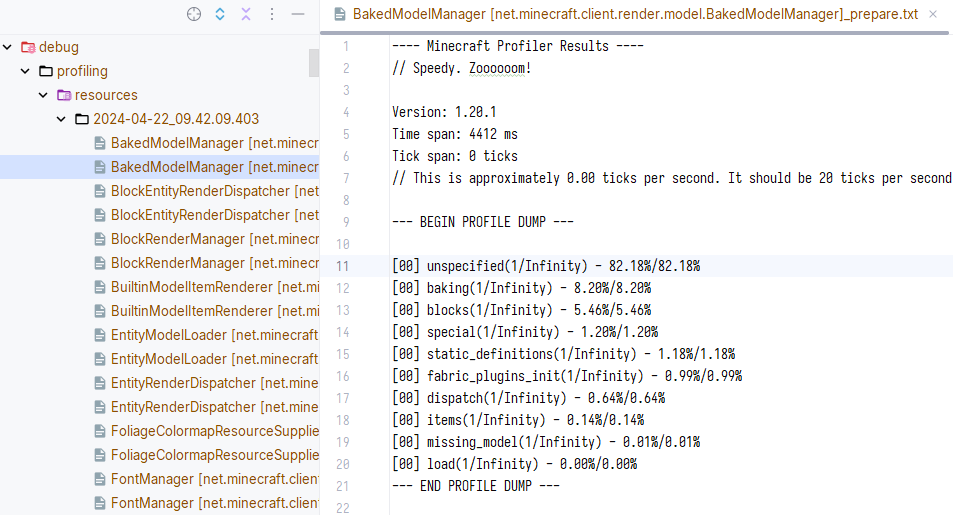
Option for profiling world loading.
[09:55:34] [Server thread/INFO] (Minecraft) Starting integrated minecraft server version 1.20.1
[09:55:34] [Server thread/INFO] (Minecraft) Generating keypair
[09:55:34] [Server thread/INFO] (Minecraft) Started flight recorder profiling id(2):name(client-1.20.1-2024-04-22-095534) - will dump to debug\client-2024-04-22-095534.jfr on exit or stop command
[09:55:37] [Server thread/INFO] (Minecraft) Preparing start region for dimension minecraft:overworld
[09:55:37] [Render thread/INFO] (Minecraft) Time elapsed: 114 ms
[09:55:37] [Server thread/INFO] (Minecraft) Dumped flight recorder profiling to debug\client-2024-04-22-095534.jfr
[09:55:37] [Server thread/INFO] (Minecraft) Dumped recording summary to debug\jfr-report-client-2024-04-22-095534.json
[09:55:37] [Server thread/INFO] (MoreProfiling) World loading profiling finished. Exported to debug\client-2024-04-22-095534.jfr
[09:55:37] [Server thread/INFO] (Minecraft) Changing view distance to 12, from 10
[09:55:37] [Server thread/INFO] (Minecraft) Changing simulation distance to 12, from 0
[09:55:39] [Server thread/INFO] (Minecraft) Player378[local:E:8feacf15] logged in with entity id 1 at (-165.5, 76.0, -50.5)- Option for suppress profiler logging profiling info json.
Option for redirecting Minecraft profiler to JFR event.
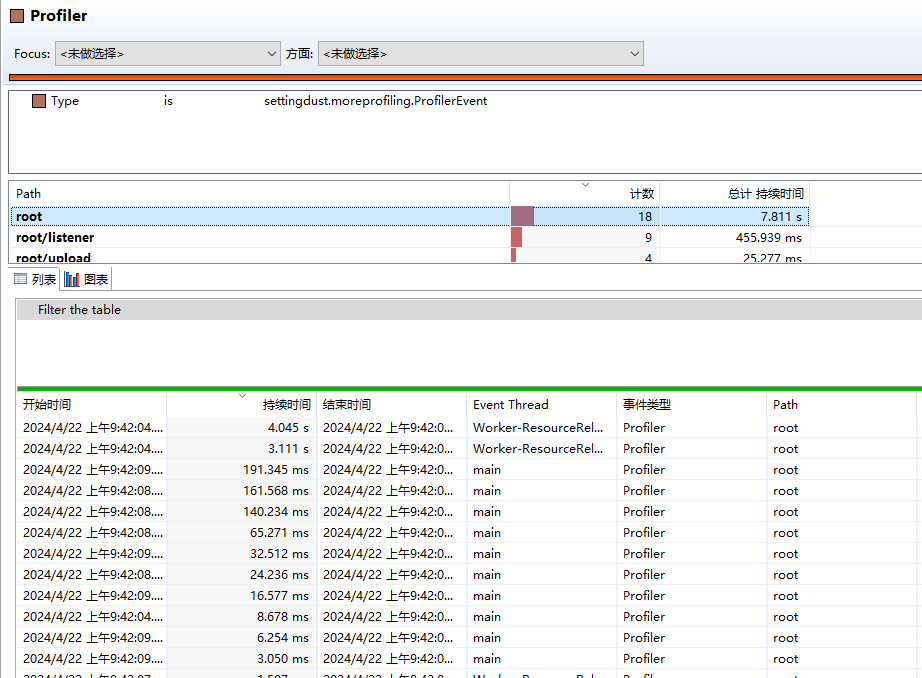
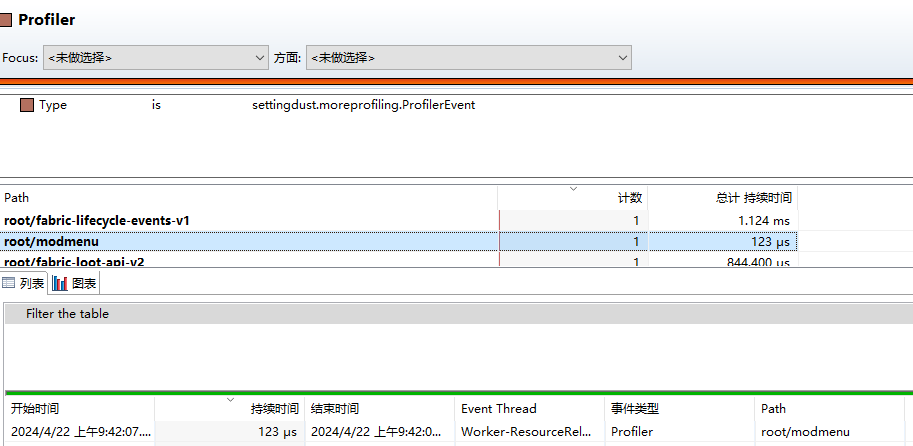
- Option for profiling when resource reloading
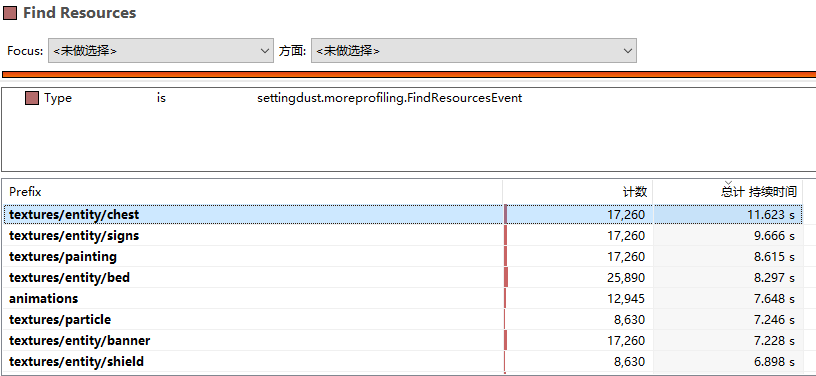
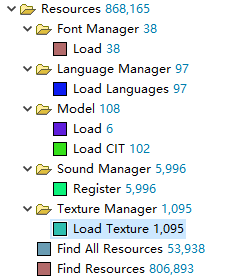
Option adding resource reload profiling events
CIT Resewn events supported
常见问题
More Profiling 支持哪些 Minecraft 版本?
More Profiling 支持 Minecraft Java 版 1.20–1.21.3,共 11 个版本,可用的加载器:Fabric / Forge / Quilt。下载时注意选择和你游戏版本一致的文件。
More Profiling 怎么安装?
先用 PCL2 或 HMCL 启动器安装对应版本的 Fabric / Forge / Quilt,再把下载的 .jar 文件放进游戏目录的 mods 文件夹,重新启动游戏即可。开启了版本隔离的,mods 文件夹在 versions/版本名 下面。运行环境:客户端 / 服务端。
settingdust 的其他作品
查看全部 →
Kiwi 🥝
by Snownee, settingdust
Minecraft 模组开发库
2371万
17 天前
Modrinth

Snow! Real Magic! ⛄
by settingdust, Snownee
不是魔法类模组。 · 雪的重力与堆积 · 被雪覆盖的方块 · 调整雪的行为
835万
3 天前
Modrinth

Mod Compat Fixes
by settingdust
修复整合包中几个模组的问题。
575.7万
2 年前
CurseForge

lazyyyyy
by settingdust
主要优化大型整合包的游戏启动时间。
483.5万
1 年前
Modrinth · CurseForge
评论
登录后评论和评分