
More Functional Storage
Functional Storage addon that adds drawer upgrades with more advanced functionality.
介绍
This is a Functional Storage addon that adds drawer upgrades with more advanced functionality.
Breaker Upgrade
Breaks blocks and places them in the drawer. Requires a tool inserted in the upgrade (durability is not consumed).
Placer Upgrade
Places blocks from the drawer.
Refill Upgrade
Refills the player’s hotbar, inventory or ender chest with items from the drawer. Will only refill slots with at least one item. Use the dimensional variant for it to work cross dimensionally.
Stonecutting Upgrade
Stonecuts items from the drawer automatically. The stonecutting output can be configured via the filter. Therefore, a tag filter can be used to for example turn any stones into stairs by matching on the stairs tag.
The direction of the upgrades can be configured in the GUI using the arrow button.
All upgrades added by this mod have a base processing time (usually once every 3 seconds) which can be reduced via Speed Upgrade Augments (placing the maximum 6 augments will make the upgrade work every tick).
Upgrade GUIs can be accessed by placing the upgrade in a drawer’s utility slot, hovering over it and then right clicking. There you can configure the upgrade (redstone control, slot selection, filtering, augments etc.).
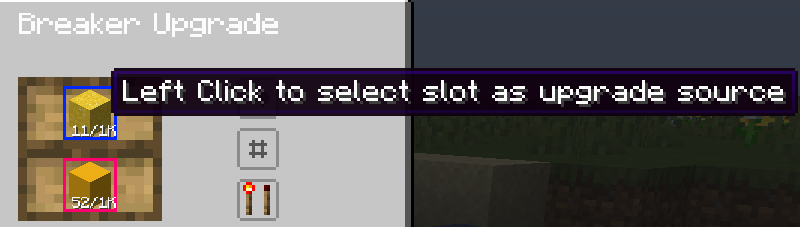
Upgrades have redstone control which makes them work only if the power the drawer receives meets the configured criteria. The slots with which an upgrade interacts can be selected on a per-upgrade basis by clicking them:
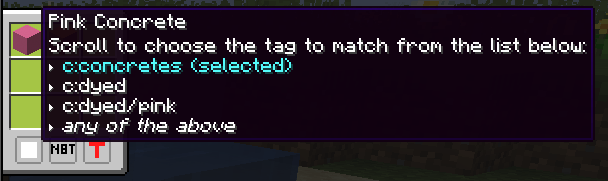
Filtering is also supported, in a panel opened by clicking the second button (the one below the direction button). The filters support blacklisting or whitelisting, matching NBT strictly or matching based on tags (see the image below)
More upgrades will be added in the future!
常见问题
More Functional Storage 支持哪些 Minecraft 版本?
More Functional Storage 支持 Minecraft Java 版 1.21.1–1.21.8,共 8 个版本,可用的加载器:NeoForge。下载时注意选择和你游戏版本一致的文件。
More Functional Storage 怎么安装?
先用 PCL2 或 HMCL 启动器安装对应版本的 NeoForge,再把下载的 .jar 文件放进游戏目录的 mods 文件夹,重新启动游戏即可。开启了版本隔离的,mods 文件夹在 versions/版本名 下面。运行环境:客户端和服务端都要装。
Matyrobbrt 的其他作品
查看全部 →
Forgified Fabric API
基于 NeoForge 实现的 Fabric API

Sinytra Connector
让你在 NeoForge 上玩 Fabric 模组

Connector Extras
将Connector与第三方API集成
Eating Animation [Neo/Forge]
Eating Animation 模组的 Neo/Forge 移植版
评论
登录后评论和评分