
Modpack Checker
作者:TriibuNupsik
A lightweight Fabric mod for Minecraft servers to verify that clients are using the correct modpack version.
截图

介绍
中文介绍正在准备中,下面暂时显示原文。
Modpack Checker
A lightweight Fabric mod for Minecraft servers to verify that clients are using the correct modpack version.
Features
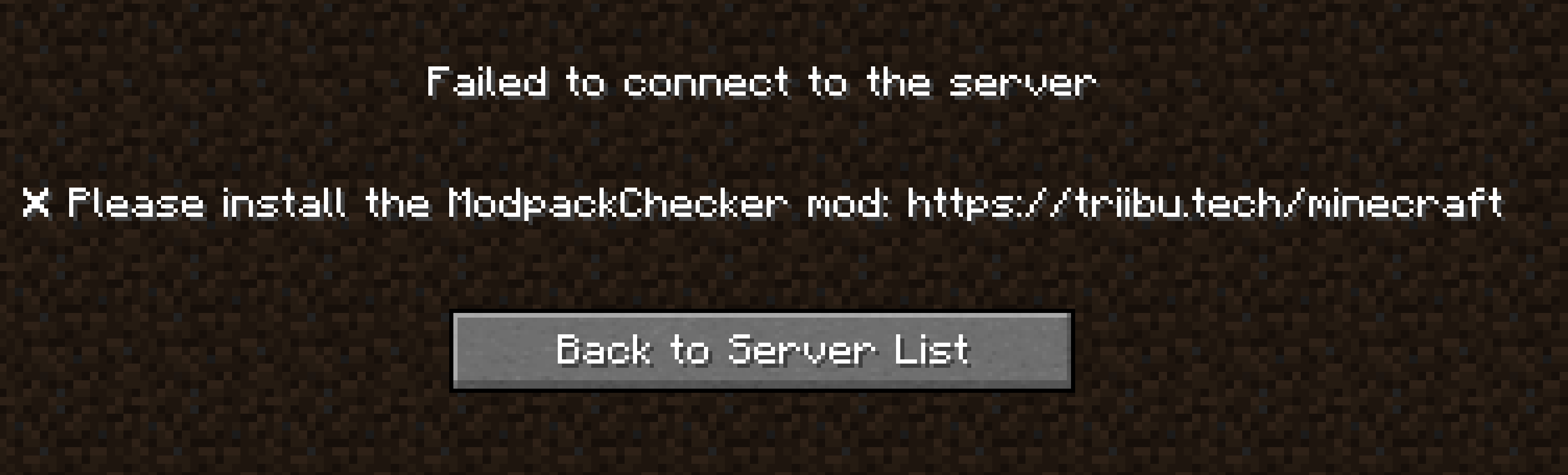
- Disconnection Messages: Ability to set custom helpful disconnection messages
- Reload Command: reload the configuration by using
/modpackchecker-reload - LAN Multiplayer Support: Works with both dedicated servers and LAN multiplayer (can be disabled by setting enabled_lan to false)
- Development Mode: Use version “development” to always allow joining (useful for testing servers)
How It Works
- Server sends a version check during login
- Client replies with the version from
modpack-checker.toml - Server compares it to its expected version
- If mismatched, the player is kicked with a custom message
Configuration
Server (config/modpack-checker.toml):
# Modpack Checker Configuration
# This file contains both server and client configuration

# Modpack version of the server and client, that must match
# version "development" always allows joining
version = "1.0.0"

# Enable or disable modpack version checking
enable_server = true
enable_lan = true

# Kick messages for different scenarios
[messages]
# Message shown when client doesn't have the mod installed
no_mod = "Modpack not installed! \n\n Please install the modpack, version \"{version}\" \n <your-modpack-link>"

# Message shown when client has wrong version (use {version} as placeholder)
wrong_version = "Wrong modpack version installed! \n\n Please install the modpack version \"{version}\" \n <your-modpack-link>"

# Message shown when there's a server configuration error
server_error = "Server configuration error. Please contact an administrator."
常见问题
Modpack Checker 支持哪些 Minecraft 版本?
Modpack Checker 支持 Minecraft Java 版 1.20–1.21.7,共 15 个版本,可用的加载器:Fabric。下载时注意选择和你游戏版本一致的文件。
Modpack Checker 怎么安装?
先用 PCL2 或 HMCL 启动器安装对应版本的 Fabric,再把下载的 .jar 文件放进游戏目录的 mods 文件夹,重新启动游戏即可。开启了版本隔离的,mods 文件夹在 versions/版本名 下面。运行环境:客户端和服务端都要装。


评论
登录后评论和评分