Modern Music
作者:Aquariverr
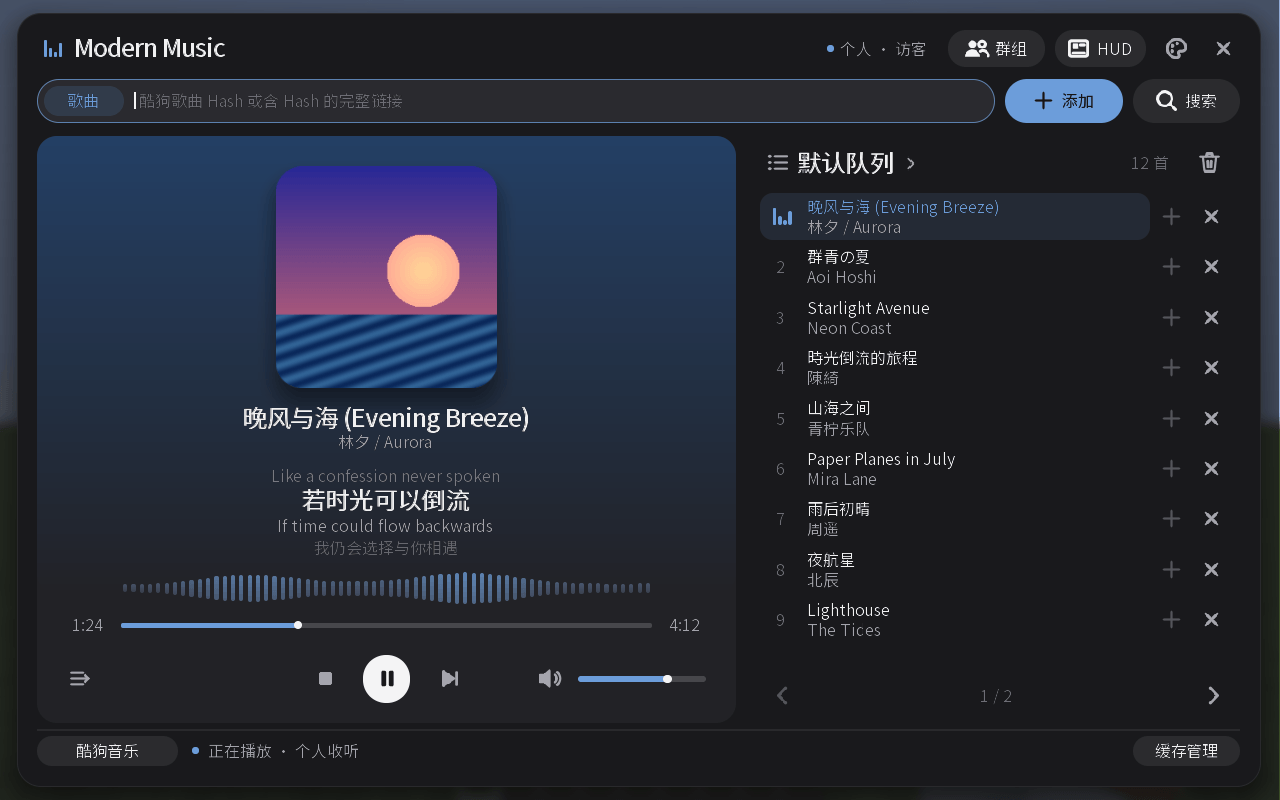
Play NetEase Cloud Music, QQ Music, and Kugou Music in Minecraft. It supports song search, playlist import, lyrics display, and synchronized listening for multiple players.
截图
介绍
中文介绍正在准备中,下面暂时显示原文。
Listen to NetEase Cloud Music, QQ Music, Kugou Music, and local audio in Minecraft, with support for individual playback and synchronized listening with other players.
- Search for songs, import playlists, and manage multiple playback queues.
- Play, pause, skip tracks, seek, adjust the volume, and switch repeat modes.
- View album art, lyrics, and an in-game HUD, with ten visual themes to choose from.
- Create listening groups or listen together with your FTB Teams teammates.
- Browse and play local MP3 and WAV files. Drag and drop files to copy them into your local audio library; administrators can also drag and drop files to upload them to the server for use in individual or group queues.
常见问题
Modern Music 支持哪些 Minecraft 版本?
Modern Music 支持 Minecraft Java 版 1.20.1–1.21.1,共 2 个版本,可用的加载器:Forge / NeoForge。下载时注意选择和你游戏版本一致的文件。
Modern Music 怎么安装?
先用 PCL2 或 HMCL 启动器安装对应版本的 Forge / NeoForge,再把下载的 .jar 文件放进游戏目录的 mods 文件夹,重新启动游戏即可。开启了版本隔离的,mods 文件夹在 versions/版本名 下面。


评论
登录后评论和评分