
ModClassifier
Separate the client-side mod and server-side mod, then place them in the mods folder and launch the game.
截图
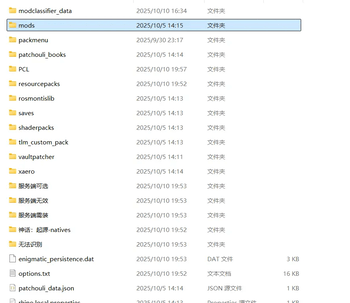
介绍
Place the mods in the “mods” folder. The sorting process will begin upon client startup and complete once the client finishes loading. You can also check the sorting progress information in the logs. The sorting results are located in four folders within the game directory: “Required on Server,” “Optional on Server,” “Invalid on Server,” and “Unrecognized.” It is recommended to copy all mods from both the “Required on Server” and “Optional on Server” folders to the server. For mods categorized as “Unrecognized,” you can use PCL to open their corresponding mod webpages for manual classification. This mod is theoretically compatible with all versions of Forge, while NeoForge and Fabric versions are currently in development. Additionally, an executable (.exe) version for sorting is also available.
将mod放在mods文件夹下,客户端启动时开始分类,客户端加载完成时即分类完成,也可以去日志里查看分类过程信息。分类结果位于游戏目录下的四个文件夹里(服务端需装,服务端可选,服务端无效,无法识别)。建议将服务端需装和服务端可选全复制到服务端里,无法识别的可利用pcl打开对应mod网站信息自行分类。此mod理论适配forge的任何版本,neoforge和fabric版本正在制作中。另外也可以用exe版本进行分类【我的世界整合包制作-客户端专用mod分类】https://www.bilibili.com/video/BV17nH7zEEZX?vd_source=ce376a51183e98a41efed2cc33ecca3e
常见问题
ModClassifier 支持哪些 Minecraft 版本?
ModClassifier 支持 Minecraft Java 版 1.12–1.21.10,共 48 个版本,可用的加载器:Forge。下载时注意选择和你游戏版本一致的文件。
ModClassifier 怎么安装?
先用 PCL2 或 HMCL 启动器安装对应版本的 Forge,再把下载的 .jar 文件放进游戏目录的 mods 文件夹,重新启动游戏即可。开启了版本隔离的,mods 文件夹在 versions/版本名 下面。
taisuiyileba 的其他作品
查看全部 →
MobSpawnController
MobSpawnSwitch 是一款强大而易用的模组,让你全面控制《我的世界》中的生物生成。无论是禁用特定生物、控制生成方式,还是微调服务器的生物行为,它都能满足你的需求。

MobSpawnController
一款轻量级服务端模组,可通过命令或直观的游戏内图形界面控制生物生成行为和属性。
MobSpawnController
一款轻量级服务端模组,可通过命令或直观的游戏内 GUI 控制生物生成行为和属性。

Aether Spellbooks
Aether Spellbooks is a content-rich addon bridging Iron's Spells 'n Spellbooks and The Aether.
评论
登录后评论和评分