
截图

介绍
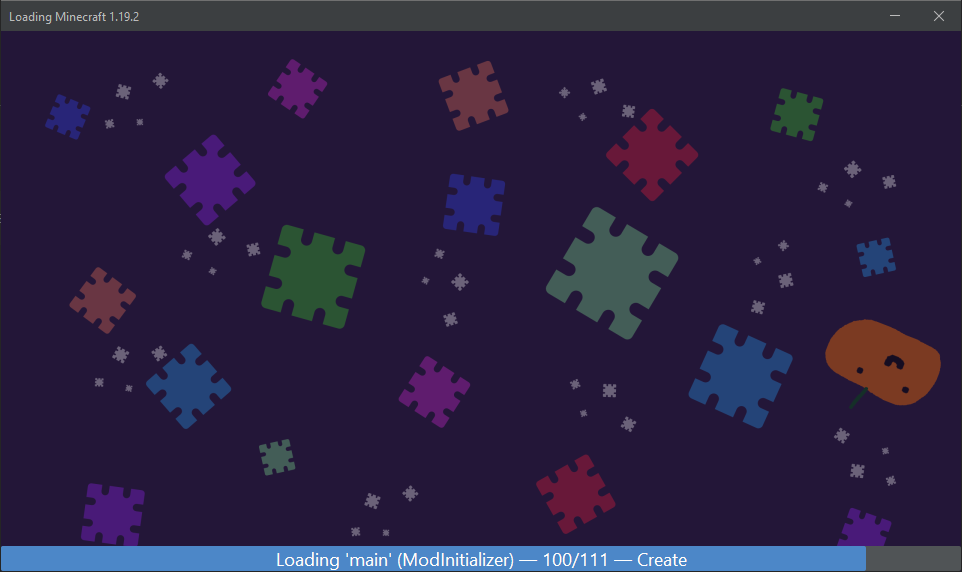
Mod Loading Screen
An advanced loading screen with the loading progress of mods. It works on all Minecraft versions, as it doesn’t even require Minecraft. Its only requirement is Fabric Loader 0.12.0 or later or Quilt Loader (specific versions of Quilt support are unknown). Do note that if you run this mod on a game other than Minecraft, the loading screen may not close itself.
Agent
Mod Loading Screen provides a Java agent, which allows opening the loading screen before even the mod loader itself loads. This feature is primarily targeted at modpack developers who want to make a seamless loading experience. The agent can be used by passing -javaagent:mod-loading-screen-1.0.4.jar as a JVM argument. If the agent is used, the loading screen should not be installed as a mod.
API
To depend on the API, use the Modrinth Maven. The API should be JiJed, and doing so will not include Mod Loading Screen inside your mod (it will only include the API, which is only a few kilobytes). The API is designed to have both forwards and backwards binary compatibility with future Mod Loading Screen versions. An API is provided for checking which API calls will return stubs and which ones are real.
repositories {
    exclusiveContent {
        forRepository {
            maven {
                name = "Modrinth"
                url = "https://api.modrinth.com/maven"
            }
        }
        filter {
            includeGroup("maven.modrinth")
        }
    }
}

dependencies {
    // implementation, not modImplementation!
    include(implementation("maven.modrinth:mod-loading-screen:1.0.4:api"))
}
The API has two top-level classes: LoadingScreenApi and AvailableFeatures. Full javadocs are available for both classes.
常见问题
Mod Loading Screen 支持哪些 Minecraft 版本?
Mod Loading Screen 支持 Minecraft Java 版 1.0–26.3,共 112 个版本,可用的加载器:Fabric / Quilt。下载时注意选择和你游戏版本一致的文件。
Mod Loading Screen 怎么安装?
先用 PCL2 或 HMCL 启动器安装对应版本的 Fabric / Quilt,再把下载的 .jar 文件放进游戏目录的 mods 文件夹,重新启动游戏即可。开启了版本隔离的,mods 文件夹在 versions/版本名 下面。运行环境:客户端 / 服务端。
TakiSpl 的其他作品
查看全部 →
World Host
无需运行服务端或设置端口转发,即可托管你的单人游戏地图!

Bingo
A multiplatform data-driven Bingo mod

Modrinth SMP
[archived] Modpack for the (unofficial) Modrinth SMP

Literal Sky Block Fabric
Adds a sky block that lets you see the sky... among other things.
评论
登录后评论和评分