介绍
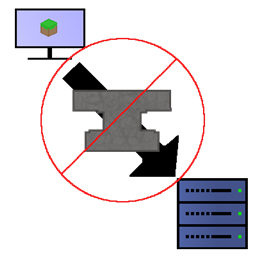
Mod Blocker is a modification for the minecraft Forge server, which allowes the server owner to configure if a client should be kicked, when it joins with other mods than the server has installed.
The mod procides a whitelist, to allow certain mods. This whitelist can be edited under “<server_folder>/<world_folder>/serverconfig/modblocker-server.toml”. Default is an empty list.
The only mods allowed without modification are the mods installed on the server itself.
When a client with unallowed mods connects, it immediately gets a “Disconnect” message.
This mod is server side only. It can be loaded on client side, but there is no point in doing so.
常见问题
Mod Blocker [FORGE] 支持哪些 Minecraft 版本?
Mod Blocker [FORGE] 支持 Minecraft Java 版 1.15.2–1.16.5,共 4 个版本,可用的加载器:Forge。下载时注意选择和你游戏版本一致的文件。
Mod Blocker [FORGE] 怎么安装?
先用 PCL2 或 HMCL 启动器安装对应版本的 Forge,再把下载的 .jar 文件放进游戏目录的 mods 文件夹,重新启动游戏即可。开启了版本隔离的,mods 文件夹在 versions/版本名 下面。
canitzp 的其他作品
查看全部 →
ActuallyComputers
实用拓展机器与开放式电脑功能的交互
Auto Feeder Helmet [NEOFORGE/FORGE]
升级你心爱的所有头盔,让它们在你什么都不做时也能喂饱你。

Traincraft
为 Minecraft 添加火车及其他载具的模组

ChiseledAdditions
让 Actually Additions 的方块和钻头也能用凿子加工。
评论
登录后评论和评分