截图
介绍
Mo’ Pickaxes!
3 new pickaxes! More to come!
This mod adds new pickaxes to the game.
I added:
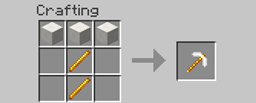
Glass Pickaxe: 
About – 3 glass and 2 sticks to make. Looks like a stone pickaxe but it is realy see through Specs:
Durability (146)
Dig speed (4)
Damage vs entity (+3)
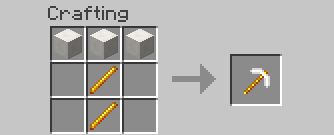
Netherrack Pickaxe: 
About – 3 netherrack and 2 sticks to make. Specs:
Durability(141)
Dig speed(2)
Damage vs entity(+3.5)
Quartz: 
About – 3 quartz blocks and 2 blaze rods to make. Specs:
Durability(201)
Dig speed(6.5)
Damage vs entity(+4)
Wool Pickaxe (Idea by MrSmiley101KP):

This pick axe is the exact sam eas a wooden one! (Any color will work!)
Bone Pickaxe (Idea by MrSmiley101KP):

Same as wood!
Redstone Pickaxe (Idea by MrSmiley101KP):

Durability(230), Dig speed (5), Damage vs entity(+4.5)
Thats all for now! If you want to you can do a mod review! All reviews will be included in the post!
Installation:
Mac:
1: Browse to the minecraft folder (/Users/YOUR USER NAME HERE/Library/Application\ Support/minecraft )
2: !nstall Forge Mod Loader (FML) (files.minecraftforge.net) use 1.7.10 recomended.
3: Go to to the mods folder that forge generated when you ran it in teh launcher and put the .jar file in there (if you got a zip open it to get the jar.)
4: Play minecraft with the forge profile.
Windows:
1: Browse to the .minecraft folder :
Windows Vista/7 – Click windows symbol and search “run”.
Then type “%appdata%”.
You should see “.minecraft” and open it.
Windows 8 – Right click the windows symbol and hit s on your keyboard.
Then type “run”
After, type “%appdata%”
You should see “.minecraft”, open it.
2: Install Forge Mod Loader (FML) (files.minecraftforge.net) use 1.7.10 recomended.
3: Go to to the mods folder that forge generated when you ran it in teh launcher and put the .jar file in there (if you got a zip open it to get the jar.).
4: Play minecraft
Enjoy 🙂
常见问题
Mo’ Pickaxes 支持哪些 Minecraft 版本?
Mo’ Pickaxes 支持 Minecraft Java 版 1.7.10,可用的加载器:Forge。下载时注意选择和你游戏版本一致的文件。
Mo’ Pickaxes 怎么安装?
先用 PCL2 或 HMCL 启动器安装对应版本的 Forge,再把下载的 .jar 文件放进游戏目录的 mods 文件夹,重新启动游戏即可。开启了版本隔离的,mods 文件夹在 versions/版本名 下面。
_ForgeUser9902995 的其他作品
查看全部 →
Mo’ Crafting
More crafting!

Craftable Horse Gear
Craft horse gear!
MineMania
A mod that does not look like much, but it is!

Potatoes!
Adds Potato Uses
评论
登录后评论和评分