
Mine Mine no Mi: Crew Manager
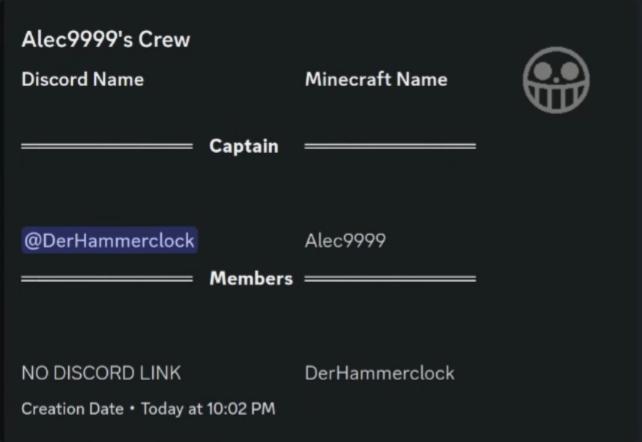
An Addon for Mine Mine no Mi that synchronizes your crews with Discord and allows you to manage the size of crews.
截图




介绍
Download the mod file directly here
It is imperative that for now this custom version is used. Changes in there are purely server sided. So only you need to install this version on your server.
Players can still use the normal Mine Mine no Mi Version.
Crew Manager
This Mine Mine no Mi Addon manages the sizes of your crews and can optionally use Discord Integration to synchronize your crews with Discord.
It can:
- Limit your crew sizes
- Dissolve existing crews that go over the crew limit
If Discord Integration is present it will additionally:
- List Crews neatly organized in a forum channel
- Show crew creation date
- Display captain
- Display members
- Display the crews banner
Config Options
["Crew Display"]
        "Sync Crew Members" = true
        "Show Crew Creation Date" = true
        #Has to be a Forum channel! Therefore your server MUST be a community server if you want to use this feature!
        #Range: 0 ~ 9223372036854775807
        "Crew Forum Channel Id" = 0
        "Show Captain of the crew" = true
        "Sync Crew Banner" = true

["Crew Manager"]
        #Leave it as -1 if you do not want any crew size limits. Crew size includes the captain! So 4 Members and 1 Captain would need a crew size of 5 to exist.
        # Setting this to 0 will disable crews on your server.
        #Range: > -1
        "Limit crew size" = -1
        #If set to true existing crews that are over the crew limit will be dissolved and removed
        "Dissolve existing crews" = false
常见问题
Mine Mine no Mi: Crew Manager 支持哪些 Minecraft 版本?
Mine Mine no Mi: Crew Manager 支持 Minecraft Java 版 1.16.5,可用的加载器:Forge。下载时注意选择和你游戏版本一致的文件。
Mine Mine no Mi: Crew Manager 怎么安装?
先用 PCL2 或 HMCL 启动器安装对应版本的 Forge,再把下载的 .jar 文件放进游戏目录的 mods 文件夹,重新启动游戏即可。开启了版本隔离的,mods 文件夹在 versions/版本名 下面。运行环境:仅服务端。
DerHammerclock 的其他作品
查看全部 →
Mine Mine no Mi: Player Revive Compat
This mod aims to add various compatibility features between Player Revive and Mine Mine no Mi

Mine Mine no Mi: Role Assigner
Automatically synchronize in-game stats like race, faction, fighting style etc. with a matching role in Discord. A must-have for server owners.

Mine Mine no Mi: Player Revive Compat
Adds multiple compatibilities with the Player Revive Mod.
Mine Mine no Mi: Crew Manager
An Addon for Mine Mine no Mi that synchronizes your crews with Discord and allows you to manage the size of crews.
评论
登录后评论和评分