
截图
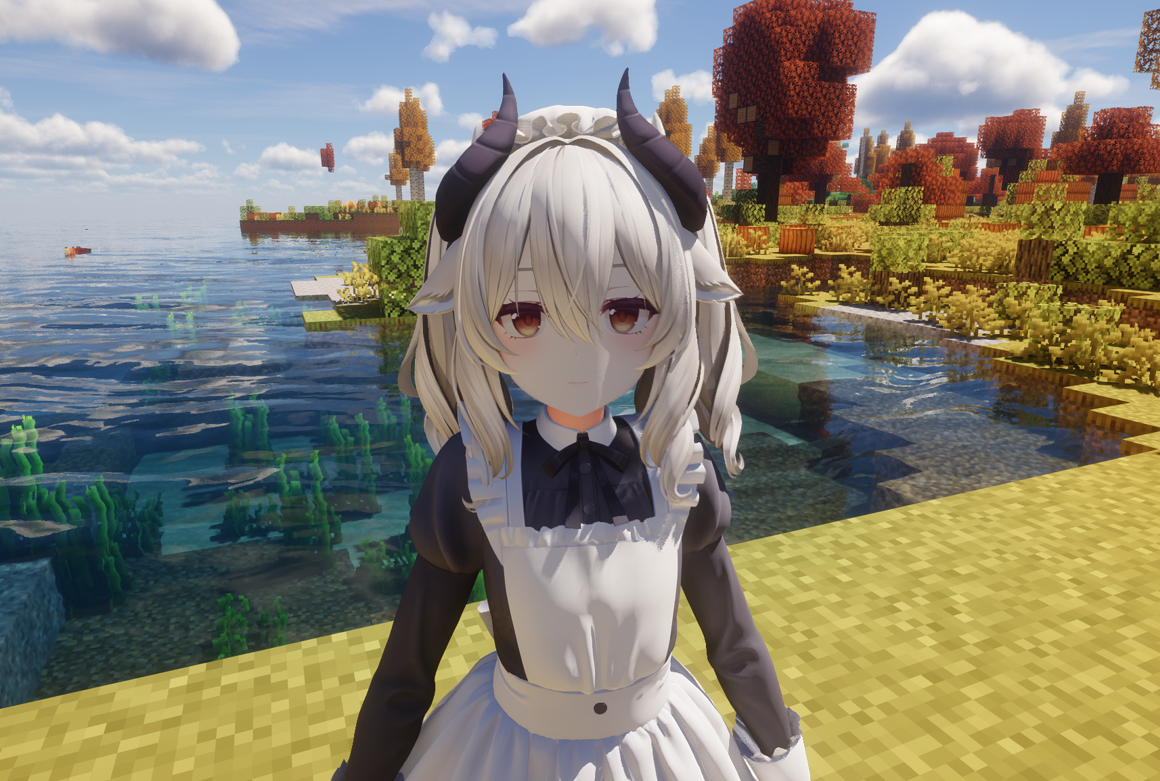
介绍
MMD Skin – Bring MMD Models to Minecraft
MMD Skin is a Minecraft mod that allows you to replace the player skin with MMD (MikuMikuDance) models, complete with real-time physics simulation for hair, clothes, and accessories.
✨ Features
- PMX/PMD Model Support – Load and render MMD models in Minecraft
- VMD Animation Playback – Play skeletal and morph animations
- Real-time Physics – Hair, skirts, and accessories react naturally to movement
- GPU Skinning – High-performance vertex skinning via Compute Shader
- Toon Rendering – Cel-shading effects with customizable parameters
- Multi-layer Animation – Blend multiple animations simultaneously
- TouhouLittleMaid Integration – Apply MMD models to maids
📦 Installation
- Install Fabric Loader or Forge for Minecraft 1.20.1
- Download the mod
.jarfile and place it in.minecraft/mods/ - Launch the game – the mod will create the
3d-skinresource directory automatically - Add your own models and animations to the corresponding folders
📁 Directory Structure
The mod uses .minecraft/3d-skin/ as the resource root:
.minecraft/
└── 3d-skin/
    ├── EntityPlayer/      # Player models
    │   ├── ModelA/        # Each subfolder = one model
    │   │   ├── model.pmx  # Model file (.pmx/.pmd)
    │   │   ├── *.png      # Textures
    │   │   ├── dance.vmd  # Model-specific animation (optional)
    │   │   └── smile.vpd  # Model-specific morph (optional)
    │   └── ModelB/
    │       └── ...
    ├── DefaultAnim/       # System preset animations
    ├── CustomAnim/        # User custom animations
    ├── DefaultMorph/      # System preset morphs
    └── CustomMorph/       # User custom morphs
EntityPlayer/ – Player Models
Store your MMD models here. Each model must be in its own subfolder.
| File Type | Extension | Description |
|———–|———–|————-|
| Model | .pmx / .pmd | Required, PMX takes priority |
| Texture | .png / .jpg / .bmp / .tga | Referenced by model |
| Animation | .vmd | Optional, model-specific |
| Morph | .vpd | Optional, model-specific |
Model Detection Rules:
- Scans each subfolder for
.pmxor.pmdfiles - If multiple model files exist,
model.pmxormodel.pmdis prioritized - Otherwise, the first file alphabetically is selected
DefaultAnim/ – System Preset Animations
Contains built-in animations that map to player states:
| Animation | Trigger |
|———–|———|
| idle.vmd | Standing still |
| walk.vmd | Walking |
| sprint.vmd | Sprinting |
| sneak.vmd | Sneaking |
| swim.vmd | Swimming |
| crawl.vmd | Crawling |
| sleep.vmd | Sleeping |
| die.vmd | Death |
| elytraFly.vmd | Elytra flight |
| onClimbable.vmd | Climbing (idle) |
| onClimbableUp.vmd | Climbing up |
| onClimbableDown.vmd | Climbing down |
| onHorse.vmd | Riding |
| swingLeft.vmd | Left hand swing |
| swingRight.vmd | Right hand swing |
You can replace these files to customize base animations.
CustomAnim/ – User Custom Animations
Place your .vmd animation files here. They can be triggered manually via the action wheel.
Animation Priority
When loading animations, the mod searches in this order:
- Model-specific folder (
EntityPlayer/ModelName/*.vmd) – Highest priority - Custom animation folder (
CustomAnim/*.vmd) - Default animation folder (
DefaultAnim/*.vmd) – Lowest priority
This allows you to create model-specific animations that override general ones.
🎮 Controls
Main Config Wheel (Hold Alt)
Hold Alt to open the main configuration wheel:
| Option | Function |
|——–|———-|
| 🎭 Model Switch | Open model selector to change player model |
| 🎬 Action Select | Open action wheel to play custom animations |
| 😊 Morph Select | Open morph wheel to apply expressions |
| 👕 Material Control | Toggle visibility of model parts |
| ⚙ Mod Settings | Open mod configuration screen |
Maid Config Wheel (Press B on maid)
If TouhouLittleMaid is installed, aim at a maid and press B to open maid-specific options.
Tip: Keybinds can be customized in Options → Controls → MMD Skin category.
⚙ Settings
Access mod settings via the config wheel or Mod Menu. Available options:
Rendering
- OpenGL Lighting – Enable/disable lighting
- MMD Shader – Use MMD-style shading
Performance
- Model Pool Max – Maximum cached models (10-500)
- GPU Skinning – Use Compute Shader for vertex skinning (requires OpenGL 4.3+)
- GPU Morph – Use Compute Shader for morph calculations
- Max Bones – Maximum bone count (512-4096)
Toon Rendering
- Enable Toon – Enable cel-shading
- Toon Levels – Number of shade levels (2-5)
- Rim Light – Edge highlighting
- Shadow Color – Custom shadow tint
- Specular – Highlight settings
- Outline – Model outline (width & color)
⚠️ Note: Toon Rendering and GPU Skinning are currently incompatible with shader mods (Iris/Optifine). Disable these features when using shaders.
🔧 Tips
- Model not showing? Check that your model folder contains a valid
.pmxor.pmdfile - Textures missing? Ensure texture files are in the same folder as the model
- Animation not playing? Verify the
.vmdfile is compatible with your model’s bone structure - Performance issues? Try enabling GPU features on older hardware
📝 Supported Formats
| Format | Extension | Description |
|——–|———–|————-|
| PMX | .pmx | MikuMikuDance model (recommended) |
| PMD | .pmd | Legacy MMD model |
| VMD | .vmd | MikuMikuDance motion data |
| VPD | .vpd | Vocaloid Pose Data (morphs) |
💡 FAQ
Q: Can I use any MMD model?
A: Most PMX/PMD models should work. Very high-poly models may impact performance.
Q: Do physics work with all models?
A: Physics simulation depends on the model having properly configured rigid bodies and joints.
Q: Can other players see my model?
A: Yes, if they also have the mod installed and the same model files.
Q: Is this compatible with shader mods?
A: Basic rendering is compatible with Iris/Optifine, but Toon Rendering and GPU Skinning do not currently support shaders. Disable these features in settings when using shader packs.
🙏 Credits
This mod is based on the following projects:
- KAIMyEntity by kjkjkAIStudio – Original Minecraft MMD mod
- KAIMyEntity-C by Gengorou-C – Direct predecessor of this project
Thanks to the original authors for their open-source contributions!
🎨 Where to Get Models
You can find MMD models on these websites (please respect the model authors’ terms of use):
Enjoy your MMD experience in Minecraft!
常见问题
MmdSkin 支持哪些 Minecraft 版本?
MmdSkin 支持 Minecraft Java 版 1.20.1–1.21.4,共 5 个版本,可用的加载器:Fabric / Forge / NeoForge。下载时注意选择和你游戏版本一致的文件。
MmdSkin 怎么安装?
先用 PCL2 或 HMCL 启动器安装对应版本的 Fabric / Forge / NeoForge,再把下载的 .jar 文件放进游戏目录的 mods 文件夹,重新启动游戏即可。开启了版本隔离的,mods 文件夹在 versions/版本名 下面。运行环境:客户端和服务端都要装。
shiroha 的其他作品
查看全部 →
RoadWeaver
RoadWeaver is a Fabric mod designed for Minecraft Java Edition, which automatically weaves elegant road networks between in-game structures such as villages.

RoadWeaver
A Minecraft mod that automatically generates beautiful roads between structures like villages and outposts.

Immersive World Entry
Immersive World Entry is a Minecraft Java Edition client mod that substitutes the static loading screen with real‑time chunk generation phases, and upon world readiness, returns player control via a cinematic camera.
评论
登录后评论和评分