
mirzozki’s football+
Physics-based football with a one-command stadium builder, goal detection, scoring, ball skins and cinematic overhead kicks. Fabric 1.20.1.
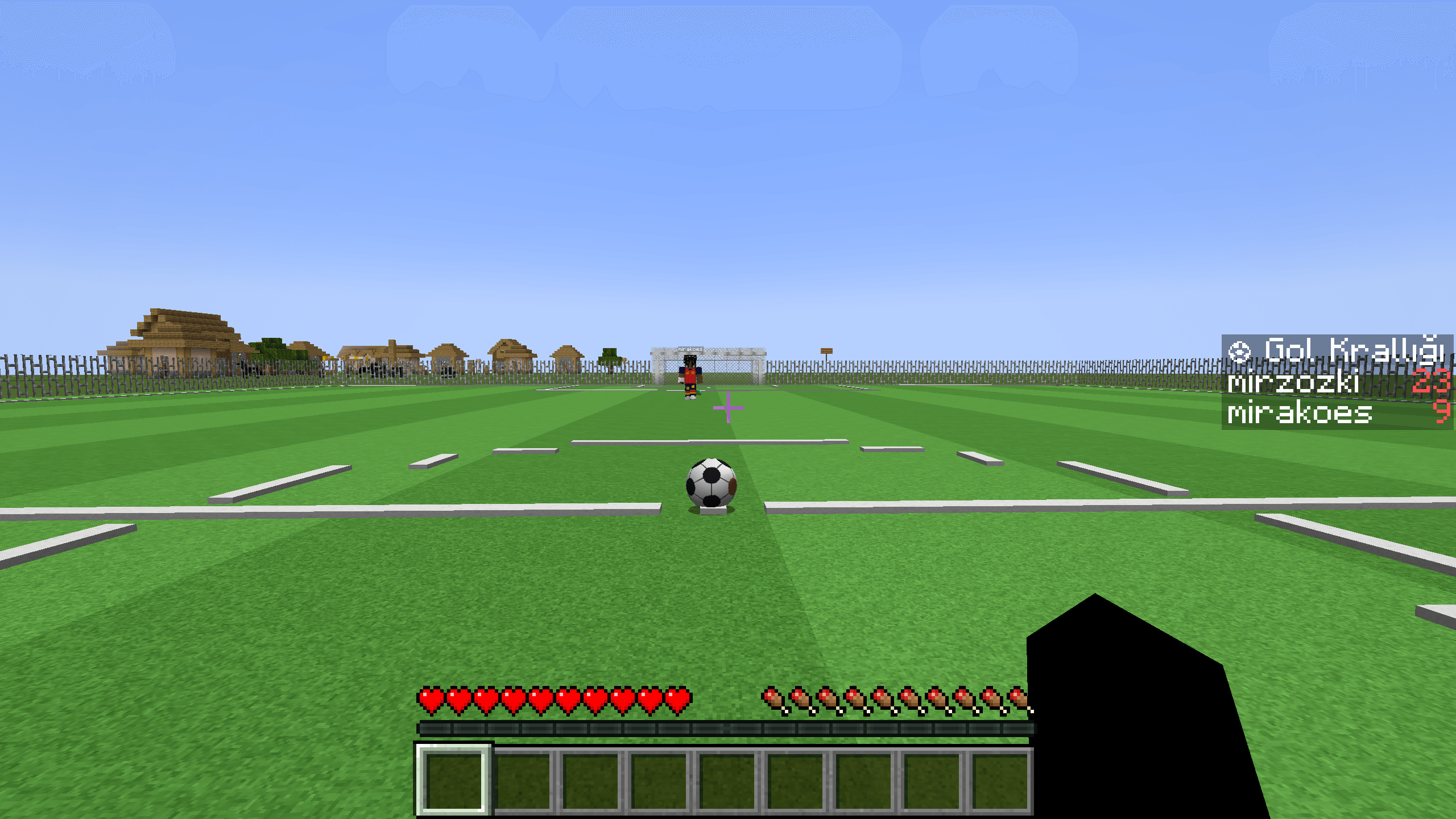
截图
介绍
Football Mod
Brings a real football pitch to Minecraft: a physics-driven ball, a fully equipped stadium, goal posts and nets, standard pitch markings, goal detection, score tracking and cinematic overhead kicks. Build the pitch with a single command and play.
Version: 1.6.2 · Minecraft: 1.20.1 · Loader: Fabric
Features
Ball & physics
- Smooth, truly round ball model (32 × 16 UV sphere) — not blocky
- Gravity, speed-dependent air drag, rolling resistance, ground and wall restitution
- The ball slows down through friction and comes to rest instead of sliding forever
- Rolling/rotation animation derived from actual movement
- Dribble the ball just by walking into it
- Sprint into a shot for more power and a higher trajectory
Cinematic overhead kick
- While holding the football, Shift + Left Click performs an overhead kick in the direction you are facing: the ball appears above your head and arcs away
- A dedicated cinematic camera detaches from your view, sweeps around you from behind to the side, hides the HUD and first-person hand, then returns to normal after about 3.5 seconds
- During the kick gesture, left click no longer mines blocks or attacks entities
Stadium
- A complete pitch with one command: turf, mowing stripes, and dirt fill underneath
- Every standard marking: touchlines, halfway line, center circle and spot, penalty area, goal area, penalty spot, penalty arc, corner arcs
- Goals: 3-block-tall posts, crossbar at 2.4 m, 3-block-deep net cage (back, sides and roof)
- Invisible goal sensor: a goal is detected when the ball crosses the line
- Custom sizes: 40–80 length, 26–56 width (default 56 × 36)
- Every part is also available as an individual block (turf, line, spot, post, crossbar, net, net panel) so you can build your own pitch by hand
Goals & scoring
- “GOOOOL” broadcast, fireworks, and the ball resetting to its start point after a goal
- Persistent scoreboard saved with the world
- Top-scorer list and per-player score lookup
- Turkish and English localization
Ball customization
- 5 ready-made skins: classic, red, blue, green, gold
- Ball Design Kit lets you pick a color and apply it to the ball
- The skin stays on the ball, including after dropping and picking it up again
Controls
| Action | Key |
|---|---|
| Shoot | Left click (hit the ball) |
| Pass | Right click |
| Pick up the ball | Shift + right click |
| Cinematic overhead kick | Shift + left click (while holding the ball) |
| Change skin | Shift + right click (in air, holding the ball) |
| Set the design kit | Right click (in air) |
| Apply design to a ball | Right click a ball while holding the kit |
Commands
| Command | Permission | Description |
|---|---|---|
/football help |
Everyone | Command list |
/football stadium build |
OP | Build a default 56 × 36 pitch |
/football stadium build <length> <width> |
OP | Build a pitch of a custom size |
/football goal <player> |
OP | Award a goal to a player |
/football score list |
Everyone | Top scorers |
/football score get <player> |
Everyone | A player’s goals |
/football score set <player> <number> |
OP | Set a score |
/football score add <player> <number> |
OP | Add to a score |
/football score reset <player> |
OP | Reset one player |
/football score resetall |
OP | Reset all scores |
The stadium command aligns with the direction you are facing — the length axis follows your view.
Crafting
Ball Design Kit (shapeless):
- 1 × Leather
- 1 × Red dye
- 1 × Green dye
- 1 × Blue dye
All pitch blocks are available in the Football creative tab.
Requirements
- Minecraft Java Edition 1.20.1
- Fabric Loader 0.15.3 or newer
- Fabric API (matching 1.20.1 version)
- Java 17
Installation
- Install Fabric Loader for Minecraft 1.20.1
- Put Fabric API in the
modsfolder - Put
footballmod-1.6.2.jarin themodsfolder - Launch the game
Works on both client and server; it must be installed on the server as well.
Notes
- The stadium command requires cheats/OP (permission level 2)
- The stadium builder flattens the terrain and clears the surroundings — do not build it over existing structures
- Goal posts have collision; nets and lines do not (they never block the player)
- The cinematic camera changes your perspective temporarily and restores it automatically
Credits
- mirza — design, development, models, textures and physics
常见问题
mirzozki’s football+ 支持哪些 Minecraft 版本?
mirzozki’s football+ 支持 Minecraft Java 版 1.20.1,可用的加载器:Fabric。下载时注意选择和你游戏版本一致的文件。
mirzozki’s football+ 怎么安装?
先用 PCL2 或 HMCL 启动器安装对应版本的 Fabric,再把下载的 .jar 文件放进游戏目录的 mods 文件夹,重新启动游戏即可。开启了版本隔离的,mods 文件夹在 versions/版本名 下面。
mirzozki 的其他作品
查看全部 →
CommandUnLimite
一个通用的 Forge 和 Fabric Minecraft 模组,移除所有游戏内命令限制,包括效果等级上限、物品给予数量和填充体积限制。

three superpowers
Unlock telekinesis, high-speed flight, and time-slowing powers with a special potion, with each power draining your hunger bar.

seven superpower
An optional expansion for 3 Superpowers that adds seven new superhero abilities, crystals, totems, portals, and progression.

dapdap
Adds new superhero armor, weapons, blocks, and ores to Minecraft.
评论
登录后评论和评分