
MineShield Compass
Shows your coordinates only through the compass by adding a clean HUD above the hotbar, while removing all position data from the F3 debug screen. A simple, Mindshield-style way to make navigation more immersive.
截图

介绍
🧭 CompassHUD — Coordinates Only Through the Compass (Mindshield-style)
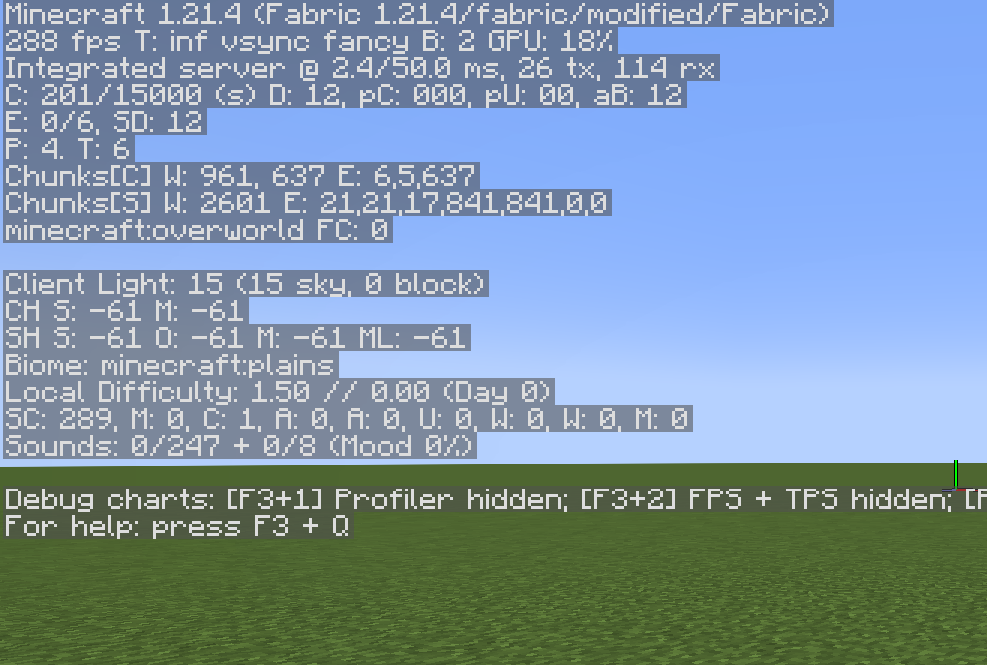
CompassHUD removes all position data from the F3 debug screen, making the compass the only way to see your coordinates — just like on Mindshield 4.
✨ Features
🧭 Compass Coordinate Display
Adds a clean HUD element above the hotbar showing your current position:
X: 122 Y: 64 Z: –172
(Updates in real time as you move.)
❌ No Coordinates in F3
The mod completely hides all coordinate information from the debug menu.
No more easy location tracking — navigation becomes more immersive and fair.
🎮 Minimal and Clean UI
No clutter, no distractions.
Only the coordinates you need, displayed in a compact and intuitive way.
📌 Perfect For:
Hardcore & survival servers
Roleplay worlds
Mindshield-style seasons
Players who want a realistic navigation experience
常见问题
MineShield Compass 支持哪些 Minecraft 版本?
MineShield Compass 支持 Minecraft Java 版 1.21.4,可用的加载器:Fabric。下载时注意选择和你游戏版本一致的文件。
MineShield Compass 怎么安装?
先用 PCL2 或 HMCL 启动器安装对应版本的 Fabric,再把下载的 .jar 文件放进游戏目录的 mods 文件夹,重新启动游戏即可。开启了版本隔离的,mods 文件夹在 versions/版本名 下面。运行环境:仅客户端。
MineMark 的其他作品
查看全部 →
Something Watches
This project adds atmospheric stalker entities that silently observe players from the shadows. These mysterious beings appear in dark corners, behind windows, and in caves, creating an unsettling horror experience in Minecraft.

The stalker
This project adds atmospheric stalker entities that silently observe players from the shadows. These mysterious beings appear in dark corners, behind windows, and in caves, creating an unsettling horror experience in Minecraft.

Skinss+
Skinss is a Fabric/Forge mod that lets players use custom skins and capes (PNG/GIF) from local files and syncs them with other players on servers running the mod.

BetterJoinLeave
Replaces "joined the game" messages with [+] and [-] icons.
评论
登录后评论和评分