
截图

介绍
MineMention
MineMention is a mention mod for the chat so you can specify who should get your messages better.
MineMention allows you to mention people or groups in chat. Whenever your message contains at least one mention, it will not be displayed to all users but only to the ones you mentioned. But you can mention multiple people.
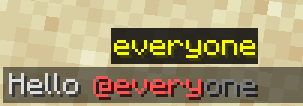
whenever you type an @ you’ll get autocompletion for your mentions:
MineMention has three builtin Groups you can mention but other mods can easily add more:
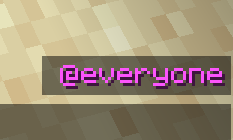
@everyonementions every player on the server.@herementions every player in the same dimension.@nearmentions every player within a 100 block distance
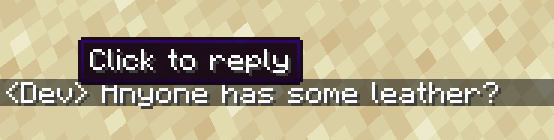
You can also click on mentions or the sender name of a message in the chat to write a reply:
Now you might think: when I write private messages with another payer I don’t want to type @PlayerName all the time.
Luckily you can run the command /d PlayerName to change your default mentions (those are applied if you don’t provide a mention explicitly)
To change the default mentions run /d with a list of mentions as arguments that should be your new default mentions (but without the preceding @ character). Run /d without arguments to reset it to @everyone.
You can also see your current default mentions right over your chat:
Whenever multiple mods register the same special mention (seems to happen a lot with @team), none of them will be available by default. You can however change that in the config. There’s a map called mentions where you can specify what special mention should be what. The key is always the name of the special mention and the value is an id of what the mentions does. You can redirect all mentions except @everyone. If you redirect a mention to minemention:none, you can remove it.
Example:
{
  "mentions": {
    "here": "minemention:none",
    "near": "minemention:none",
    "close": "minemention:near"
  }
}
This would remove @here and rename @near to @close.
The ids of the builtin mentions are minemention:everyone, minemention:here, minemention:near, minemention:ftb and minemention:none.
常见问题
MineMention 支持哪些 Minecraft 版本?
MineMention 支持 Minecraft Java 版 1.16.4–1.20.1,共 10 个版本,可用的加载器:Forge。下载时注意选择和你游戏版本一致的文件。
MineMention 怎么安装?
先用 PCL2 或 HMCL 启动器安装对应版本的 Forge,再把下载的 .jar 文件放进游戏目录的 mods 文件夹,重新启动游戏即可。开启了版本隔离的,mods 文件夹在 versions/版本名 下面。运行环境:客户端和服务端都要装。
noeppi-noeppi 的其他作品
查看全部 →
Botanical Machinery
自动化植物魔法其实没你想的那么难。

SandBox
A world generation library.

Just Enough Advancements (JEA)
An addon for JEI which let you search for advancements. This is pronounced like "yeah".

Bongo
The bingo minigame for recent minecraft versions.
评论
登录后评论和评分