
merchantmind
An AI-powered shopkeeper mod with a rotating catalog of 11 categories, smart barter trading, bulk-bonus selling, per-world saves, and a Charge & Slam combat mechanic — made entirely with AI assistance.
截图

介绍
Merchant Mind
Merchant Mind is a comprehensive AI shopkeeper mod for Minecraft that adds a dynamic, rotating shop to a server or singleplayer world. Driven by a custom economy and item-value appraisers, it offers systems for reserving, purchasing, installment payments, trading, selling, and restocking gear, along with several optional quality-of-life combat features.
This project currently has two maintained Fabric builds with the same intended gameplay systems:
- Merchant Mind 3.4.9+mc26.1.2 — Fabric for Minecraft Java 26.1.2.
- Merchant Mind 3.4.2+mc1.21.11 — Fabric port for Minecraft Java 1.21.11.
The gameplay goal is the same between the two builds, but they are compiled against different Minecraft/Fabric APIs. They are not interchangeable: install the JAR that matches your Minecraft version. The 1.21.11 build is a compatibility port, so small rendering, menu, networking, or loader-level differences may exist even when the feature behavior is intended to match.
Features
The AI Shopkeeper
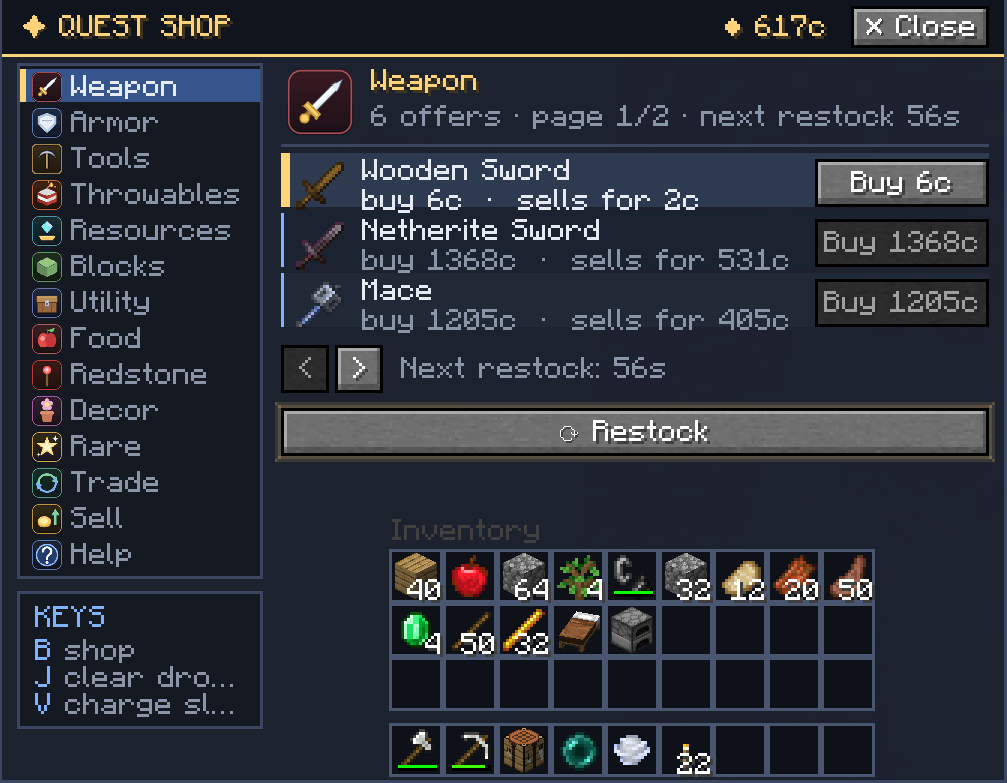
The mod introduces a Shop accessible through the configured keybind. The shop features a rotating catalog organized into 11 categories: Weapon, Armor, Tools, Throwables, Resources, Blocks, Utility, Food, Redstone, Decor, and Rare. Each category maintains its own restock state and shelves a random selection from its item pool. When a category is scheduled to restock or becomes sold out, its available shelves are refilled.
Reserve and Purchase Flow
A player can reserve an available listing before paying for it. A reservation lasts 15 minutes. A listing that is actively reserved is protected from being replaced by any restock operation; its item and authoritative price remain unchanged until the reservation is completed, cleared, or expires.
After reserving an item, the action changes to Pay so it is distinct from the normal purchase action. The payment screen provides two choices:
- Pay full: pays the complete remaining balance and delivers the item immediately.
- Installment: opens a separate payment view with a slider. The maximum payment is limited by both the player’s current balance and the amount still owed for the item.
Installment payments are authoritative on the server. After a partial payment, the item remains reserved and the UI can show the amount paid, the original item price, and the remaining balance. When the remaining balance reaches zero, the item is delivered and the purchased listing is removed.
Iron Restock Shortcut
During an active restock, an optional iron slot can open on the shop screen. Players can submit the configured number of Iron Ingots to finish the restock immediately. Iron is an optional speed-up and is not required to start a restock. The exact restock duration and shortcut cost are controlled by the current build’s shop configuration and should not be assumed to be identical across unrelated older releases.
Per-World Saves
The shop’s inventory, restock timers, reservations, payment progress, and player coin balances are saved locally to the specific world folder (<save>/data/merchantmind_shop.json). Every world maintains a separate economy and shop state.
Intelligent Trading (Barter System)
The Trade tab lets you swap items directly rather than going through coins. The mod calculates the value of the items offered and matches them against the shop’s current inventory using a deterministic value-matching algorithm. It selects a return item based on total value and unit value, while bundle limits help prevent mass-conversion exploits. Any leftover value that the returned bundle cannot absorb can be returned as coins through the existing trade flow.
Smart Selling
The Sell tab lets you sell items for coins. The appraiser calculates a base value from the item’s internal worth and applies the current bulk-value rules. The payout is bounded by the economy rules so buying from the shop and immediately selling back is not intended to create an arbitrage profit.
Charge & Slam Combat
Hold the Slam key to charge your weapon. The longer you hold, the more damage your next qualifying sword or axe attack can deal, up to the current build’s configured maximum. The charge is consumed when a qualifying hit lands. A custom HUD bar can display charge progress and bonus damage, together with a screen-stretch wind-up effect while charging.
Combat Tweaks
The mod includes several server-side combat adjustments:
- Arrow Reflect: Arrows shot at the player by mobs can be reflected back according to the mod’s combat rules.
- Instant Pearl Heal: Ender Pearl landing/despawn handling can apply the configured regeneration effect.
- Jump Crits: Critical hits on hostile mobs while airborne can receive the configured bonus.
- Mob Suppression: Selected mob-spawn rules can reduce combat clutter.
- Item Clearing: A dedicated keybind can clear dropped items in the world.
- Cinematic Respawn (Optional): If the Cinematic Respawn mod is installed, the player can receive the optional cinematic respawn behavior.
Keybinds
Keybinds are configurable in the Minecraft controls menu. The defaults are defined by the current client build and may be changed by the player or by another keybind conflict. The main actions include opening the Merchant Shop, clearing dropped items, and charging the Slam ability.
Version Scheme
Merchant Mind follows Semantic Versioning + build metadata in the format MAJOR.MINOR.PATCH+mc<minecraft_version>. The version is maintained in gradle.properties (mod_version), and fabric.mod.json receives it from Gradle through ${version} during the build.
| Component | When to increment | Notes |
|---|---|---|
| MAJOR | Breaking change — old saves or configs no longer work | Reset MINOR and PATCH to 0 |
| MINOR | New feature added, everything old still works | Reset PATCH to 0 |
| PATCH | Bug-fix-only, no new features, nothing broken | |
| +mc | Minecraft version this build targets | No effect on version comparison |
The current target/version combinations are 3.4.9+mc26.1.2 and 3.4.2+mc1.21.11. Do not install a JAR on a different Minecraft target just because the mod version number looks similar.
Technical Details
| Mod Loader | Fabric |
| Minecraft targets | 26.1.2 and 1.21.11, using separate JARs |
| Fabric API | Required; use a version compatible with the selected Minecraft target |
| Fabric Loader | Required; use a version compatible with the selected Minecraft target |
| License | MIT |
| Optional | Cinematic Respawn |
The 26.1.2 build uses the Fabric/Minecraft 26.1.2 dependency line. The 1.21.11 build uses the Fabric/Minecraft 1.21.11 dependency line. The two builds must not be mixed with the other Minecraft version.
Note: The mod’s internal economy assigns a fixed base worth to items and uses that value to calculate buy and sell prices. The exact resulting price can also depend on the current shop rules and price variation, so the description should not be read as a promise that every item always has one fixed displayed price.
This mod — and this description — was made with AI assistance, in Thailand. The description is intended to document the implemented systems, but it is not a guarantee that every modpack, loader version, resource pack, or third-party mod will be compatible.
Contact & Feedback
Found a bug? Want a new feature? Have an idea? Email [email protected]. When reporting a problem, please include the Minecraft version, Fabric Loader version, Fabric API version, Merchant Mind JAR version, and the crash/log details if available.
The source code is available on GitHub. Merchant Mind requires Fabric API; optional features may also interact with other installed mods such as Cinematic Respawn.
A Note About the Shop Menu
The shop menu may show a short performance hitch when it opens, depending on the hardware, resource pack, installed mods, and the first-time loading of GUI assets. This is not a claim that every installation will stutter, and it is not evidence that FPS is always unaffected. If the menu freezes, crashes, or fails to open, please report the complete environment and log details through the contact address above.
常见问题
merchantmind 支持哪些 Minecraft 版本?
merchantmind 支持 Minecraft Java 版 1.21.11–26.1.2,共 2 个版本,可用的加载器:Fabric。下载时注意选择和你游戏版本一致的文件。
merchantmind 怎么安装?
先用 PCL2 或 HMCL 启动器安装对应版本的 Fabric,再把下载的 .jar 文件放进游戏目录的 mods 文件夹,重新启动游戏即可。开启了版本隔离的,mods 文件夹在 versions/版本名 下面。
Mattrixthai9911 的其他作品
查看全部 →
PeakSurge
PeakSurge is a server-side Fabric mod for Minecraft that lets you control how often the stony_peaks biome generates in the Overworld, from 1% to 100%, tuning the landscape to your preference.

slumbersignal
SlumberSignal is a client-side only Fabric mod for Minecraft 26.1.2. It does exactly one thing: it tells you the exact moment the Overworld night becomes dark enough to use a bed, with a deliberately over-animated notification.
评论
登录后评论和评分