
截图

介绍
Meloquill aims to make modding for music discs more interesting in Minecraft. Adding a couple new items such as the new Azure Ore and Disc Smithing Template, Meloquill would be a perfect addition to any mod with music discs!
The process is simple!
- You go and get one Paper and four Honeycomb and put it in a Crafting Table as such:
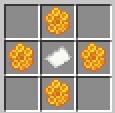
- Grab a Brush and find a Cold Ocean Ruin and start sweeping for a chance to find the Disc Smithing Template.
After you have done those, you can now use the Smithing Template and the Empty Music Disc to make new Music Discs. Meloquill has only one default disc. Written and created by everyones favorite Minecraft artist C418, the music disc Dog has made it back in the game by using Purple Dye as the last ingredient in the Smithing Table.
You can duplicate the new Smithing Template by using Azure instead of Diamonds with a Coal Block as the block.
For Modders Interested In Using This Pack With Their Mod;
If you are wondering how to implement your mod to go along with Meloquill, this is how, it is actually really simple.
You have to use this code in the recipes section in your mod:
{
  "type": "minecraft:smithing_transform",
  "addition": {
    "item": "INGREDIENT"
  },
  "base": {
    "item": "melo:empty_music_disc"
  },
  "result": {
    "item": "RESULT"
  },
  "template": {
    "item": "melo:disc_smithing_template"
  }
}
Replace ‘INGREDIENT’ with the item you want to use to make your music disc with and then replace ‘RESULT’ with the Music Disc you want the player to get afterwards. I hope this helps, if you have any fither questions, you can message me on Discord.
Discord Server: https://discord.gg/SHN5SVfN6V
常见问题
Meloquill 支持哪些 Minecraft 版本?
Meloquill 支持 Minecraft Java 版 1.20–1.20.4,共 5 个版本,可用的加载器:Fabric。下载时注意选择和你游戏版本一致的文件。
Meloquill 怎么安装?
先用 PCL2 或 HMCL 启动器安装对应版本的 Fabric,再把下载的 .jar 文件放进游戏目录的 mods 文件夹,重新启动游戏即可。开启了版本隔离的,mods 文件夹在 versions/版本名 下面。运行环境:客户端 / 服务端。
评论
登录后评论和评分