
World Manager
Create and manage worlds in-game, through commands. An improved Multiverse alternative for Fabric.
截图
介绍
WorldManager
Create and manage worlds in-game, through commands.
Commands
The main command is /worldmanager. It has a shorter alias /wm.
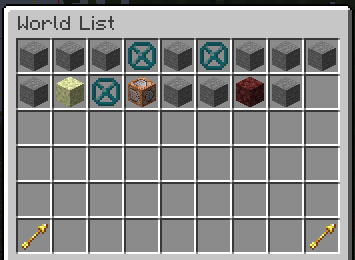
/wm listopens an overview gui of all custom worlds that have been created through this mod/wm delete <id>deletes the specified world, kicking all players that are currently in it/wm tp <id> [<targets>]teleports to the specified world to the players last location./wm seticon <id> [<icon>]sets the world icon to the specified item, or the item in your hand./wm manage [<id>]opens world management gui for the specified world, or the current world/wm setportal <portal_id> [<destination>]changes the portal destination of the specified portal in the current world
Create
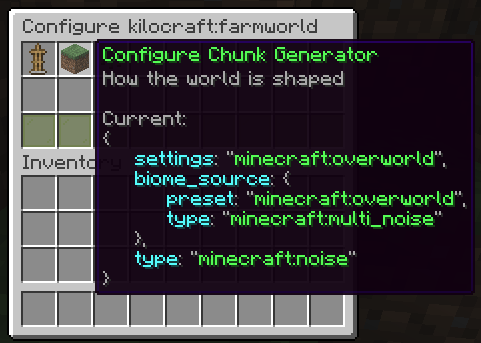
/wm create <id> opens a gui where you can configure your world (dimension type, chunk generator and seed)
/wm create <id> <nbt> allows you to create a world without using the gui (advanced). {seed: 0L, generator: {biome: "minecraft:the_void", type: "fantasy:void"}, type: "minecraft:overworld"} could be used to create a void world.
Import
/wm create <id> <path> [--custom-config] allows you to import a world from a zip, rar or tar archive, or from a folder.
Export
/wm export [<id>] allows you to export the current world to an export.zip archive.
This zip file will contain the specified world (or all selected worlds if the id is not specified), along with an
appropriate level.dat file and a datapack to correctly load the worlds (e.g., in singleplayer).
The file / folder needs to contain a valid level.dat file.
This will import the overworld dimension of the given world.
Multiverse
Multiverse doesn’t correctly specify the world configuration. WorldManager won’t be able to infer configurations like
world height or chunk generation. You should append --custom-config when importing to manually configure your world
to match the original configuration as close as possible.
Spawn
/wm setspawn sets the world spawn of the current world to your position.
/wm spawn <id> [<targets>] teleports to the specified world spawn. If the spawn point is not set, it uses the vanilla spawn point logic.

_Powered by fantasy <3_
常见问题
World Manager 支持哪些 Minecraft 版本?
World Manager 支持 Minecraft Java 版 1.21–26.3,共 15 个版本,可用的加载器:Fabric / Quilt。下载时注意选择和你游戏版本一致的文件。
World Manager 怎么安装?
先用 PCL2 或 HMCL 启动器安装对应版本的 Fabric / Quilt,再把下载的 .jar 文件放进游戏目录的 mods 文件夹,重新启动游戏即可。开启了版本隔离的,mods 文件夹在 versions/版本名 下面。运行环境:仅服务端。
DrexHD 的其他作品
查看全部 →
CrashExploitFixer
这个模组修复了在Minecraft中发现的许多崩溃漏洞。

VillagerConfig
基于数据驱动交易的高级村民配置

quick pack
优化数据包/资源包 zip 文件的加载时间

Ledger
一款服务端日志记录模组
评论
登录后评论和评分