
Mekanism Monitors
Live monitors/screens for Mekanism multiblocks: monitor walls, alerts, link cards and a tablet to watch and control reactors, turbines and matrices from anywhere.
截图
介绍
Mekanism Monitors
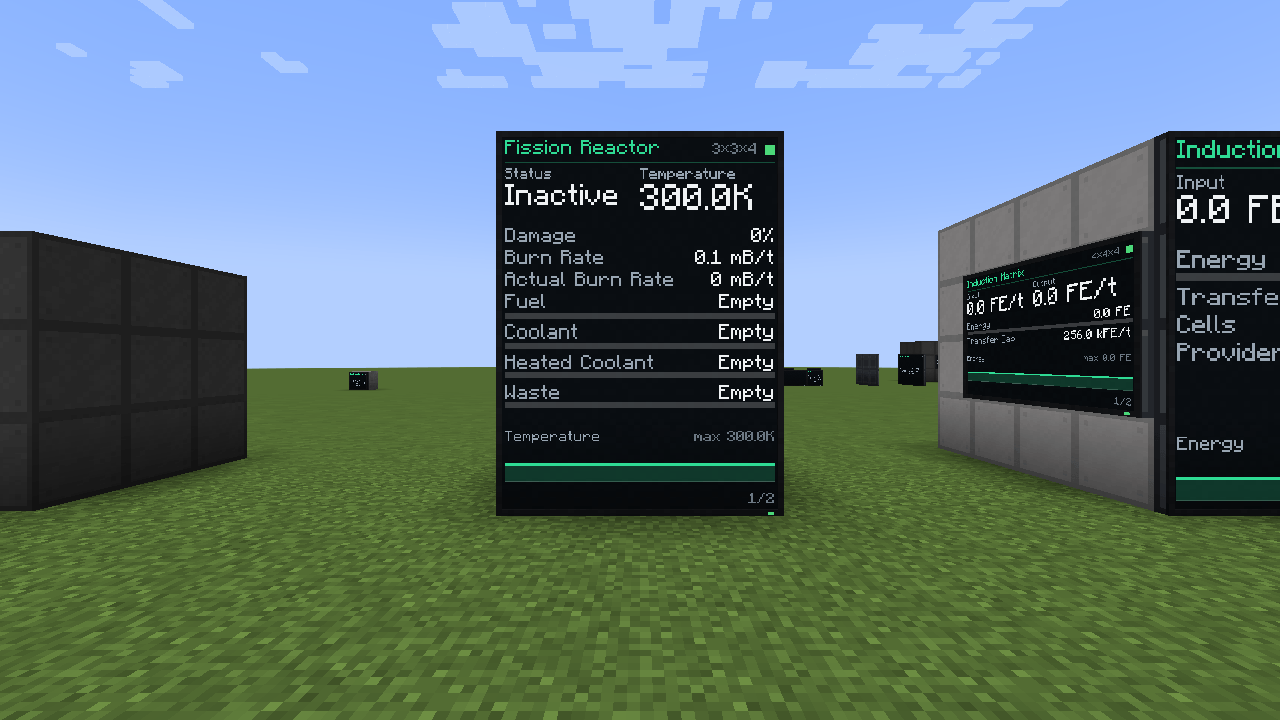
Screens for Mekanism multiblocks. Put a monitor on a reactor, turbine, induction matrix or any other Mekanism multiblock and it shows its live values. Build a whole wall of them, watch your multiblocks from anywhere with link cards, and SCRAM your reactor from across the world. No ComputerCraft, no Lua, no setup.
Monitor
- A slim, modern wall panel: place it against any casing, port, valve or structural glass of a formed multiblock (sneak while placing, like on any machine)
- Shows the structure name, size, status light, important values and fill bars
- Switches pages by itself, or right click with an empty hand to flip pages
- Uses the same energy and temperature units you picked in Mekanism config
- The screen glows, so you can read it in a dark place
- Tells you why it’s blank
- Break and rebuild the structure, monitor starts displaying info again
The values come straight from Mekanism, so they always match the multiblocks GUI.
Monitor walls
- Put monitors next to each other and they merge into one big screen, up to 8×6
- The frame only goes around the outside, so the wall looks like one big display
- Walls of 2×2 and bigger show large headline values and a live graph, for example the reactor temperature over the last 2 minutes
Settings
Sneak + right click a monitor with an empty hand:
- Auto or manual pages
- 6 colors: mint, cyan, amber, white, crimson and purple
- Alarm sound and Auto SCRAM on or off
- Show or hide each value
- An alert for each value: above or below any threshold you set
Remote monitoring
- Link Card: sneak and right click a multiblock to link it, then right click a monitor with the card. The monitor now shows that multiblock from anywhere in the same dimension
- Quantum Link Card: the same, but supports cross dimensions linking
- Rename a card in an anvil to give the screen your own title
- Multiblock Tablet: a handheld monitor for 4 linked multiblocks. Sneak + right click a multiblock to link it, right click to open
Remote control
From a monitor’s settings or from the tablet:
- Fission Reactor: activate (with a confirm click), SCRAM and burn rate
- Fusion Reactor: injection rate
- Industrial Turbine: dumping mode
Every action is written to the server log, and on servers admins can turn remote control off or limit it in the config.
Alerts
- The screen frame blinks red and the value turns red
- The monitor rings a bell and gives a redstone signal (but never into the block it’s mounted on)
- Auto-SCRAM
- Default alarms: reactor temperature, damage, waste, and low coolant while the reactor runs
Security
To link a multiblock you have to right click it, so chunk claims and protection mods still apply. On servers admins can turn remote control off or limit it in the config.
Supported multiblocks
Each one has its own screen layout:
- Fission Reactor
- Fusion Reactor
- Industrial Turbine
- Thermoelectric Boiler
- Induction Matrix
- Supercritical Phase Shifter (SPS)
- Thermal Evaporation Plant
- Dynamic Tank
Multiblocks from other Mekanism addons get a basic screen with their energy, fluids, chemicals and heat.
Other mods
- Mekanism Missiles: put a monitor on an Early Warning Radar (or link it with a card or the tablet) to see contacts, threats and the time to impact. Big monitor walls show a live radar scope with a sweep and blips, and the monitor can ring and send a redstone signal when a missile is inbound
- Create: put a Display Link on a monitor and it writes the values to a Display Board or a sign
- JEI: info pages for every item
- (Addon authors: register an
IMonitorValueProviderto put your own blocks on a monitor)
Config
You can change mod settings by COMMANDS or in the CONFIG FILE.
Usually (%appdata% -> .minecraft -> config -> mekmonitorsconfig.properties)
Use mekmonitors.HELP in game to see all commands.
Requirements
- Mekanism
FAQ
I have an issue / bug / crash / report / request, where can I contact you about it ?
Use my Discord server, you can join it here -> https://discord.gg/y366spsSjv
Can I put this mod into my modpack ?
Yes you can. Would appreciate mention of mod/author/link in modpacks description/credits.
Does this mod support servers ?
Yes it does.
常见问题
Mekanism Monitors 支持哪些 Minecraft 版本?
Mekanism Monitors 支持 Minecraft Java 版 1.20.1–1.21.1,共 2 个版本,可用的加载器:Forge / NeoForge。下载时注意选择和你游戏版本一致的文件。
Mekanism Monitors 怎么安装?
先用 PCL2 或 HMCL 启动器安装对应版本的 Forge / NeoForge,再把下载的 .jar 文件放进游戏目录的 mods 文件夹,重新启动游戏即可。开启了版本隔离的,mods 文件夹在 versions/版本名 下面。
Thanatoros 的其他作品
查看全部 →
Better Allay
自定义悦灵如何区分药水和药箭。还可选择让悦灵在关闭生物破坏时仍能捡起物品,并设置悦灵喜欢音符盒的时长。

Better Copper Golem
让铜傀儡变成更聪明的分类器,并记住箱子里的物品。支持木桶、潜影盒和大多数模组存储方块。还可精细调整药水分类方式和铜傀儡的各项属性。

Deactivate Riptide Flight
禁用带有激流附魔的三叉戟飞行。激流附魔不会被移除,但不再生效。

Mekanism Lights
如果你不想每隔三格就放一个光源,这个模组就适合你。它添加了类似通用机械风格的照明灯,不同等级的灯拥有不同的照明范围。
评论
登录后评论和评分