
截图

介绍
Sudo
This module adds some commonly used Linux commands to the game, including sudo, echo, cat, and export.
Some Linux mechanisms have also been added, such as the home folder and the .bashrc file.
Instructions
Parameters
Some commands support parameters, you can use _ plus parameters.
Variables
Some commands also support the use of variables. You can use variables in the form of ${variable name}. For how to set variables, please see export.
Dynamic variables
Dynamic variables are recalculated on every execution, here are all dynamic variables:
home: the current user’s home folderuuid: uuid of the current userplayer: the username of the current userexp: the current user’s experience valuelevel: the level of the current userhealth: current user’s healthmax_health: the current user’s maximum healthworld: current world namelocation: current location (format is x.y.z)server: current server namemotd: motd of the current servertime: current time (Unix timestamp)
Order
echo
usage:
/echo <content> # Output contentcat
usage:
/cat <file path> # Output file contentwrite
usage:
/write <file path> <content> #Write file content, which will overwrite the original content.export
usage:
/export <variable name> <variable value> #Set variables
/export public_<variable name> <variable value> # Set public variables, sudo permissions are required
apt
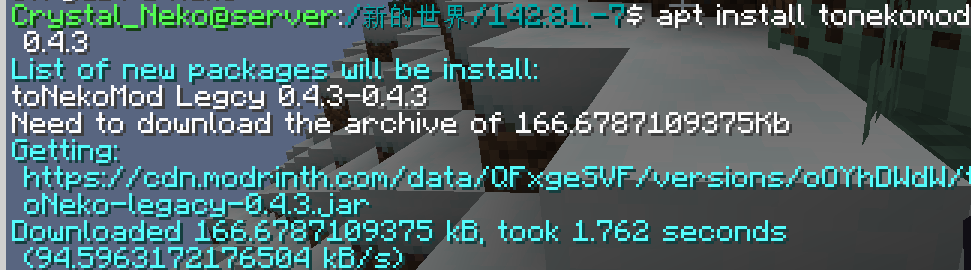
Install mods from Modrinth.
usage:
/apt install <slug> <version> # Install module
/apt search <slug> # Search module
image of apt command:
bash
Call the system to execute bash commands (only supports Linux).
usage:
/bash <command>WARNNING:THIS COMMAND IS DANGEROUS. IT MAYBE DAMAGE YOUR SYSTEM.
neofetch
You know the command.
Special files
.bashrc
This file executes the commands inside when the player logs in. The commands are separated by ; and there is no / before the command.
The file is located in home/<player name>/.bashrc. Players can modify this file without sudo permissions.
常见问题
mcsudo 支持哪些 Minecraft 版本?
mcsudo 支持 Minecraft Java 版 1.20–1.21.3,共 11 个版本,可用的加载器:Fabric / Quilt。下载时注意选择和你游戏版本一致的文件。
mcsudo 怎么安装?
先用 PCL2 或 HMCL 启动器安装对应版本的 Fabric / Quilt,再把下载的 .jar 文件放进游戏目录的 mods 文件夹,重新启动游戏即可。开启了版本隔离的,mods 文件夹在 versions/版本名 下面。运行环境:仅服务端。
CrystalNeko 的其他作品
查看全部 →
toNekoMod
Neko is so cute, isn't it?

Ayame PaperDoll
Highly configurable PaperDoll/Paper Doll mod. Forked from Extra Player Renderer.

ctLibMod
A library for data storage and make things simple

ctLib
A library for data storage and make things simple
评论
登录后评论和评分