
Gatekeeper
A Fabric mod for Minecraft that replaces username/password login with cryptographic key authentication.
截图
介绍
Gatekeeper replaces username/password login on offline-mode servers with cryptographic key authentication. Every player holds a unique digital key that the server recognises — no password to guess, share, or steal.
Designed for small offline-mode servers where the operator personally knows every player.
Runs on Fabric and on Paper — both server implementations speak the same protocol, and the same Fabric client mod works with either.
How it works
When you connect to a Gatekeeper server for the first time, the mod silently generates a unique key pair for that server and stores it on your computer. Every subsequent connection your game proves — cryptographically — that it holds the right key, without ever transmitting it over the network. The server checks your key against its approved list and lets you in.
No passwords. No shared secrets. Nothing to forget or leak.
Requirements
- Server: either Fabric with Fabric API, or Paper
- Client: Fabric with Fabric API
- Every connecting client must have the mod installed, whichever server platform you run
- Client and server must be on matching versions — an outdated client is turned away with a message naming the version to install
- The server must run with
online-mode=falseinserver.properties
Spigot, CraftBukkit and Folia are not supported: holding a player in the configuration phase needs Paper’s connection API.
Installation
Server (Fabric)
- Install Fabric and Fabric API.
- Drop
gatekeeper-<version>.jarinto themods/folder. - Set
online-mode=falseinserver.properties. - Start the server — a
config/mcgatekeeper/directory is created automatically.
Server (Paper)
- Drop
gatekeeper-paper-<version>.jarinto theplugins/folder. - Set
online-mode=falseinserver.properties. - Start the server — a
plugins/McGatekeeper/directory is created automatically.
Important:
online-mode=falsewithout Gatekeeper means anyone who knows a player’s username can impersonate them. Gatekeeper eliminates that risk, but it means you must approve every new player before they can join.
Client
- Install Fabric and Fabric API.
- Drop
gatekeeper-<version>.jarinto yourmods/folder. - That’s it — keys are generated and stored automatically.
First connection
The first time a player connects:
- A key pair is generated for that server in the background.
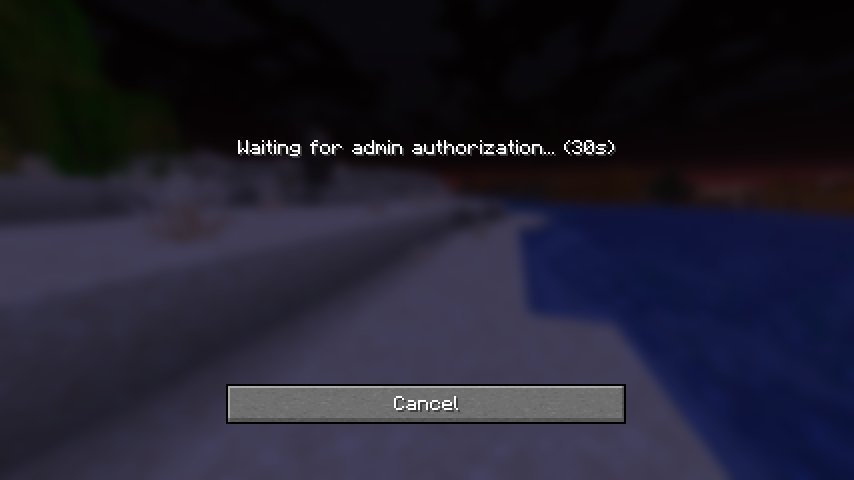
- The connection screen shows a message saying the server is waiting for admin approval.
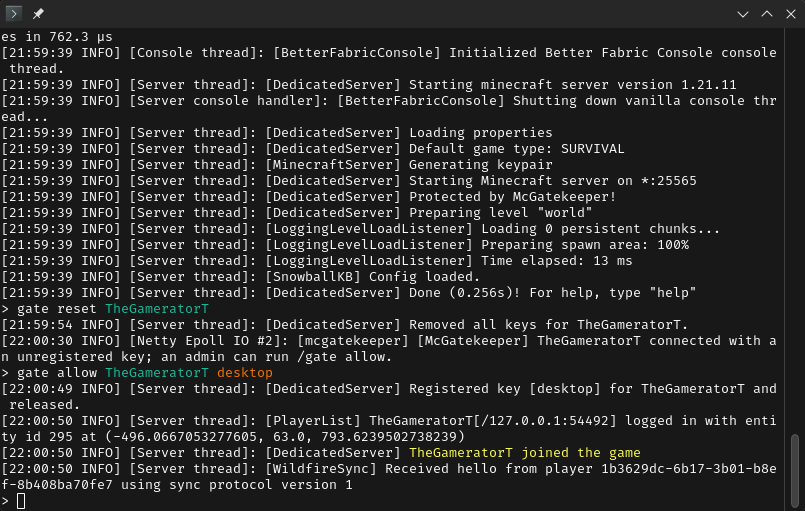
- An operator runs
/gate allow <username> <label>to approve the player and register their key.
The player is let in immediately and their key is remembered for all future connections from that device.
Admin commands
| Command | What it does |
|—|—|
| /gate allow <player> <label> | Approves a waiting player and registers their key |
| /gate list <player> | Lists all registered keys for a player with fingerprints |
| /gate reset <player> | Removes all keys for a player |
| /gate reset <player> <label> | Removes a single key (e.g. a lost device) |
Tab-complete on /gate allow suggests players currently awaiting approval.
Requires operator level 3 on Fabric, or the mcgatekeeper.admin permission (granted to operators by default) on Paper.
Key management
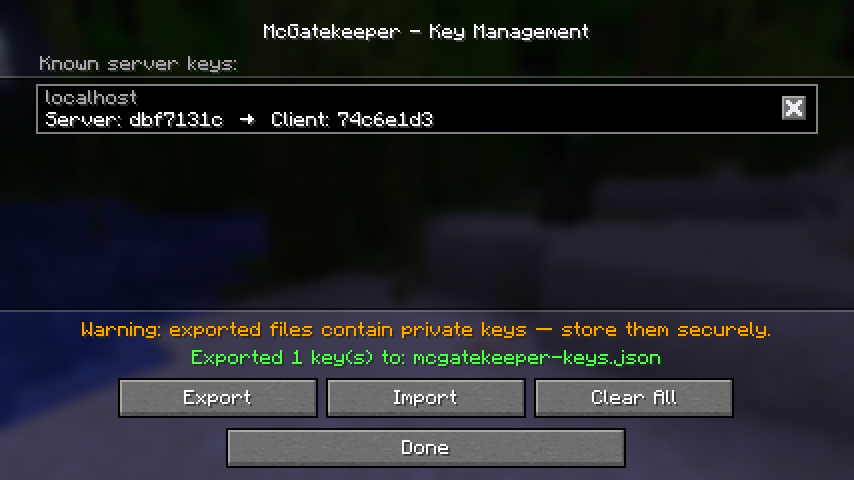
You can view and manage your stored keys via Mods → Gatekeeper → Manage Keys (requires Mod Menu). Each entry shows the server address the key was last used with, plus short fingerprints for both the server and client keys.
For full technical documentation, the security model, and source code, see the GitHub repository.
常见问题
Gatekeeper 支持哪些 Minecraft 版本?
Gatekeeper 支持 Minecraft Java 版 1.21.11,可用的加载器:Fabric / Paper。下载时注意选择和你游戏版本一致的文件。
Gatekeeper 怎么安装?
先用 PCL2 或 HMCL 启动器安装对应版本的 Fabric / Paper,再把下载的 .jar 文件放进游戏目录的 mods 文件夹,重新启动游戏即可。开启了版本隔离的,mods 文件夹在 versions/版本名 下面。运行环境:客户端和服务端都要装。
thegameratort 的其他作品
查看全部 →
Title Fixer
简单的客户端模组,让屏幕上显示的标题始终适应屏幕空间。

Title Fixer
让游戏内 HUD 标题始终适配屏幕。

Fire Overlay Controller
Allows changing the in-game fire burning overlay opacity and height.
Fire Overlay Controller
Allows changing the in-game fire burning overlay opacity and height.
评论
登录后评论和评分