
截图
介绍
This mod is a wrapper for MCFDoc which is an open source documentation generator for datapacks with a general syntax, made by me. You can read documentation for it here.
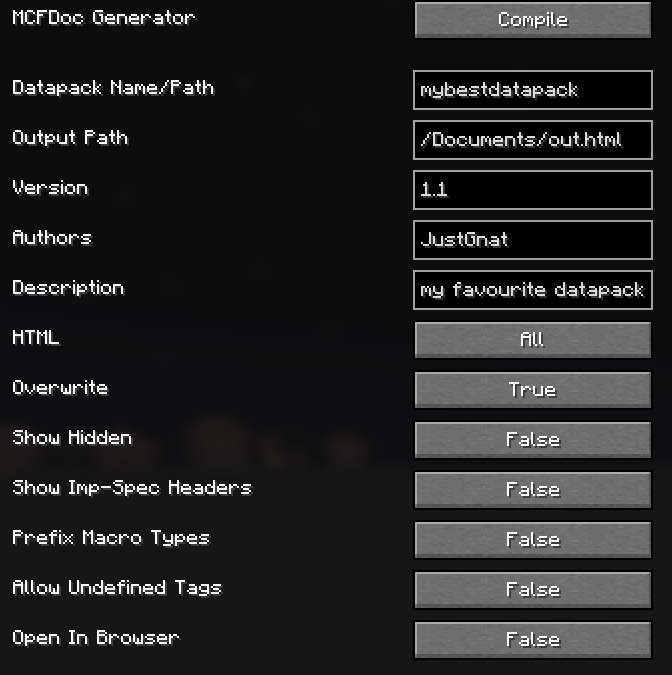
This mod lets you use it very easily through an ingame GUI.
To open the GUI, use the /mcfdoc command.
How to Use
In the GUI, the text field named Datapack Name/Path must contain the name or location of the datapack. If just a name is given, it will search for a datapack in the current worlds directory with that name. Otherwise, the full filepath must be given.
The text field named Output Path should contain the full filepath to the file which will be generated. This should include the file that will be written to, for example /home/me/Documents/output.html.

The button at the bottom, Open In Browser, determines whether the generated document should be automatically opened in your browser.
Once you have finished, press the Compile button! If one of the essential fields is left empty a pop up (which you can click on to close) will appear.
Troubleshooting
When an error occurs during generation, you will be notified in chat and either a fix or the location of the problem will be given.
Prism Launcher Users
Some installations of Minecraft are sandboxed to prevent access to irrelevant parts of your filesystem. Prism Launcher, when installed on Linux as a Flatpak is sandboxed and so you may encounter a datapack not found error or an error when writing the output to a file. If this is the case then you can give Prism Launcher extra permissions, or you could ensure both the datapack and output are within the minecraft directory.
Any file not found / failure to write to a file generally are due to lack of access permissions.
Extra
The documentation syntax is similar to Imp-Doc, which may be of interest.
MCFDoc is open source under the AGPL-3.0 license and so anyone can contribute.
常见问题
MCFDoc 支持哪些 Minecraft 版本?
MCFDoc 支持 Minecraft Java 版 1.21.11,可用的加载器:Fabric。下载时注意选择和你游戏版本一致的文件。
MCFDoc 怎么安装?
先用 PCL2 或 HMCL 启动器安装对应版本的 Fabric,再把下载的 .jar 文件放进游戏目录的 mods 文件夹,重新启动游戏即可。开启了版本隔离的,mods 文件夹在 versions/版本名 下面。运行环境:仅客户端。
JustGnat 的其他作品
查看全部 →
Modern Map Tooltip
Displays the map component in the tooltip

Server Resource Pack Ignorer
Adds a button in the Confirm Server Textures screen to allow you to reject server textures from downloading without being disconnected.

No Loading Bar
Removes the new loading bar on the world loading screen that appeared in 1.21.9 snapshot 25w31a
No Loading Bar
Removes the new loading bar on the world loading screen that appeared in 1.21.9 snapshot 25w31a
评论
登录后评论和评分