
介绍
Instantly know how good an enchantment is.
Instead of “Sharpness II” in the item or the enchanting table tooltip, you’ll see “Sharpness II / V”.
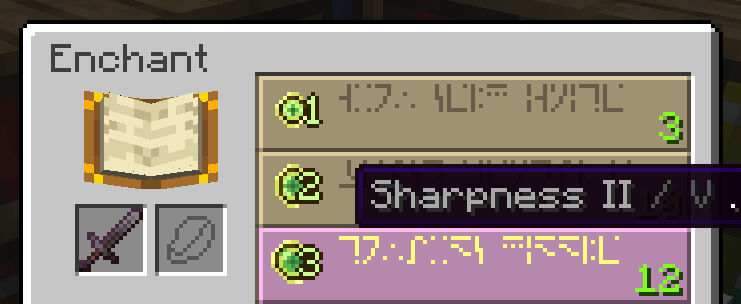
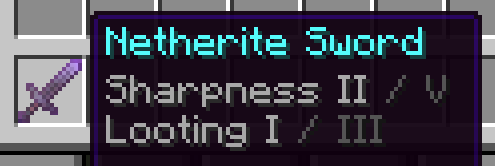
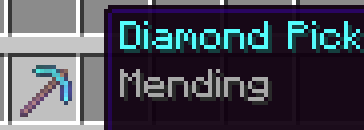
“Sharpness V” or “Mending”, however, are left alone since they’re the max level. Simple, intuitive, and IMO should have been built-in.
It also works with potion effects in a really clean way (I’ll add screenshots later).
Why?
“Why would this have to be built-in?”: For people who don’t like to rely on memory when it comes to numbers.
What’s different about this mod implementation from the other ones is that it intentionally provides no configuration and is designed to be a subtle vanilla-feeling drop-in-and-forget.
I’m not sure that the dark gray color is the perfect choice for preserving the Vanilla feel. If this mod gets enough downloads, we can make a poll to decide whether to leave it dark gray or the initial tooltip color.
常见问题
Max Level Info 支持哪些 Minecraft 版本?
Max Level Info 支持 Minecraft Java 版 1.21.2–1.21.11,共 10 个版本,可用的加载器:Fabric。下载时注意选择和你游戏版本一致的文件。
Max Level Info 怎么安装?
先用 PCL2 或 HMCL 启动器安装对应版本的 Fabric,再把下载的 .jar 文件放进游戏目录的 mods 文件夹,重新启动游戏即可。开启了版本隔离的,mods 文件夹在 versions/版本名 下面。运行环境:仅客户端。
artginzburg 的其他作品
查看全部 →
Insomnia Notifier
Shows phantom risk — as a vanilla effect icon.
Insomnia Notifier
Shows phantom risk — as a vanilla effect icon.

UI Keybinds
Adds shortcuts to navigate the UI buttons — without a mouse!

Colored Enchantment Names
Each item type has a color — Armor / Weapon / Trident
评论
登录后评论和评分