
Master Sword (from Zelda)
Adds a powerful Master Sword inspired by Zelda, capable of dealing massive damage.
截图
介绍
Master Sword – Legendary Weapon
This mod adds a powerful legendary sword inspired by the famous Master Sword from fantasy adventure games. It introduces a new high-damage weapon designed for players who want a unique and extremely powerful combat experience.
The Master Sword becomes one of the strongest weapons available in the game, allowing players to defeat powerful enemies much faster thanks to its massive attack power. The sword can deal up to 2000 damage per hit, making it a perfect weapon for epic battles, boss fights, or players who want a legendary item with incredible strength.
Features
-
Adds a new powerful sword inspired by a legendary hero weapon.
-
Extremely high attack damage (up to 2000 damage per hit).
-
Provides players with a unique weapon for defeating strong enemies.
-
Changes the combat experience by making battles faster and more intense.
-
Gives players a powerful reward for creating a legendary-style item.
Gameplay Experience
With this mod installed, players can experience a new way to fight in Minecraft. The Master Sword allows players to take on dangerous enemies with a weapon designed for maximum power. Whether used in survival mode, adventure maps, or custom worlds, this sword adds a legendary feeling to combat and gives players a powerful tool for their adventures.
This project is a fan-made creation inspired by the concept of a legendary sword and is not affiliated with Nintendo or The Legend of Zelda.
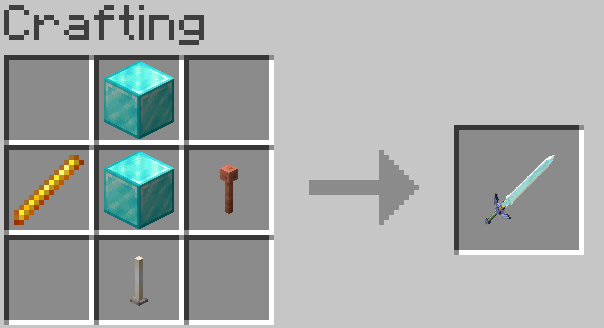
| WARNING !! in 1.21.8, replace lightning rod by a breeze rod.
If you likes this project, you can visit my website AdPROGRAMM’s website or join my discord Discord link
You can also join the whatsapp channel with this link
常见问题
Master Sword (from Zelda) 支持哪些 Minecraft 版本?
Master Sword (from Zelda) 支持 Minecraft Java 版 1.20.1–1.21.8,共 2 个版本,可用的加载器:Forge / NeoForge。下载时注意选择和你游戏版本一致的文件。
Master Sword (from Zelda) 怎么安装?
先用 PCL2 或 HMCL 启动器安装对应版本的 Forge / NeoForge,再把下载的 .jar 文件放进游戏目录的 mods 文件夹,重新启动游戏即可。开启了版本隔离的,mods 文件夹在 versions/版本名 下面。
评论
登录后评论和评分