截图
介绍
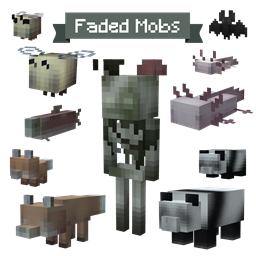
👻 A haunting new look for familiar Minecraft mobs 🕸️
Something has taken the life from Minecraft’s familiar creatures.
A quiet kind of horror, where the unsettling part isn’t what you see, but what is no longer there.
~ A submission to the SpookyJam 2026 ~
🕷️—————————————————————————————–🕸️
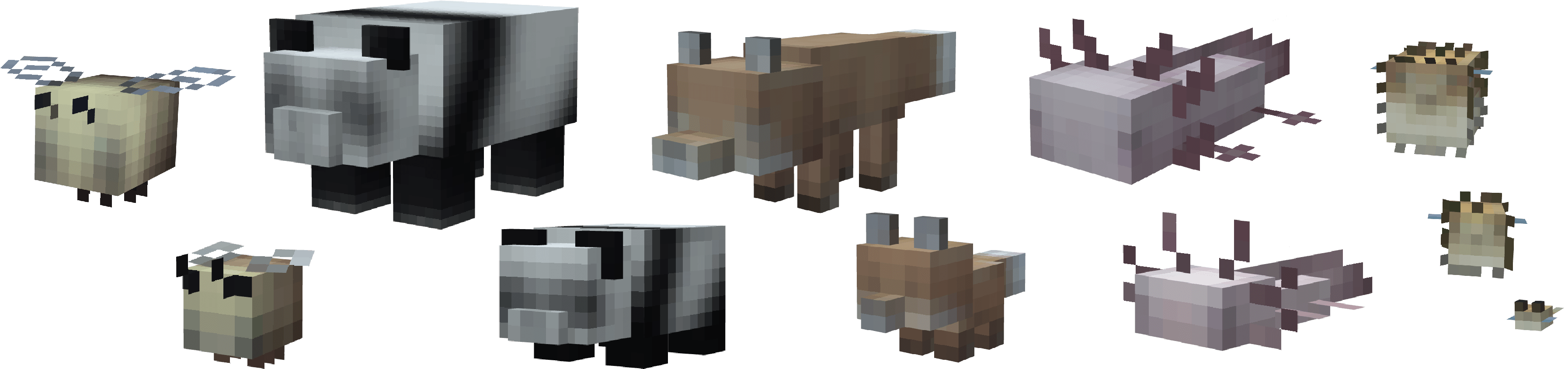
All default mobs change automatically to these faded textures around All Hallows’ Eve!
🎃 1-10 / 13-11 🎃
🌱 The Sapling mod needs to be installed in order for this mod to work 🌱
⚙️This mod needs to be installed on both the client and the server so you can see the same textures as your friends 🤗
The faded mobs spawn all across the world
and stay in their own skin when re-opening a world.
They replace all regular mobs but are compatible with other textures and won’t override them
‼️🏷️If you want to keep a certain faded texture on a specific mob for the whole year
make sure to give them a name tag before the spooky season ends!
Otherwise, they will change. ‼️🏷️
If you want the faded textures all year round, you can change that with commands
(or in the config)
/maplemods category faded setDate 01-01 31-12
Commands
⚙️To customize your experience.
The commands need operator rights (or cheats turned on in singleplayer). Dates are day-month, like 01-12.
All Faded Mobs at Once
/maplemods category faded (disable/enable) | Turn the faded look off or back on for every mob
/maplemods category faded setDate <from> <to> | Only show the faded mobs part of the year, for example: /maplemods category faded setDate 01-10 31-11
/maplemods collection maplesfadedmobs (disable/enable) | Turn all the textures of this mod off or back on
One Mob (Bee for example)
/maplemods bee updateCategorySettings faded (disable/enable/setDate) | Turn the faded look off or on for one kind of mob, or give it its own dates
/maplemods bee updateCategorySettings _default (disable/enable) | Disable or enable the original bee texture
/maplemods bee updateTextureSettings faded (disable/enable/setWeight) | To choose how often a faded bee spawns
Admin Tools
/maplemods bee adminTools resetAllLoadedEntityTextures | To give the mobs that are already loaded in the game a new texture
/maplemods bee adminTools reloadConfigFile | To reload changes in the config
Config Values
/maplemods bee setConfigValues _showCurrentValues | To see the current settings
/maplemods bee setConfigValues nameTagPreventsTextureChange (false/true) | Option to save the texture with the name tag or to disable it
/maplemods bee setConfigValues replaceModdedTextures (false/true) | Option to also dress bees that have a texture from another mod
Replace “bee” with any mob from the collection, e.g. fox, goat or iron_golem.
Very excited to submit my first mod to the SpookyJam!
✨ Hope you enjoy seeing them wander around as much as I enjoyed creating them ✨
常见问题
Maple’s Faded Mobs 支持哪些 Minecraft 版本?
Maple’s Faded Mobs 支持 Minecraft Java 版 1.20.1–26.3,共 6 个版本,可用的加载器:Fabric / Forge / NeoForge / Quilt。下载时注意选择和你游戏版本一致的文件。
Maple’s Faded Mobs 怎么安装?
先用 PCL2 或 HMCL 启动器安装对应版本的 Fabric / Forge / NeoForge / Quilt,再把下载的 .jar 文件放进游戏目录的 mods 文件夹,重新启动游戏即可。开启了版本隔离的,mods 文件夹在 versions/版本名 下面。
MapleMods 的其他作品
查看全部 →
Sapling
为 MapleMods 🍁 提供支持的 Minecraft 模组前置库。

Maple’s Bees | Seasonal Variants
添加季节性蜜蜂变种,它们的自定义纹理会随季节变化!✨🐝

Maple’s Frogs | Seasonal Variants
加入会随季节变换纹理的青蛙季节变种!🐸

Maple’s Rabbits | Seasonal Variants
为兔子添加随季节变化的外观和自定义材质!🐰 包含新版与经典版。
评论
登录后评论和评分