
截图
介绍
Hi, occasionally I like to just test what’s possible, this is a result of that urge.
I got really tired of dealing with SUPER LONG / cumbersome translation files, if you reference vanilla’s translations for 1.21.1 it’s already at/nearing 500Kb of raw text… and trying to developer large-scale content mods you run into similar issues (assume you’re not data-genning, but even then the scale can get crazy.) So…
Many Translations!
This is a small shared-library mod that lets any mod (or resource pack) split a single
language file into several smaller ones, instead of maintaining one giant (or multiple giant) files.
What problem does this solve though, really?
Vanilla loads exactly one file per namespace per language code:
assets/<namespace>/lang/<code>.json.
ClientLanguage.loadFrom does an exact
path lookup (String.format("lang/%s.json", code)); it never scans the lang/
directory, so mods with a lot of content end up with increasingly large,
hard-to-review JSON files. Or more typically, a single giant "en_us.json" file.
How it works
ClientLanguageMixin, redirects the
ResourceManager#getResourceStack(...) call inside ClientLanguage#loadFrom.
After fetching the normal exact-match stack for lang/<code>.json, it also
looks up (via ResourceManager#listResourceStacks) every resource in the same
namespace matching lang/<code>_*.json, sorts those matches by filename, and
traverses them in that order.
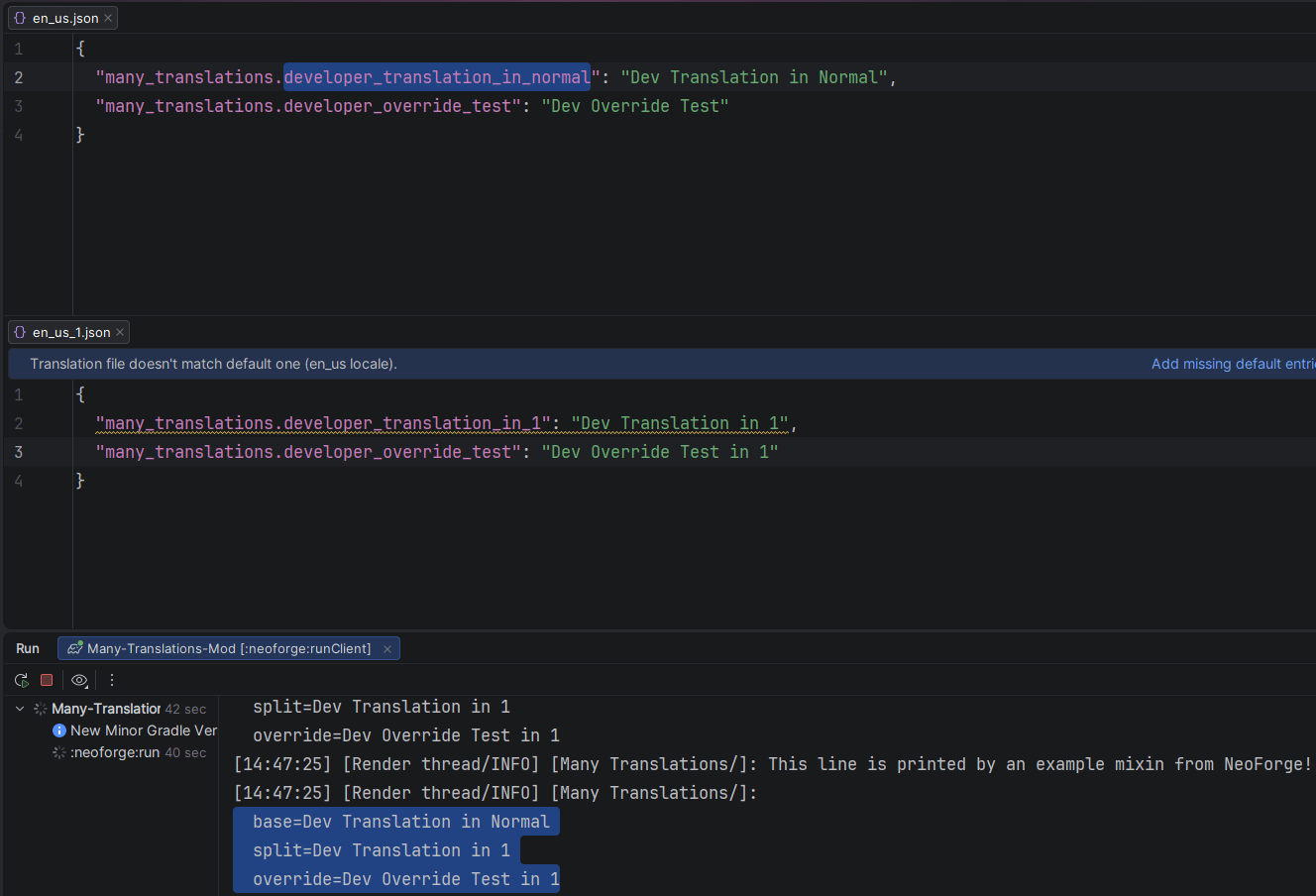
Translation keys are merged in file order, so later files wins on collisions.
Okay, how do I use it?
Create your mod like normal! Use the normal en_us.json / whatever locale code you’re building for until it gets overwhelming.
Then with this mod installed, you can simply copy and paste out the huge sections to separate files such as en_us_1.json or en_us_items.json etc.
Note To Developers
This mod can be consumed with CurseMaven for in-development work.
常见问题
Many Translations 支持哪些 Minecraft 版本?
Many Translations 支持 Minecraft Java 版 1.21.1,可用的加载器:Fabric / NeoForge。下载时注意选择和你游戏版本一致的文件。
Many Translations 怎么安装?
先用 PCL2 或 HMCL 启动器安装对应版本的 Fabric / NeoForge,再把下载的 .jar 文件放进游戏目录的 mods 文件夹,重新启动游戏即可。开启了版本隔离的,mods 文件夹在 versions/版本名 下面。
jason13official 的其他作品
查看全部 →
[Let's Do] 葡萄园 [Let’s Do] Vinery
阳光洒满的葡萄园,吱呀作响的木桶,凉爽酒窖里落满灰尘的酒瓶。种植葡萄,压榨自酿葡萄酒,打造你梦想中的酒庄。

MonoLib
一个适用于 Fabric、Forge 和 NeoForge 的非侵入式前置库模组。

Dis-Enchanting Table
从附魔武器或附魔书中回收附魔!

Animal Armor Trims – Horse & Wolf
现在你可以给马铠和狼铠添加盔甲纹饰了!
评论
登录后评论和评分