
截图
介绍
中文介绍正在准备中,下面暂时显示原文。
Allows players to mark the items they craft by embellishing the tooltip of the item.
Walkthrough
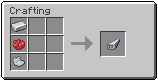
- Craft a stamp from an iron ingot and two dyes
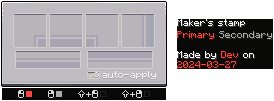
- Right-click with the stamp in your hand to open the stamp UI
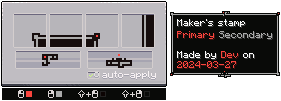
- Draw tooltip borders and decorations in the stamp UI
- Choose if the stamp should automatically apply to all crafted items (only works for items with durability)
- Then apply the stamp by:
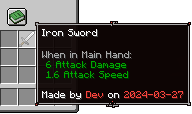
- Craft an item in the regular workbench and it should recieve the tooltip you drew in step 3 (if the stamp is set to auto apply and is in the player inventory)
- Put the stamp in your main hand and another item in the offhand, rightclick to apply the stamp to the offhand item
常见问题
Maker’s mark 支持哪些 Minecraft 版本?
Maker’s mark 支持 Minecraft Java 版 1.20.1,可用的加载器:Forge。下载时注意选择和你游戏版本一致的文件。
Maker’s mark 怎么安装?
先用 PCL2 或 HMCL 启动器安装对应版本的 Forge,再把下载的 .jar 文件放进游戏目录的 mods 文件夹,重新启动游戏即可。开启了版本隔离的,mods 文件夹在 versions/版本名 下面。运行环境:客户端和服务端都要装。
mickelus 的其他作品
查看全部 →
tetra
by mickelus
模块化工具、武器与装备。探索与远古科技。
3224万
3 个月前
Modrinth · CurseForge

mutil
by mickelus
我所有模组都会用到的实用工具前置库。
3217万
2 个月前
Modrinth · CurseForge

tetracelium
by mickelus
Adds mod compatability for Tetra
391.8万
6 个月前
Modrinth · CurseForge

Trolldom
by mickelus
A magic mod with roguelike elements
42.7万
2 年前
CurseForge
评论
登录后评论和评分