
介绍
MacroGrid
Command macros for Minecraft — one keypress away.
MacroGrid is a client-side Fabric mod that adds a customizable in-game button panel for running commands and chat messages instantly — no more retyping the same /tp, /gamemode or /time set over and over.
Press G. Click a button. (You can change this in the controls settings)
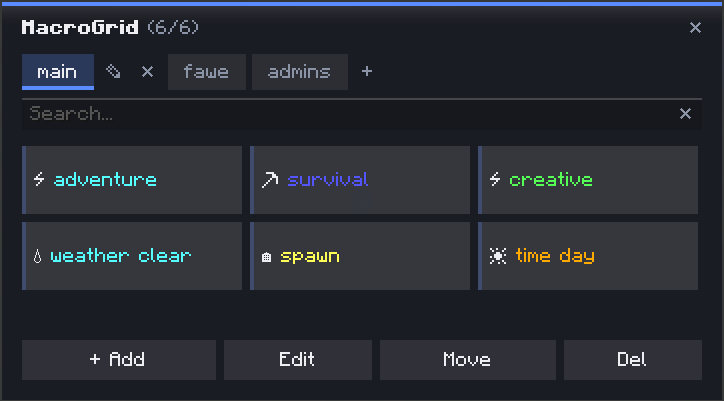
✨ Features
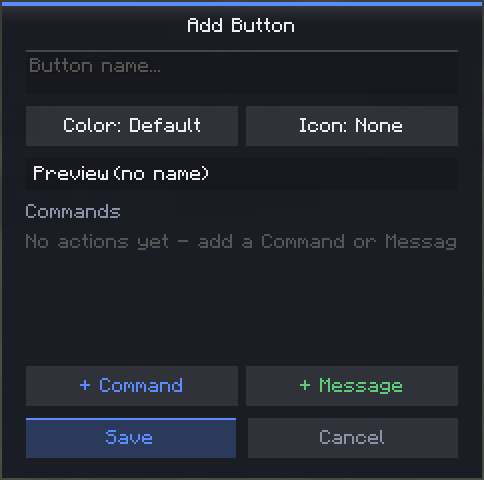
- ➕ Add — create a button in seconds: name, color, icon, done
- 🎨 Colors & icons — 10 colors and 35+ icons to tell your buttons apart at a glance
- 🧩 Multi-action buttons — chain multiple commands and chat messages on a single button, executed in order
- 📁 Tabs / profiles — organize buttons into separate tabs (e.g.
main,fawe,admins) — create, rename and delete tabs freely - 👁️ Live preview — see exactly how a button will look (color + icon + name) before saving
- ✏️ Edit / ✋ Move / ❌ Del — dedicated toolbar modes for managing your grid; Move swaps two buttons’ positions, Delete requires a confirmation click so you don’t lose a button by accident
- 🔍 Search bar — instantly filter buttons by name, even across a big grid
- 💾 Persistent — buttons are saved to a JSON config in your
.minecraft/configfolder, editable by hand if you want to bulk-edit
🚀 How to use
- Press
Gto open MacroGrid - Click + Add
- Give it a name, pick a color and icon, then add one or more commands/messages
- Hit Save — your button is ready to use
🔧 Managing buttons & tabs
| Action | How |
|—|—|
| Run a button | Click it (default mode) |
| Edit | Toolbar → Edit, then click a button |
| Move | Toolbar → Move, click one button, then another to swap positions |
| Delete | Toolbar → Del, click a button, click again to confirm |
| New tab | Click + next to the tabs |
| Rename tab | Click the pencil icon on the active tab |
| Delete tab | Click the ✕ next to the active tab (requires at least one other tab to exist) |
💻 Example — multiple actions on one button
A single button can run more than one thing, in order — for example a “Prep” button that sets gamemode and time together:
/gamemode creative
/time set day
📦 Requirements
- Fabric API
🔗 Links
常见问题
MacroGrid 支持哪些 Minecraft 版本?
MacroGrid 支持 Minecraft Java 版 1.21.11–26.2,共 5 个版本,可用的加载器:Fabric。下载时注意选择和你游戏版本一致的文件。
MacroGrid 怎么安装?
先用 PCL2 或 HMCL 启动器安装对应版本的 Fabric,再把下载的 .jar 文件放进游戏目录的 mods 文件夹,重新启动游戏即可。开启了版本隔离的,mods 文件夹在 versions/版本名 下面。运行环境:仅客户端。
评论
登录后评论和评分