
Mace Helper
作者:ZtnX
This mod helps you in PVP-technique Elytra Rocket Mace, and it also has various auxiliary functions
截图
介绍
中文介绍正在准备中,下面暂时显示原文。
MACE HELPER
Rocket Mace · Spear Mace · Your combat setup
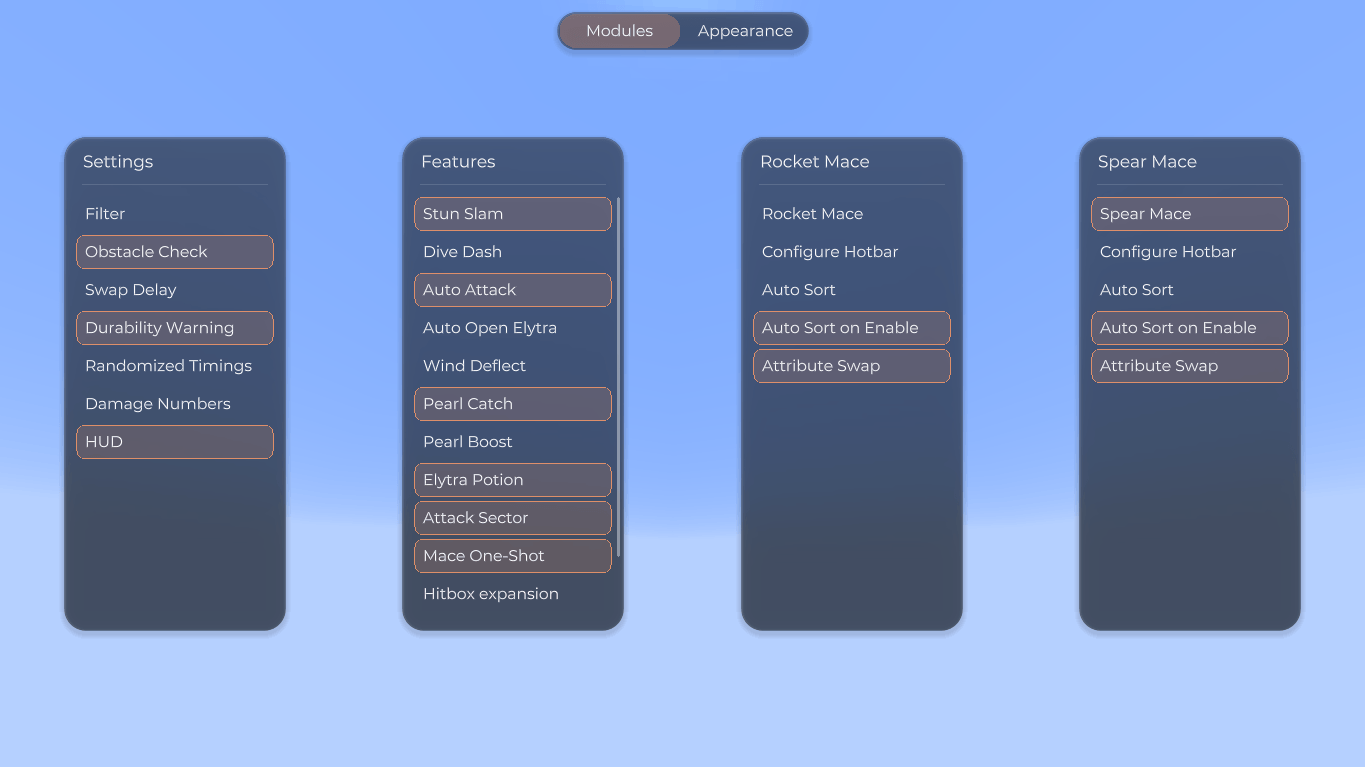
A client-side toolkit for aerial mace combat. Manage equipment swaps, break through shields, and combine movement tools to keep your combos going.
Choose a combat style, configure its hotbar, and enable the helpers you need.
Rocket Mace
Manages Elytra, chestplate, mace, and firework swaps for aerial combos.
Elytra + Firework + Mace
Spear Mace
Performs the sword → spear → mace combo while falling toward a target.
Sword → Spear → Mace
One combat style at a time. Other helpers can be toggled independently.
Combat tools
•
Stun Slam / Shield Break – Uses an axe to break through shields before a mace strike.
•
Auto Attack – Attacks valid targets automatically when the technique is ready.
•
Attack Sector – Selects targets within a configurable angle in front of you.
•
Attribute Swap – Swaps weapons using configurable hotbar slot pairs.
•
Mace One-Shot – Boosts mace smash damage using simulated fall height.
•
Hitbox Expansion – Expands client-side targeting hitboxes for easier aiming.
•
Wind Deflect – Automatically deflects other players’ Wind Charges within melee range.
Movement & utility
•
Pearl Catch – Intercepts your Ender Pearl with a Wind Charge for an aerial teleport.
•
Pearl Boost – Throws a Wind Charge after your Ender Pearl lands on the ground.
•
Dive Dash – Dashes downward along your view direction. Adjustable speed and cooldown.
•
Auto Open Elytra – Deploys your Elytra when using a firework in the air.
•
Elytra Potion – Helps you receive a splash potion’s effect while flying.
•
Auto Eat – Eats automatically when hungry, then restores your previous slot.
•
Anti Hunger – Helps reduce hunger consumption while sprinting.
Make it yours
•
Hotbar Manager – Assigns gear to slots and sorts the hotbar for your selected combat style.
•
Glass Menu – Customizable themes with English and Russian interface options.
•
HUD – Shows your combat mode and remaining firework boost time. Drag it anywhere on screen.
•
Damage Numbers – Displays floating health-loss indicators near your crosshair.
Getting started
1.
Open the menu with Right Shift by default. Change the key in Minecraft’s Controls.
2.
Left-click to toggle a feature or run an action. Right-click for settings.
3.
Enjoy the game!
Requirements
Warning
Using this mod may violate server rules and result in a ban. Check the rules before playing.
Server checks and plugins can affect feature behavior.
常见问题
Mace Helper 支持哪些 Minecraft 版本?
Mace Helper 支持 Minecraft Java 版 1.21.8–1.21.11,共 2 个版本,可用的加载器:Fabric。下载时注意选择和你游戏版本一致的文件。
Mace Helper 怎么安装?
先用 PCL2 或 HMCL 启动器安装对应版本的 Fabric,再把下载的 .jar 文件放进游戏目录的 mods 文件夹,重新启动游戏即可。开启了版本隔离的,mods 文件夹在 versions/版本名 下面。
评论
登录后评论和评分