
截图


介绍
Magicraft 🪄




📖 Description
Become a Powerful Mage!
Be a mage with a spell, scroll, mana, and grimoire vanilla-style system!
- Learn Spells: Right-click a Scroll to permanently learn a new spell.
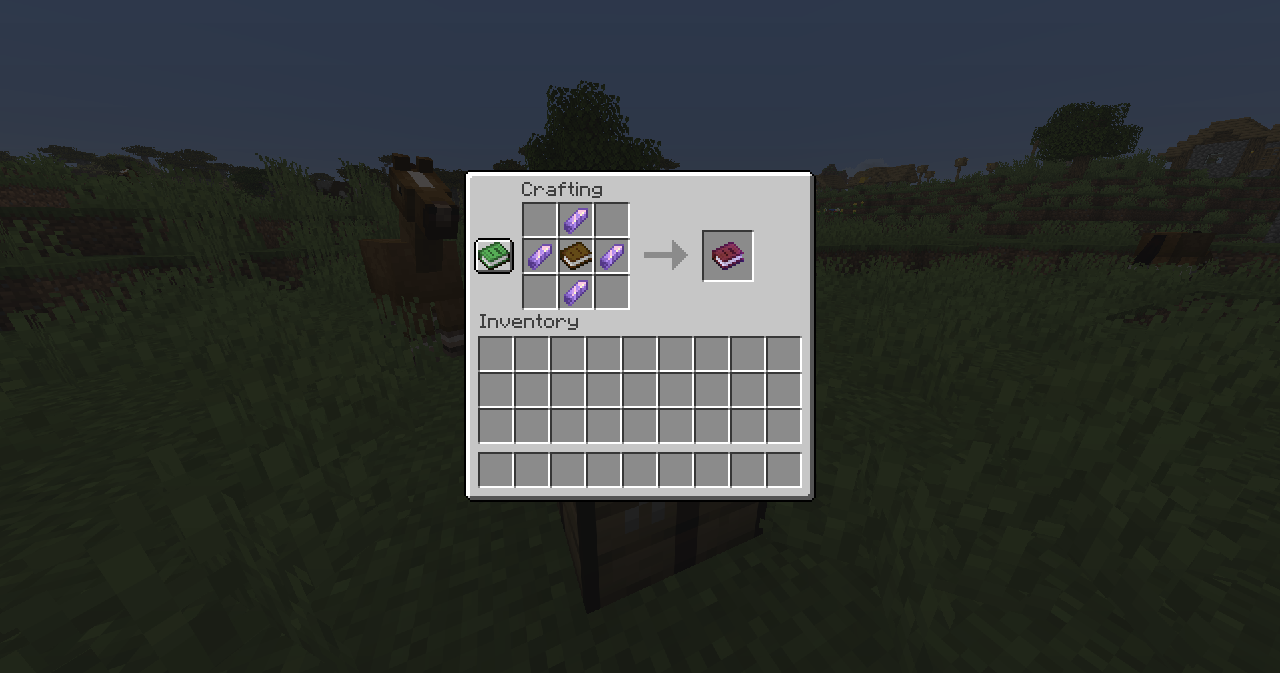
- Manage Your Magic: Right-click your Grimoire to open your spell list and select the spell you want to cast.
- Cast Spells: Once a spell is selected, left-click while holding the Grimoire to unleash its power.
- Mana System: Every spell consumes mana. By default, you regenerate 1 mana point every 5 seconds.
- Mana Potions: Running out of mana? Craft a Mana Potion to instantly restore your entire mana pool.
- Mage Armor: Craft the Mage Armor in the smithing table to regenerate mana more faster!
Where can you find Scrolls?
Scrolls are extremely rare, making every new spell feel like a valuable discovery. You can obtain them from:
- Wandering Trader trades
- Fishing treasure
- Archaeology loot
- Bastion Remnant treasure
- Buried treasure
- End City treasure
- Shipwreck treasure
- Evoker Drop
- Wandering Trader Drop
- The Wither Drop
- Illusioner Drop
- Mage Drop
Every scroll you find brings you one step closer to becoming the ultimate mage.
Good luck, and may your magical journey begin!
⌨️ Commands
Reset player spells:
/execute as <player> run function magicraft:player/spell/learn/reset/resetSummon mage:
/function magicraft:mage/summonGive Magicraft item:
/loot give @a loot magicraft:<item>🪪 License
👾 Bugs/Issues
Please report any problem/bug/issues in the Discord Server.
💌 Donate
🎁 Server Hosting
Creating your own server can be a very lengthy, tedious and costly process.
But with BisectHosting, you get your own server in just a couple of clicks! With their 24/7 support and fast-response time, no issues shall stand in your way!
Interested? Then we’ve got a deal for you!
https://bisecthosting.com/lullaby

常见问题
Magicraft 支持哪些 Minecraft 版本?
Magicraft 支持 Minecraft Java 版 1.21.11–26.3,共 6 个版本,可用的加载器:Fabric / Forge / NeoForge / Quilt。下载时注意选择和你游戏版本一致的文件。
Magicraft 怎么安装?
先用 PCL2 或 HMCL 启动器安装对应版本的 Fabric / Forge / NeoForge / Quilt,再把下载的 .jar 文件放进游戏目录的 mods 文件夹,重新启动游戏即可。开启了版本隔离的,mods 文件夹在 versions/版本名 下面。运行环境:客户端 / 服务端。
lullaby 的其他作品
查看全部 →
Backpacks
非常简单且高性能的背包!

Clumps
合并经验球并瞬间拾取经验球以减少卡顿!

Lucky Blocks
Lucky Blocks in Vanilla Minecraft! (no resourcepack!)

Graves
A fully customizable grave to save your loot upon death!
评论
登录后评论和评分