
LTB
LTB (Litematic To Blueprint) converts your Litematica .litematic schematics into Axiom blueprints (.bp) — straight from an in-game GUI, in a couple of clicks.
截图
介绍
LTB (Litematic To Blueprint) converts your Litematica .litematic schematics into Axiom blueprints (.bp) — straight from an in-game GUI, in a couple of clicks.
If you build with Litematica but edit and paste with Axiom, LTB removes the manual step in between: point it at a schematic and it writes a ready-to-use blueprint into Axiom’s own blueprint folder.
Features
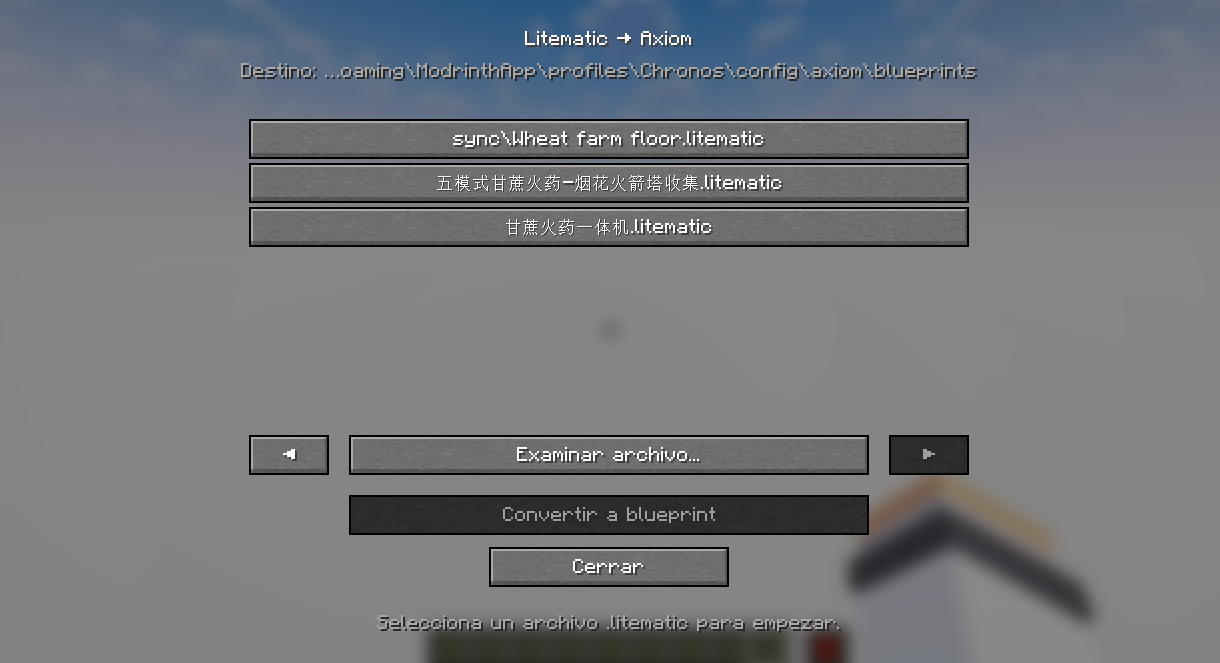
In-game converter. Press B (rebindable in Controls) or run /ltb to open the converter screen — no need to leave the game or touch any files by hand.
Pick your schematic. Browse the .litematic files already in your schematics/ folder, or open any file anywhere with the native file picker.
One-click conversion. LTB writes the .bp directly into Axiom’s default blueprint folder (config/axiom/blueprints/), so it shows up in Axiom’s blueprint browser immediately.
Accurate block conversion. Litematica and Axiom pack block data differently under the hood; LTB handles both packing formats so your build comes out intact, palette and all.
Never overwrites. If a blueprint with the same name already exists, LTB saves a uniquely-named copy instead of replacing it.
Supported Platforms
LTB is currently available for Fabric on Minecraft: Java Edition 1.21.5 and later (1.21.5 – 1.21.11). It is client-side only.
The build is compiled against 1.21.5; the conversion relies on Minecraft’s NBT API, which is stable across the whole 1.21.5–1.21.11 range. Versions 1.21.4 and earlier are not supported (the NBT API changed in 1.21.5), and the newer non-obfuscated releases (26.x) will require a separate build.
Requirements
Fabric API (required)
Litematica and Axiom (recommended). LTB reads .litematic files and writes .bp files, so it works with their data on disk — neither mod has to be running for the conversion itself, but you’ll want both to actually create schematics and use the resulting blueprints.
Good to know
A few honest limitations of the current release:
One region per file. If a .litematic contains multiple Litematica regions, LTB will ask you to merge them into a single region in Litematica first.
Block entities carry over (chests, signs, etc.). Entities (mobs, item frames, armor stands) are not converted.
The native file picker depends on your operating system. If it doesn’t open on your setup, just use the in-GUI list of your schematics/ folder instead.
常见问题
LTB 支持哪些 Minecraft 版本?
LTB 支持 Minecraft Java 版 1.21.4–26.2,共 9 个版本,可用的加载器:Fabric。下载时注意选择和你游戏版本一致的文件。
LTB 怎么安装?
先用 PCL2 或 HMCL 启动器安装对应版本的 Fabric,再把下载的 .jar 文件放进游戏目录的 mods 文件夹,重新启动游戏即可。开启了版本隔离的,mods 文件夹在 versions/版本名 下面。运行环境:仅客户端。
Jokkr1 的其他作品
查看全部 →
Dreamers Shaders
A vivid fantasy shaderpack with magical skies — auroras every night, nebulae and magenta sunsets, plus a crystal-clear Nether crowned by fiery infernal auroras. Based on Complementary Unbound.

Vantage_
This mod adds configurable cameras, allowing you to quickly view your build or gameplay from different perspectives.
评论
登录后评论和评分