Lost Cursor Fix
Fixes Minecraft's inconsistent inventory cursor position by automatically centering the mouse whenever an inventory screen is opened.
截图
介绍

🎯 Lost Cursor Fix
Stop losing your mouse cursor.
Ever opened a chest or your inventory and had to search for your cursor first?
Vanilla Minecraft often places the mouse inconsistently when opening GUI screens — especially inventories, chests, furnaces, and other containers.
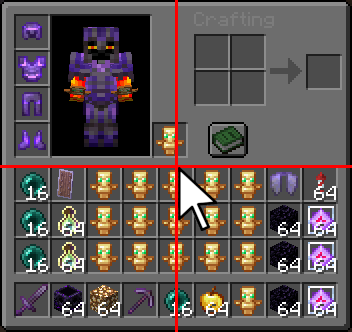
Lost Cursor Fix solves this by automatically centering your cursor every time a handled screen opens. Clean, simple, and seamless.
✨ Features
🎯 Perfect Cursor Centering
Automatically moves the mouse cursor to the exact center of the screen whenever an inventory GUI opens.
⚡ Easy Toggle Commands
Enable or disable the mod instantly with simple chat commands — no config menu needed.
🛠 Commands
| Command | Description |
|—|—|
| /lcf toggle | Toggle the mod on or off |
| /lcf on | Enable Lost Cursor Fix |
| /lcf off | Disable Lost Cursor Fix |
| /lcf report | Get the Discord support link |
Aliases:
/lostcursorfix toggle/lostcursorfix on/lostcursorfix off
📦 Compatibility
✅ Supported Versions
- Minecraft
1.21→1.21.11
🧪 Experimental Support
- Compatible with Fabric
26.x - Works with special/April Fools experimental releases
💻 Environment
- Client-side only
- Does not need to be installed on servers
💬 Support
Join our Discord for support, bug reports, or suggestions:
🌐 https://discord.gg/mP23dpVQ6V
🇩🇪 Lost Cursor Fix (Deutsch)
Schluss mit der Suche nach dem Mauszeiger.
Du öffnest eine Kiste oder dein Inventar — und dein Cursor ist plötzlich irgendwo am Bildschirmrand?
Minecraft positioniert den Mauszeiger in GUI-Menüs oft unzuverlässig und inkonsistent.
Lost Cursor Fix behebt dieses Problem, indem der Mauszeiger beim Öffnen eines Inventars automatisch exakt in die Bildschirmmitte gesetzt wird.
✨ Funktionen
🎯 Perfekte Zentrierung
Setzt den Mauszeiger automatisch in die Mitte des Bildschirms, sobald ein Inventar geöffnet wird.
⚡ Einfache Steuerung
Aktiviere oder deaktiviere die Mod jederzeit über praktische Chat-Befehle.
🛠 Befehle
| Befehl | Beschreibung |
|—|—|
| /lcf toggle | Mod ein-/ausschalten |
| /lcf on | Mod aktivieren |
| /lcf off | Mod deaktivieren |
| /lcf report | Discord-Supportlink anzeigen |
📦 Kompatibilität
✅ Unterstützte Versionen
- Minecraft
1.21bis1.21.11
🧪 Experimentelle Unterstützung
- Kompatibel mit Fabric
26.x - Unterstützt experimentelle/April-Fools-Versionen
💻 Installation
- Rein clientseitig
- Keine Serverinstallation erforderlich
💬 Support
Trete unserem Discord bei für Hilfe, Fehlerberichte oder Vorschläge:
🌐 https://discord.gg/mP23dpVQ6V
❓ Can I use this mod in a modpack? 📦
Of course! Please feel free to include this mod in your modpacks! 💜✨
You may:
- ✅ Use this mod in public and private modpacks
- ✅ Upload modpacks containing this mod to Modrinth, CurseForge, etc.
- ✅ Use it on servers and with friends
Just please:
- ❌ Do not reupload the mod itself
- ❌ Do not claim the mod as your own
Have fun! 🌟
常见问题
Lost Cursor Fix 支持哪些 Minecraft 版本?
Lost Cursor Fix 支持 Minecraft Java 版 1.21–26.2,共 16 个版本,可用的加载器:Fabric。下载时注意选择和你游戏版本一致的文件。
Lost Cursor Fix 怎么安装?
先用 PCL2 或 HMCL 启动器安装对应版本的 Fabric,再把下载的 .jar 文件放进游戏目录的 mods 文件夹,重新启动游戏即可。开启了版本隔离的,mods 文件夹在 versions/版本名 下面。运行环境:仅客户端。
FelixFGF 的其他作品
查看全部 →
Fast Quit
Leave the Server/World with a custom keybind (REALY FAST) 🎮✨

Inventory Highlighter (HighlightRender)
Highlights items in your inventory 🎒 with different colors 🌈 THE FIRST remake of “Highlighter” 🔄 based on type and enchantments ✨. for newer versions 🆕, fully customizable ⚙️ with adjustable colors 🎨, rules 📏, and highlighting 🔍.
Lost Cursor Fix
Fixes Minecraft's inconsistent inventory cursor position by automatically centering the mouse whenever an inventory screen is opened.

HotbarCustomizer
This mod allows you to fully customize your hotbar to match your personal style and gameplay needs. transparency, and overall design for a cleaner and more modern HUD experience.
评论
登录后评论和评分