
Longer Strength II Potions
Changes level 2 strength potions to last 8 minutes instead of 1.5 minutes
介绍
 Check out KitR!
This project has been implemented into KitR, among many other SMP features.
https://modrinth.com/datapack/kitr
Overview
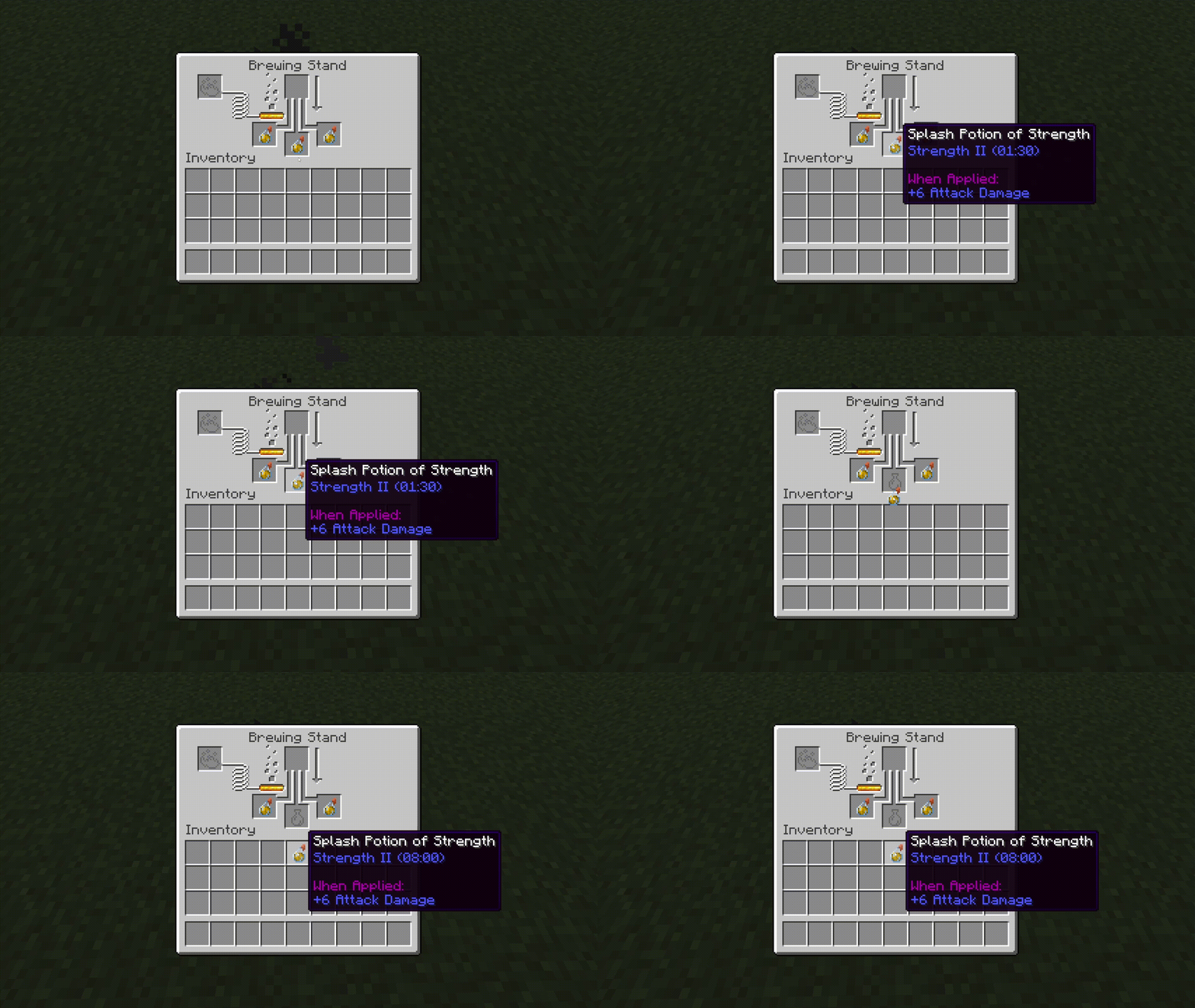
Strength II potions, splash potions, lingering potions and tipped arrows last longer. The duration becomes the same as a long level 1 of its type.
_This mechanic was inspired by Lifesteal World, where Strength II splash potions would last 8 minutes_
Note
_The potions will look 1.5 minutes when they have been brewed and are still in the brewing stand, but they will work as intended as soon as they enter a player’s inventory._
Installation
Server Installation (Datapack)
- Go in the main server file
- Open _world_ -> _datapacks_
- Upload the datapack in the _datapacks_ folder
World Installation (Datapack)
- Press Win + R and enter %appdata%
- Open _.minecraft_ -> _saves_ -> __ -> datapacks
- Upload the datapack in the _datapacks_ folder
(Note that if you are using a launcher like Modrinth App or Prism Launcher, you’ll need to go on your instance on the launcher and click on _Open Folder_.)
Server Installation (Mod)
- Go in the main server file
- Open _mods_
- Upload the mod in the _mods_ folder
常见问题
Longer Strength II Potions 支持哪些 Minecraft 版本?
Longer Strength II Potions 支持 Minecraft Java 版 1.21–26.3,共 17 个版本,可用的加载器:Fabric / Forge / NeoForge / Quilt。下载时注意选择和你游戏版本一致的文件。
Longer Strength II Potions 怎么安装?
先用 PCL2 或 HMCL 启动器安装对应版本的 Fabric / Forge / NeoForge / Quilt,再把下载的 .jar 文件放进游戏目录的 mods 文件夹,重新启动游戏即可。开启了版本隔离的,mods 文件夹在 versions/版本名 下面。运行环境:客户端 / 服务端。
Napad 的其他作品
查看全部 →
No Ender Pearl Teleportation
阻止末影珍珠传送玩家。
Bliss Dragon Egg
The Dragon Egg holder has 20 hearts

Customizable Pearl Cooldown
Allows you to choose the duration of the cooldown of Ender Pearls
No Ender Pearl Teleportation
Stops Ender Pearls from teleporting players
评论
登录后评论和评分