
Login Music
A simple Minecraft mod that can play music when players join in the world.
截图

介绍
Login Music
A simple Minecraft mod that can play music when players join in the world.
This mod uses AI to assist in development.
Inspired by TartaricAcid’s Net Music !
| Milestone | Big changes |
|———–|———————————————————————————————-|
| 1.1.0 | javafx has given place to com.googlecode.soundlibs:mp3spi, which provides MP3 support now. |
| 1.2.0 | the music config has changed to JSON type. |
| 1.2.1 | Music can be played directly through the Internet without downloading; lyrics support! |
| 1.2.2 | Audio backend loading, Players can receive audio from other players on the server. |
| 1.2.6 | Add cache system. Refactor the code. |
The logo comes from here, designed by juicy_fish.
Functions
- MP3 supported
- Audio backend loading
- Play different musics based on the player’s name (uuid)
- Show lyrics while playing music
- …
File Structure
Destructive changes:
Since mod version 1.2.5, the config file’s storage has been changed! If you upgrade from previous version, please move them to the new place!
All music files are stored in the /data/login_music folder.
{version folder}
├── config
│   ├── login_music-music.json      # Specific musics
│   ├── login_music-client.toml     # Client config
│   └── login_music-common.toml     # Common config
│
├── data/login_music        # Store music files
│   ├── MusicsCache
│   │   ├── music_1.mp3
│   │   ├── music_2.wav
│   │   └── ...
│   └── LyricsCache
│       ├── music_1.lrc
│       ├── music_2.lrc
│       └── ...
└── ...
Configuration
Since mod version 1.2.0, the music config has changed to JSON type, just as shown below.
If you enter a server with this mod, the config file on the server has higher priority, which will cover your custom settings.
{
  "defaultMusic": {
    "id": "Default",
    "musicName": "Default.mp3",
    "musicPath": "https://www.example.com/example.mp3",
    "lyricName": "Default.lrc",
    "lyricPath": "https://www.example.com/example.lrc"
  },
  "musics": [
    {
      "id": "Steve",
      "musicName": "login_music_1.mp3",
      "musicPath": "https://www.example.com/login_music_1.mp3",
      "lyricName": "login_music_1.lrc",
      "lyricPath": "https://www.example.com/login_music_1.lrc"
    },
    {
      "id": "Alex",
      "musicName": "login_music_2.mp3",
      "musicPath": "https://www.example.com/login_music_2.mp3",
      "lyricName": "login_music_2.lrc",
      "lyricPath": "https://www.example.com/login_music_2.lrc"
    }
  ]
}
The music will be downloaded if
InternetAccessis settrue(the default setting isfalse), otherwise, the music is played through network audio streams, which may cause a short pause when entering a world.
For example, When a player named Steve enters the world, the mod will try to find the music matched the name Steve (in this case it’s login_music_1.mp3 ) in the folder data/login_music first. Then try to download it from its related url if it has failed before.
If there is a file with the same name in the folder, it will skip the download even if the file does not match the URL.
If more entries need to be added, please follow the JSON’s rule.
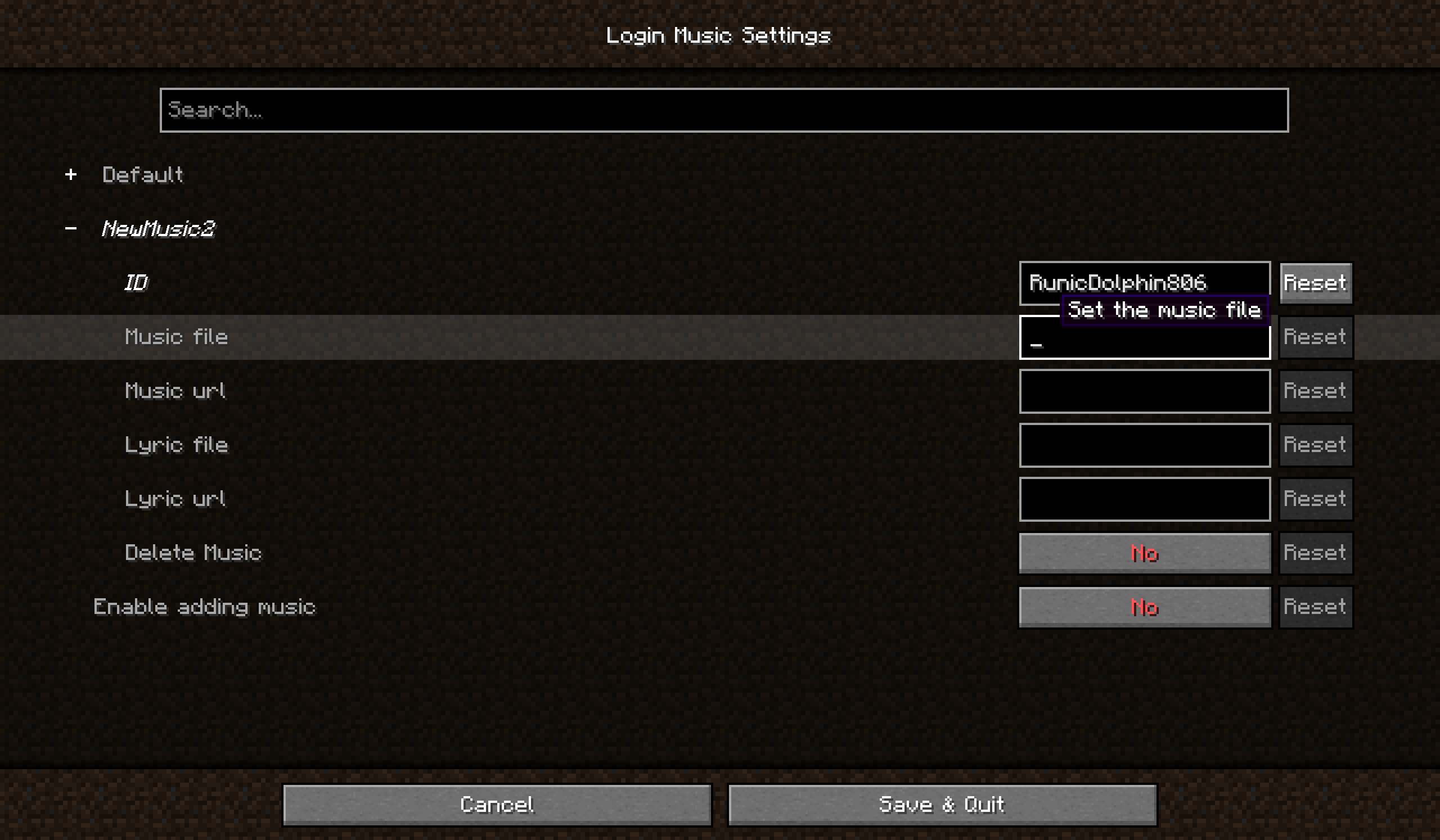
Since mod version 1.2.4, you can open Login Music Config from the main menu if Cloth Config API has been installed.
Command
The Command system has been rebuilt since 1.2.6, all the commands need permission level 2.
| Command | Function |
|—————————|—————————————|
| /loginmusic reload | reload music config |
| /loginmusic list | show music config available currently |
| /loginmusic stop | stop you current playing music |
| /loginmusic play | replay your login music |
| /loginmusic cache list | show the cached file |
| /loginmusic cache clear | clear the cached file |
常见问题
Login Music 支持哪些 Minecraft 版本?
Login Music 支持 Minecraft Java 版 1.20.1–1.21.1,共 2 个版本,可用的加载器:Forge / NeoForge。下载时注意选择和你游戏版本一致的文件。
Login Music 怎么安装?
先用 PCL2 或 HMCL 启动器安装对应版本的 Forge / NeoForge,再把下载的 .jar 文件放进游戏目录的 mods 文件夹,重新启动游戏即可。开启了版本隔离的,mods 文件夹在 versions/版本名 下面。运行环境:客户端和服务端都要装。

评论
登录后评论和评分