
截图

介绍
Requirements
Minecraft Forge and Silent Lib are mandatory. Mod loaders other than Forge are not supported.
Introduction
Loginar Storage aims to improve inventory management by adding new ways to store and transport items. The mod is meant to “fit in” with vanilla, while also being useful in a heavily modded environment.
Mobs
Loginar


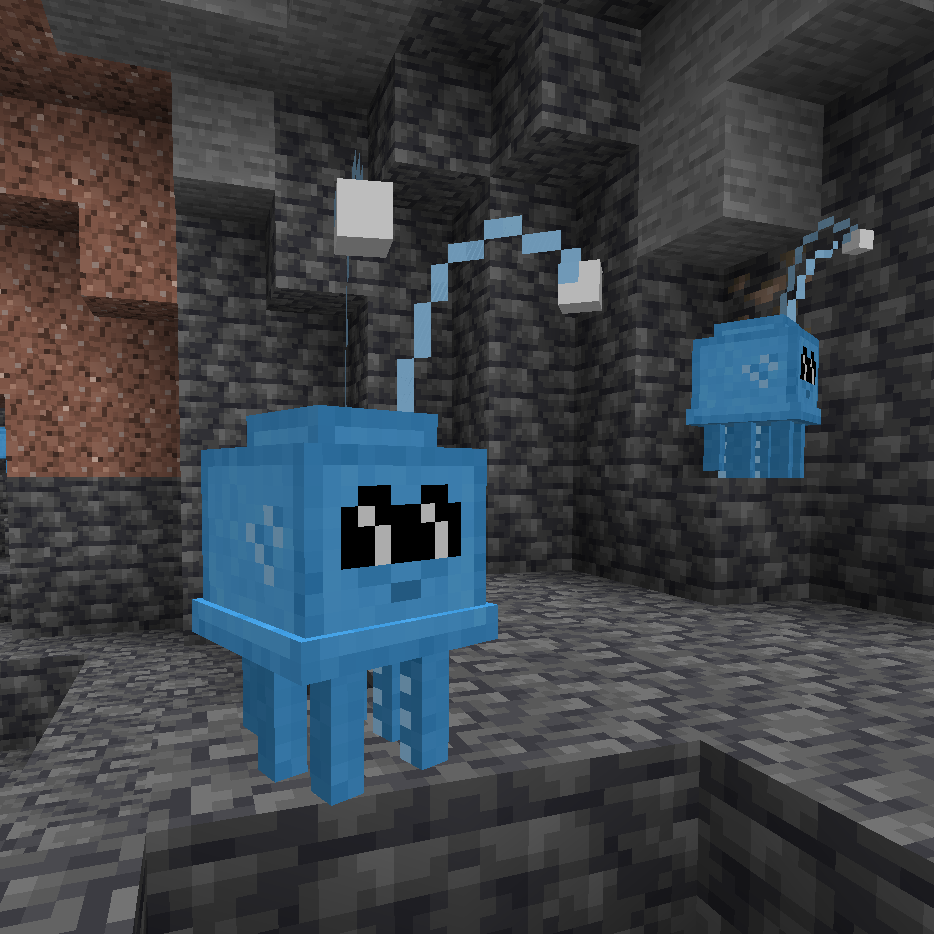
These short, squid-like creatures come from a hot, blue star, far away from our own. It is unclear what they want with our world, but they are not particularly hostile unless perturbed. They appear to gather deep underground in certain, seemingly-random areas. Listen for the unique purring sound they make!
Loginars drop two different items when killed, antennae and tentacles. A loginar antenna is a very important item for crafting and may have some other uses. Loginar tentacles can be cooked and eaten; eating them without cooking is ill-advised.
Blocks and Items
Loginar Urns

Loginar urns are for storing and transporting items. Any items stored in the urns are retained when the urn is broken and picked up (just like shulker boxes).
They come in multiple sizes. The smallest urn stores only 9 items (1 row) while the largest stores 54 (6 rows). The smaller sizes are easier to craft than shulker boxes. Larger sizes are more difficult to acquire.
Crafting
_Use JEI to see exact recipes._
Tiny Loginar Urns are crafted with (assuming no data pack modifications) a loginar antenna, terracotta, and a gem. The color of the terracotta and the gem will affect the final appearance of the urn. Larger urn sizes require the previous size and additional items to craft.

Recoloring
Urns can be recolored by crafting them with dyes or gems. Multiple dyes can be applied to create custom colors.

Upgrades
To apply an upgrade to a loginar urn, simply craft the urn with the upgrade item.

List of Upgrades
- Backpack – Allows the urn to be opened without placing it. Simply hold the urn in your hand, look away from any blocks, and right-click. If you right-click on a block, the urn will still be placed as normal.
- Vacuum – Not working at time of writing (version 0.2.2). Causes nearby items to be drawn towards the urn and inserted into its inventory.
- Item Swapper – Press the “Swap Urn Items” keybinding (defaults to “X”, check your controls menu) to bring up the swapper menu. Click an item and it will be swapped with your current held item. Very useful for tools that you use occasionally, but not enough to dedicate a hotbar slot to them. The urn with the swapper upgrade may be in your offhand or anywhere in your inventory except your main hand (obviously).
常见问题
Loginar Storage 支持哪些 Minecraft 版本?
Loginar Storage 支持 Minecraft Java 版 1.19.4–26.1.2,共 11 个版本,可用的加载器:Forge / NeoForge。下载时注意选择和你游戏版本一致的文件。
Loginar Storage 怎么安装?
先用 PCL2 或 HMCL 启动器安装对应版本的 Forge / NeoForge,再把下载的 .jar 文件放进游戏目录的 mods 文件夹,重新启动游戏即可。开启了版本隔离的,mods 文件夹在 versions/版本名 下面。运行环境:客户端和服务端都要装。
SilentChaos512 的其他作品
查看全部 →
Silent Lib (silentlib)
让模组的编写和维护更加轻松的前置库。

Silent Gear
可升级的工具、武器和盔甲。自定义材料系统!

Scaling Health
修改玩家、模组生物的生命值等属性!《困难生活》的精神续作。

Silent’s Gems
可自定义的工具!多彩的建筑方块!实用的小工具!
评论
登录后评论和评分