
截图
介绍
中文介绍正在准备中,下面暂时显示原文。
LogScope

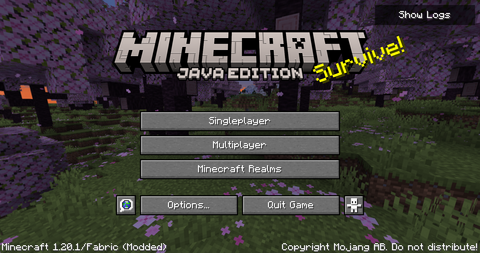
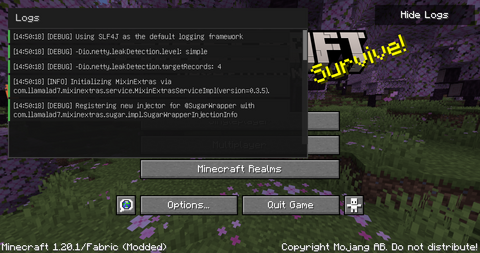
A lightweight, real-time log viewer for your Minecraft title screen


✨ Features
- 📊 Real-time log monitoring directly from the title screen
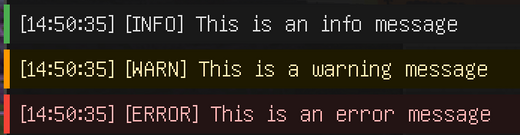
- 🎨 Color-coded messages (Info, Warning, Error)
- 🔄 Automatic updates as new logs appear
- 📜 Scrollable log window with smooth navigation
- 🎯 Single-click toggle for instant access
- 🪶 Lightweight and performance-friendly
📸 Screenshots
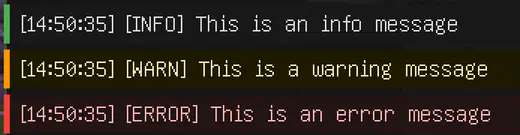
Color-coded logs
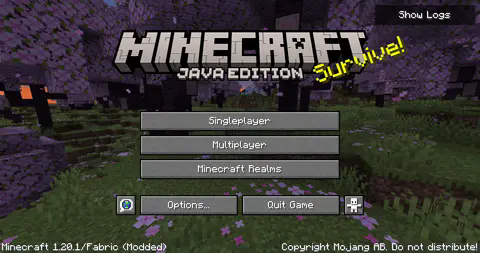
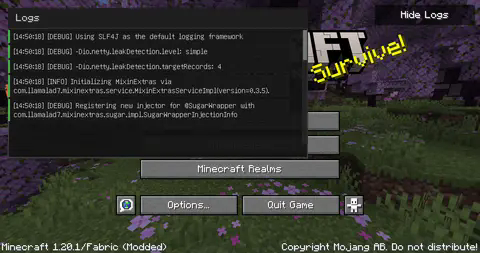
LogScope in action
🚀 Quick Start
- Click the “Show Logs” button in the top-right corner of your title screen
- View logs in real-time as they appear
- Scroll through the log history using your mouse wheel or the scrollbar
- Click “Hide Logs” to close the window
📋 Requirements
- Minecraft (Compatible version)
- Fabric Loader ≥0.15.11
- Fabric API
💻 Installation
- Install Fabric Loader and Fabric API
- Download the latest version of LogScope
- Drop the .jar file into your
modsfolder - Launch Minecraft and enjoy!
💡 Credits
LogScope adapts and builds upon the Console widget originally implemented in Sodium by JellySquid3 and contributors. The implementation has been modified to work as a standalone feature on the title screen.
📜 License
LogScope is licensed under the EUPL v1.2 license – see the LICENSE file for details.
Made with ❤️ for the Minecraft community
常见问题
Log Scope 支持哪些 Minecraft 版本?
Log Scope 支持 Minecraft Java 版 1.20.1,可用的加载器:Fabric。下载时注意选择和你游戏版本一致的文件。
Log Scope 怎么安装?
先用 PCL2 或 HMCL 启动器安装对应版本的 Fabric,再把下载的 .jar 文件放进游戏目录的 mods 文件夹,重新启动游戏即可。开启了版本隔离的,mods 文件夹在 versions/版本名 下面。运行环境:仅客户端。

评论
登录后评论和评分