
Log Hush
Keeps known start-up warnings (perf counters, offline lookups) and phrases you pick out of latest.log.
截图


介绍
You open latest.log to find out why the game crashed or a mod misbehaves, and the first screen is a wall of warnings that have nothing to do with it: Windows performance counters the game cannot read, each with a page of stack trace. The line you are looking for is somewhere below.
Where: the game’s log files (logs/latest.log and logs/debug.log). In the game, type /loghush in chat.
What it does: from the moment the game starts, Log Hush keeps a short list of known, harmless messages out of the log files, and lets you add more.
- Built-in rule, on by default, made from lines seen in a real Minecraft 26.3 start on Windows:
windows-perf-counters(“Unable to locate English counter names in registry Perflib…”, “Invalid registry value type detected for PerfOS counters…”, “Failed to get system info for Process …”; the game cannot read the Windows performance counters on this PC). - Built-in rule, off by default (switch on with
rule.online-services-offline=true):online-services-offline(“Couldn’t connect to realms”, “Failed to fetch Realms feature flags”, “Failed to fetch user properties”, “Could not authorize you against Realms server”). Off by default because it would also hide a real sign-in or Realms problem from latest.log. /loghush: how many lines each rule hushed. The last line is clickable and opens the hidden file./loghush top: the warnings and errors that repeated most this session and were NOT hushed. Click one and/loghush add <text>appears in your chat box; press Enter and it is hushed from then on (works at once, saved inconfig/loghush.properties, no restart). Lines that come with a stack trace are not listed, because your own phrases never hush those.- Nothing is deleted. Every hushed line, with its stack trace, goes to
logs/loghush-hidden.log(the previous run’s file is kept asloghush-hidden.log.1). Once the game has started, latest.log itself gets one INFO line: how many lines were hidden by which rules and where the full text is, so whoever reads the log later knows. - Safety: FATAL lines are never hushed (unit-tested); a line with a stack trace is only hushed by a built-in rule, never by your own phrases; your phrases must be at least 8 characters.
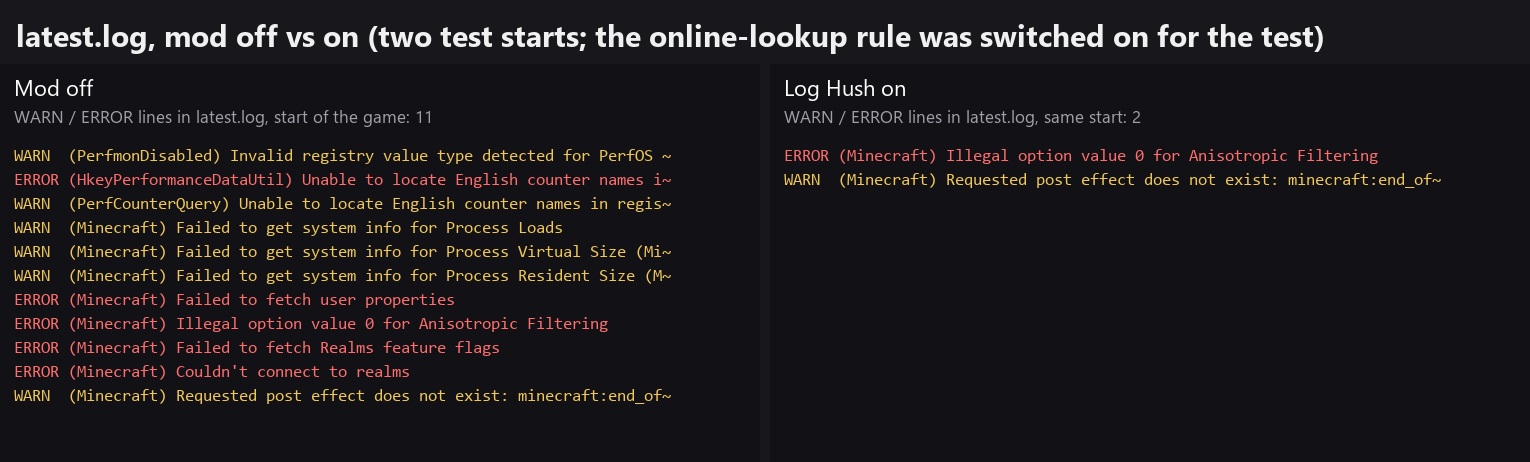
Result: latest.log starts with the lines that matter. In the automated test (two separate game starts of the same test world, mod off vs on, online rule switched on for the test) latest.log had 11 WARN/ERROR lines without the mod and 2 with it (a loader warning that only appears in the development setup is not counted); the 9 missing ones were perf-counter and online-lookup lines, and every one is in the hidden file.
常见问题
Log Hush 支持哪些 Minecraft 版本?
Log Hush 支持 Minecraft Java 版 26.3,可用的加载器:Fabric。下载时注意选择和你游戏版本一致的文件。
Log Hush 怎么安装?
先用 PCL2 或 HMCL 启动器安装对应版本的 Fabric,再把下载的 .jar 文件放进游戏目录的 mods 文件夹,重新启动游戏即可。开启了版本隔离的,mods 文件夹在 versions/版本名 下面。
Hullspark 的其他作品
查看全部 →
Death Point Marker
After you die, one HUD line keeps pointing you back to your loot: direction, distance and coordinates. No chat spam to scroll back to.

Hullspark Cat Dance
Cats near a playing jukebox hop, lean and swish their tails to the beat. Draw-only, client-side.

LastView
Your loading screen shows the place you left. Rejoin a world and its loading screen has your last view behind it instead of the menu panorama.

Hullspark Coordinate HUD
Always see where you are and how far you are from spawn. One line at the top of the screen, no minimap, no F3.
评论
登录后评论和评分