
LivechatDiscord
Monitor your Minecraft server's live chat directly in Discord — organized by category with smart admin mentions.
截图
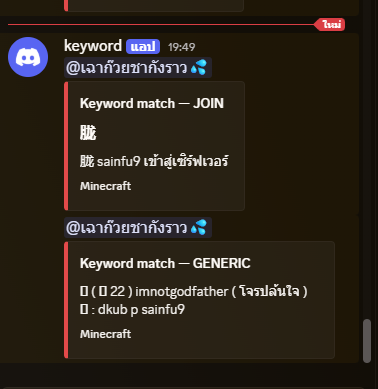

介绍

📡 AdminChat Monitor
Keep your whole community connected — monitor chat, get boss alerts, and never miss the action, straight from Discord.
AdminChat Monitor bridges your server and Discord in real-time. Admins can watch all chat activity and staff logs without staying logged in, while players get instant boss spawn alerts and announcements right in your community Discord — so everyone stays in the loop, wherever they are.
✨ Features
🐉 Boss Spawn Notifications
Instantly alert everyone the moment a world boss or custom mob spawns, including:
- 📍 Location & world name
- ⏳ Countdown timer
Perfect for rallying your community — admins and players never miss a raid again.
💬 Live Chat Relay
Forward all in-game chat to Discord instantly, so your community and staff never miss a message.
🗂️ Category Channels
Activity is automatically separated by type into clean, organized channels:
| Channel | Purpose |
|———|———|
| General Chat | Standard player chat |
| CSpy | Command spy logs |
| LPX | LuckPerms extended logs |
| Vulcan | Anticheat alerts & flags |
| MSG | Private message logs |
…and more!
🔔 Admin Mention System
Automatically tags admins in Discord when a player calls for help in-game — support requests never slip through the cracks.
⚙️ Fully Configurable
Choose which events to relay, which Discord channels to use, and who gets pinged — all from a simple config.yml.
🌐 Multi-Server Support
Running a network? Monitor multiple servers from a single Discord server using separate channel categories per node.
⚡ Lightweight & Async
All Discord webhooks are sent asynchronously, so your server TPS stays unaffected.
🔒 Permission-Based Access
Restrict sensitive logs (CSpy, LPX, MSG) to specific Discord roles — keeping private data away from regular staff.
🎯 Use Cases
👥 For Players & Community
- 🐲 Boss Events — Get pinged the moment a raid boss or world boss spawns, with location & countdown
- 📢 Stay Connected — Follow server chat and announcements even when you’re not online
🛡️ For Admins & Staff
- Moderation — Catch rule-breakers in chat without being online
- Staff Oversight — Monitor command usage and permission changes in real-time
- Player Support — Never miss a
/helpopor support request again
### Ready to bring your server and community closer?
Install AdminChat Monitor and keep everyone in the loop — from anywhere.
常见问题
LivechatDiscord 支持哪些 Minecraft 版本?
LivechatDiscord 支持 Minecraft Java 版 26.1–26.1.2,共 3 个版本,可用的加载器:Fabric。下载时注意选择和你游戏版本一致的文件。
LivechatDiscord 怎么安装?
先用 PCL2 或 HMCL 启动器安装对应版本的 Fabric,再把下载的 .jar 文件放进游戏目录的 mods 文件夹,重新启动游戏即可。开启了版本隔离的,mods 文件夹在 versions/版本名 下面。运行环境:仅客户端。
评论
登录后评论和评分