
LittleFrames Remote
A companion addon for LittleFrames that adds a craftable remote, per-user playlist files, direct video selection, and simple in-game playback controls.
介绍
LittleFrames Remote
I reuploaded the most recent version due to the wrong one for the volume update being uploaded sorry for the incovience
finished the work in progress version it is now an offical release I will be adding a patch to it for the playlist import book soon instead of a whole new version check below for whats new if you use that version please give any feedback im a solo dev so anything is helpful
A companion addon for LittleFrames on NeoForge 1.21.1 that adds a craftable remote, playlist files, in-game media selection, playback controls, and a working Media Visor HUD.
Features
– Craftable Frame Remote
– Per-user playlist files stored in the config folder
– In-game playlist selection
– Previous / Next / Play-Pause controls
– Main menu playlist access
– Media Visor HUD
– Working visor video
– Working visor audio
– Visor playback no longer cuts out at range
– Support for local `file:///…` video URLs
– Support for YouTube URLs with the WaterMedia YouTube plugin
Dependencies
Required:
– CreativeCore
– LittleFrames
– LittleTiles
– WaterMedia
Optional for YouTube:
– WaterMedia YT Plugin
Target platform:
– Minecraft 1.21.1
– NeoForge
How Playlists Work
Playlists are stored here:
`config/littleframes_remote/playlists/`
Each playlist is a `.txt` file.
Controls
– Right-click air: next video
– Sprint + right-click air: previous video
– Sneak + right-click air: play/pause
– Press `V`: open playlist UI
– Press `H`: toggle visor HUD
– Press `J`: configure visor HUD
Recipes
Frame Remote
Use a **Creative Picture Frame** in the recipe instead of a normal item frame.
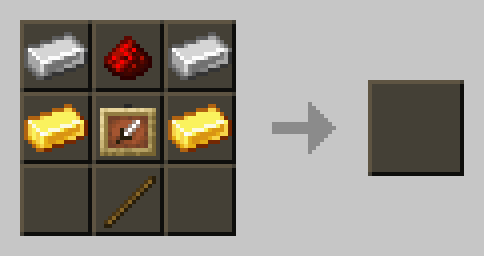
Creative Picture Frame
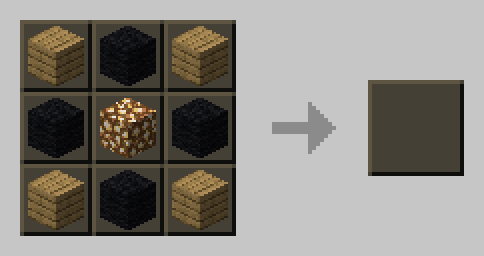
Playlist Import Book
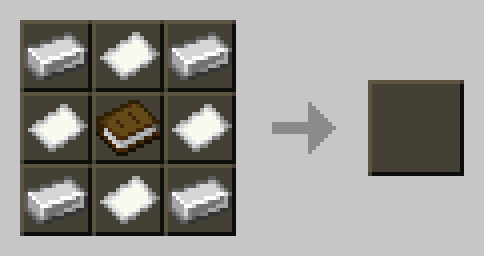
Media Visor
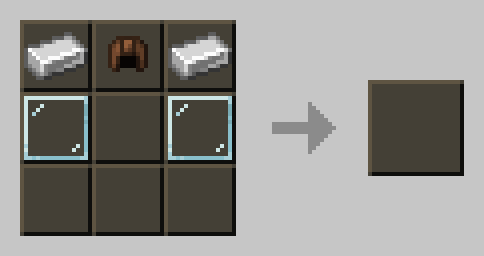
Media Visor Upgrade
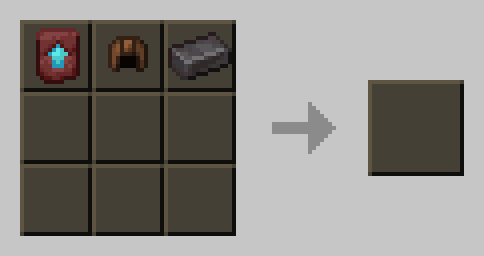
Current Status
Working
– Remote controls
– Playlist loading
– Playlist UI
– Main menu playlist access
– Visor video
– Visor audio
– Visor playback at range
Bug Reports
Please include:
– Minecraft version
– NeoForge version
– LittleFrames Remote version
– LittleFrames / LittleTiles / CreativeCore versions
– WaterMedia version
– `latest.log` or crash report
常见问题
LittleFrames Remote 支持哪些 Minecraft 版本?
LittleFrames Remote 支持 Minecraft Java 版 1.20.1–1.21.1,共 2 个版本,可用的加载器:Forge / NeoForge。下载时注意选择和你游戏版本一致的文件。
LittleFrames Remote 怎么安装?
先用 PCL2 或 HMCL 启动器安装对应版本的 Forge / NeoForge,再把下载的 .jar 文件放进游戏目录的 mods 文件夹,重新启动游戏即可。开启了版本隔离的,mods 文件夹在 versions/版本名 下面。
评论
登录后评论和评分