
Litematica RawMaterials
A Litematica addon that expands the material list into the raw materials you need to gather, following crafting recipes.
介绍
Litematica RawMaterials
A Litematica addon that expands the material list into raw materials.
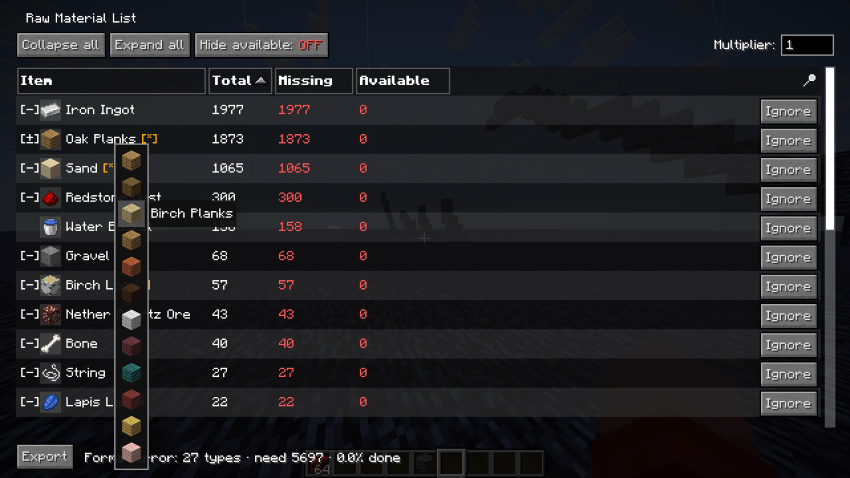
Litematica’s material list shows what a schematic is made of, but anything you’d normally craft (a block of redstone, a hopper, a chest) is listed as-is. RawMaterials follows the crafting recipes and shows the total raw materials you need to gather, minus what’s already in your inventory.
Requirements
- Minecraft 26.2 (Fabric)
- malilib 0.29.0+
- Litematica 0.28.0+
Features
Recipe expansion
Crafted items are broken down into their ingredients, recursively, down to raw materials.
Inventory netting
Items already in your inventory are subtracted, so the list shows what’s actually left to gather. Fully covered branches stop expanding and turn green.
Expand and fold
Open or collapse individual rows, or the whole list at once.
Tag ingredients
When a recipe accepts a tag (any planks, any log), you choose which item to count toward it.
Usage
Open a material list in Litematica first; RawMaterials uses the most recently opened one. Then press M + K to open it as a raw-material list.
Inside the list:
- Left-click a row to expand it into its ingredients.
- Right-click a row to fold it back into the crafted item.
- Middle-click a tag row to pick which item to use.
Press M + J to open the settings screen, where you can rebind both keys.
Notes
Recipes come from your client’s recipe book, the same source Litematica uses. On a vanilla multiplayer server, recipes you haven’t unlocked won’t expand, so some totals may not be fully broken down until you’ve unlocked them.
Building
./gradlew buildThe mod jar is written to build/libs/ (e.g. rawmats-fabric-26.2-0.1.0.jar). Put it in your mods folder along with malilib and Litematica for the same Minecraft version.
常见问题
Litematica RawMaterials 支持哪些 Minecraft 版本?
Litematica RawMaterials 支持 Minecraft Java 版 1.21.11–26.3,共 6 个版本,可用的加载器:Fabric。下载时注意选择和你游戏版本一致的文件。
Litematica RawMaterials 怎么安装?
先用 PCL2 或 HMCL 启动器安装对应版本的 Fabric,再把下载的 .jar 文件放进游戏目录的 mods 文件夹,重新启动游戏即可。开启了版本隔离的,mods 文件夹在 versions/版本名 下面。
naari3 的其他作品
查看全部 →
OffersHUD
Display a list of villager's trading offers as a HUD.

OffersHUD
Display a list of villager's trading offers as a HUD.
Litematica RawMaterials
A Litematica addon that expands the material list into the raw materials you need to gather, following crafting recipes.
评论
登录后评论和评分