
LiteGrid
A 3x3 mob-spawn safety HUD: live block-light readings of the tiles around you, color-coded by spawn risk. Toggle with L.
截图
介绍
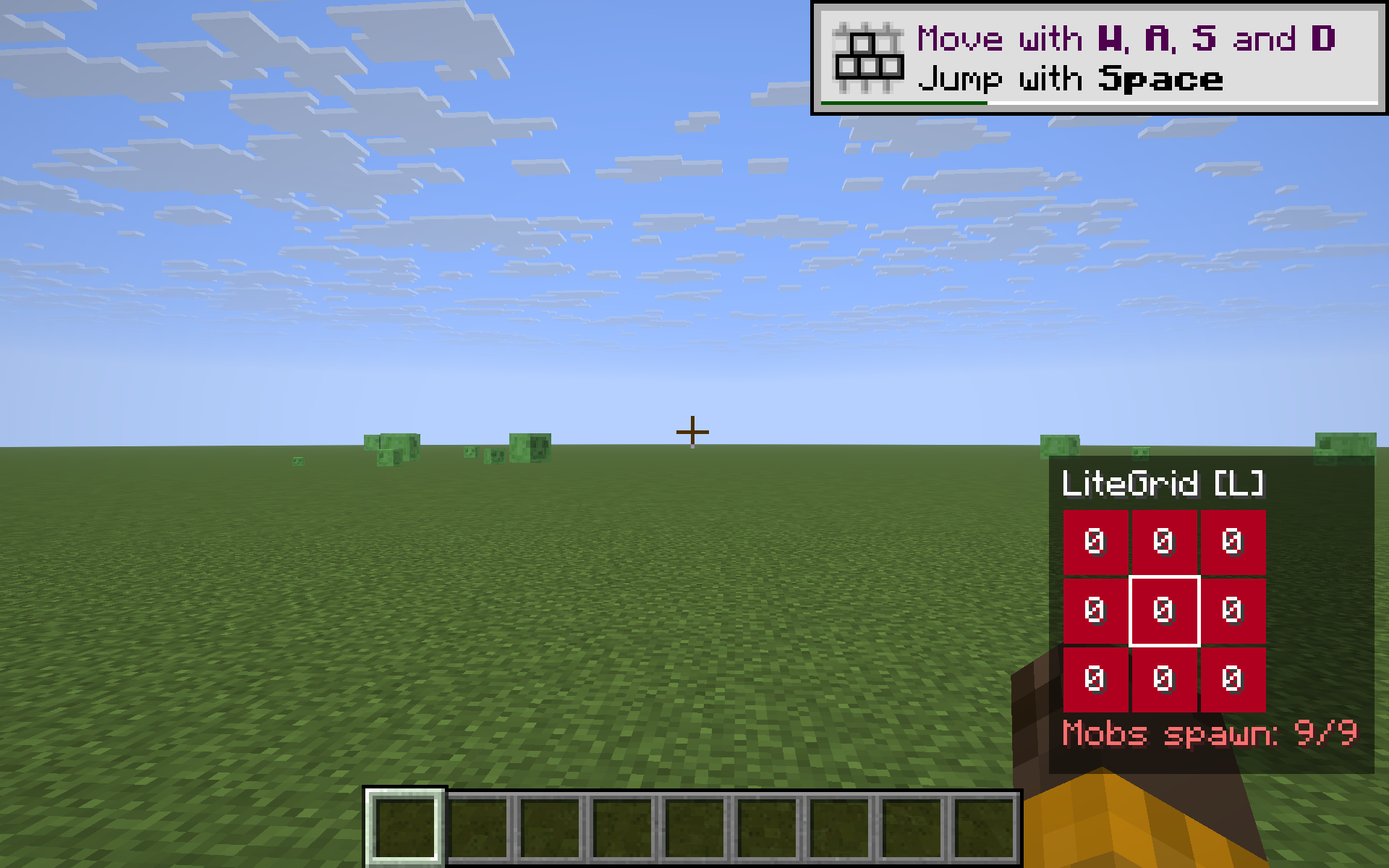
LiteGrid is a tiny spawn-proofing helper. It draws a 3×3 grid in the bottom-right corner showing the block light level of the floor tile you’re standing on and the eight tiles around you, so you can tell at a glance whether mobs can spawn here.
What you see
- Nine cells in a 3×3 grid, each showing a number from
0to15— that block’s light value. - Cell colors:
- Green — block light ≥ 8 (well-lit, mob-safe).
- Amber — block light 1–7 (some light, dim).
- Red — block light 0 (hostile mobs can spawn here at night).
- A white outline marks your own tile.
- A footer says either
Spawn-prooforMobs spawn: N/9so you know if the area around you is safe to leave unlit overnight.
Use it for
- Spawn-proofing your base, mob farms, or paths between buildings — instantly see the gaps your torches don’t cover.
- Quickly checking a cave area before AFK’ing.
- Teaching new players where mobs spawn and why torches matter.
Features
- One key to toggle the HUD on/off (default L, raw GLFW polling — same key works on every supported MC version).
- Hides automatically when you press F1.
- Reads the block light component (the part that matters for mob spawning), not the sky component — so a daylit grass field still shows red, accurately predicting what happens at night.
- Pure client-side — install on the client only, works on any server, no cheats, no game state changes.
- Tiny render cost — nine block-light lookups per frame and a few rectangles.
Compatibility
Works on Minecraft 1.21.8, 1.21.9, 1.21.10, and 1.21.11 (Fabric Loader 0.16+). One JAR for all four — install via Fabric, drop into your mods/ folder.
Why not just press F3?
F3 shows light at your eye position only, packed in among 40 other debug values. LiteGrid shows the spatial spread around your feet — exactly what you care about when placing torches — without covering half your screen.
常见问题
LiteGrid 支持哪些 Minecraft 版本?
LiteGrid 支持 Minecraft Java 版 1.21.8–1.21.11,共 4 个版本,可用的加载器:Fabric。下载时注意选择和你游戏版本一致的文件。
LiteGrid 怎么安装?
先用 PCL2 或 HMCL 启动器安装对应版本的 Fabric,再把下载的 .jar 文件放进游戏目录的 mods 文件夹,重新启动游戏即可。开启了版本隔离的,mods 文件夹在 versions/版本名 下面。
kvapilvaclav0 的其他作品
查看全部 →
Verity dog
This mod turns your dog into Verity.

TargetLock
Press J to instantly aim your camera at the nearest living entity within 10 blocks. If no entity is in range, a message will appear on your screen letting you know.
TargetLock
Press J to instantly aim your camera at the nearest living entity within 10 blocks. If no entity is in range, a message will appear on your screen letting you know.

HorseStats
Ride any horse, donkey, mule or llama and a small top-left HUD shows the mount's health, top speed (m/s) and jump height (blocks) live - no need to open its inventory. Toggle with H.
评论
登录后评论和评分