
LiteBuild
Builds Litematica blueprints legit: real walking, aiming, clicking and mining with server confirmations. Dependency-aware phases, fluids, verification, repairs, configurable HUD. No cheats.
截图
介绍
LiteBuild
LiteBuild builds your Litematica schematics the slow, honest way — with the same mouse, keyboard and packets a human player would use.
No world edits. No silent aim. No teleporting. No packet tricks. LiteBuild walks to each block, turns its head, picks the right item, and clicks — then waits for the server to confirm. It’s a builder, not a cheat engine, and its wire traffic stays inside vanilla rules.
What it does
Imports everything Litematica can read — .litematic, .schem (Sponge), .schematic, vanilla structure .nbt.
Dependency-aware phases: structure → attachments → mechanisms → fluids → activation.
Moves like a player: A* pathfinding, capped smooth rotations, real sprint on long legs, one coherent look movement per target then a still head — no radar scanning.
Smart batching: straight rows and reachable patches are placed from a single good stance instead of one-step-one-block crawling.
Real inventory: hotbar switching + main-inventory refills via normal swap clicks, with short human-level delays; armor and offhand are never touched.
Honest scaffolding: up to 8 temporary supports per path segment, removed with real mining; foreign and changed blocks are never touched.
Fluid safety: water only in fully enclosed live-verified regions; lava refused next to flammable material.
Self-verification: checkpoints every 5–10 blocks, then a full two-pass final audit — "done" only when the server confirms it twice.
Safe repairs: provably safe, owned mistakes are auto-fixed (bounded); everything else becomes a manual task with coordinates and a reason.
Controls
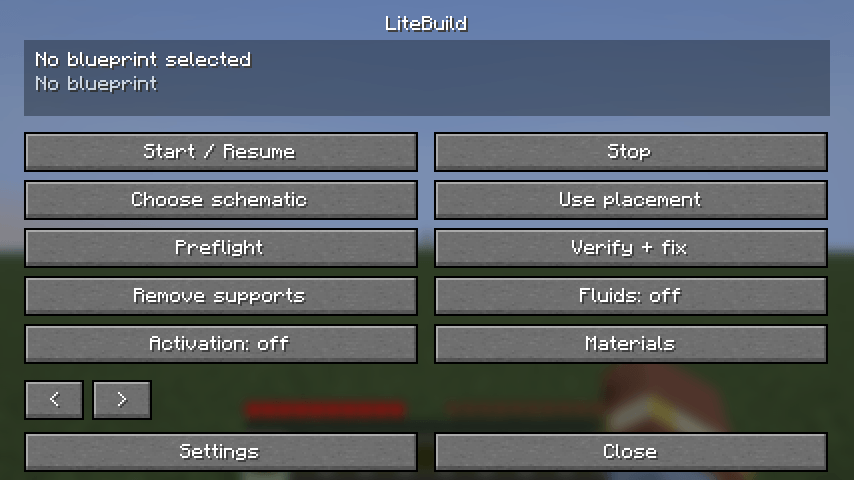
G — control panel · H — pause / emergency stop
/lb — select, load <file>, start, pause, stop, status, materials, issues, fluids, activate, cleanup
Auto-pauses on manual input, open GUIs, focus loss, damage, low health, riding/flying, world changes or moved placements.
HUD & settings
Configurable status panel (corner, scale, opacity, compact) plus a settings screen with six tabs: building, timings, look, movement, pauses, HUD — validated and saved atomically.
Note: in-game texts are currently German; English localization is on the 1.0 roadmap.
Installation
Fabric Loader 0.19.5+ for Minecraft 26.2
Required: Fabric API, Litematica ≥ 0.28.8, MaLiLib ≥ 0.29.6
Drop the jar into mods/ — Java 25 required
Honest limitations
Entities and block-entity contents (chests, sign text) are manual tasks, not reproduced.
Dense update-order mechanisms may need manual intermediate steps.
Intentionally slower than creative paste tools — legal interactions only.
The test suite audits the packet stream against vanilla invariants (≤45°/tick rotation, vanilla reach, packet order, no double-use). Strong evidence, not a guarantee: where a server forbids build bots, this mod is not allowed.
Source & issues: https://github.com/xxxxpeterxxxxxx-cloud/litebuild
License: GPL-3.0-or-later
常见问题
LiteBuild 支持哪些 Minecraft 版本?
LiteBuild 支持 Minecraft Java 版 26.2,可用的加载器:Fabric。下载时注意选择和你游戏版本一致的文件。
LiteBuild 怎么安装?
先用 PCL2 或 HMCL 启动器安装对应版本的 Fabric,再把下载的 .jar 文件放进游戏目录的 mods 文件夹,重新启动游戏即可。开启了版本隔离的,mods 文件夹在 versions/版本名 下面。
评论
登录后评论和评分