
LinkPreview
See what links in chat are about before clicking them, safely and automatically.
介绍





Why see a boring link when you could see _this_?
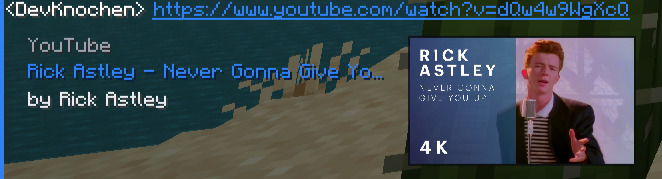
Titles. Thumbnails. Descriptions. Right there in your chat.
🔗 Paste a link, get a preview
Send a link in chat and LinkPreview will automatically fetch and display a rich embed. Just like in Discord.
Supported sites include:
| | Site | Preview includes |
|—|—|—|
| 🌐 | Most Websites | Page title and description |
| 🖼️ | Images | Inline preview of the image itself |
| 🎬 | YouTube | Video title, channel name, and thumbnail |
| 🎵 | Spotify | Track title, artist name, and thumbnail |
🔒 The site never sees your IP. To fetch link previews, LinkPreview connects to an external Cloudflare server on your behalf.
📥 Getting started
🎮 Minecraft Client
- Download LinkPreview and the Fabric API.
- Drop it in your
mods/folder. - Boot up Minecraft.
- Send a link in chat. That’s it!
⚠️ Only download from Modrinth. Don’t trust random sites!
🐛 Something broken?
Open an issue on GitHub. Describe your issue, include what version you’re on, what other mods you have, and any crash logs. We’ll sort it out.
📩 Contact
Reach out at [email protected]
Enjoyed it? A ❤️ on Modrinth or a ⭐ on GitHub genuinely makes our day.
常见问题
LinkPreview 支持哪些 Minecraft 版本?
LinkPreview 支持 Minecraft Java 版 1.20–26.2,共 23 个版本,可用的加载器:Fabric / Quilt。下载时注意选择和你游戏版本一致的文件。
LinkPreview 怎么安装?
先用 PCL2 或 HMCL 启动器安装对应版本的 Fabric / Quilt,再把下载的 .jar 文件放进游戏目录的 mods 文件夹,重新启动游戏即可。开启了版本隔离的,mods 文件夹在 versions/版本名 下面。运行环境:仅客户端。


评论
登录后评论和评分