LinguaCraft Counting
An optional add on mod for LinguaCraft and LinguaCraft Voices to learn how to count
介绍





Hear how every language counts.
About
When you pick up or craft several of something, LinguaCraft asks for the whole amount the way the language says it. LinguaCraft Counting lets you hear it: 三块圆石, 鉄の剣二本, 조약돌 세 개, два железных меча, zwei Eisenschwerter, veintiuna manzanas.
This is an add-on. It does nothing on its own: you need LinguaCraft and LinguaCraft Voices installed too.
Features
Every number, with its counter word
1 to 64 in every language LinguaCraft counts in, with each counter word or ending the language uses: 一把 / 两把, いっぽん / にほん / さんぼん, 한 자루 / 두 자루, один / одна / одно.
The counted forms of names
In languages where the noun changes with the number (Russian, Polish, German, Spanish and others), each item’s counted forms: железных меча, железных мечей, Eisenschwerter, espadas de hierro.
Stacks
A full stack said as a stack: 一组圆石, 丸石1スタック, two stacks of apples, um pack de pedregulho. Bigger amounts are asked in parts so every number is exact: 92 cobblestone is one stack, then twenty-eight.
Particles and counter words
The words that go with counting, each recorded once: 块, 本, 개, "blocks of", Blöcke, блока, の. In game the number, these and the word are shown in three colours.
One smooth phrase
The parts are joined into a single sound in game, with an even gap and no click, so a phrase sounds like one thing said, not separate clips.
Off until you want it
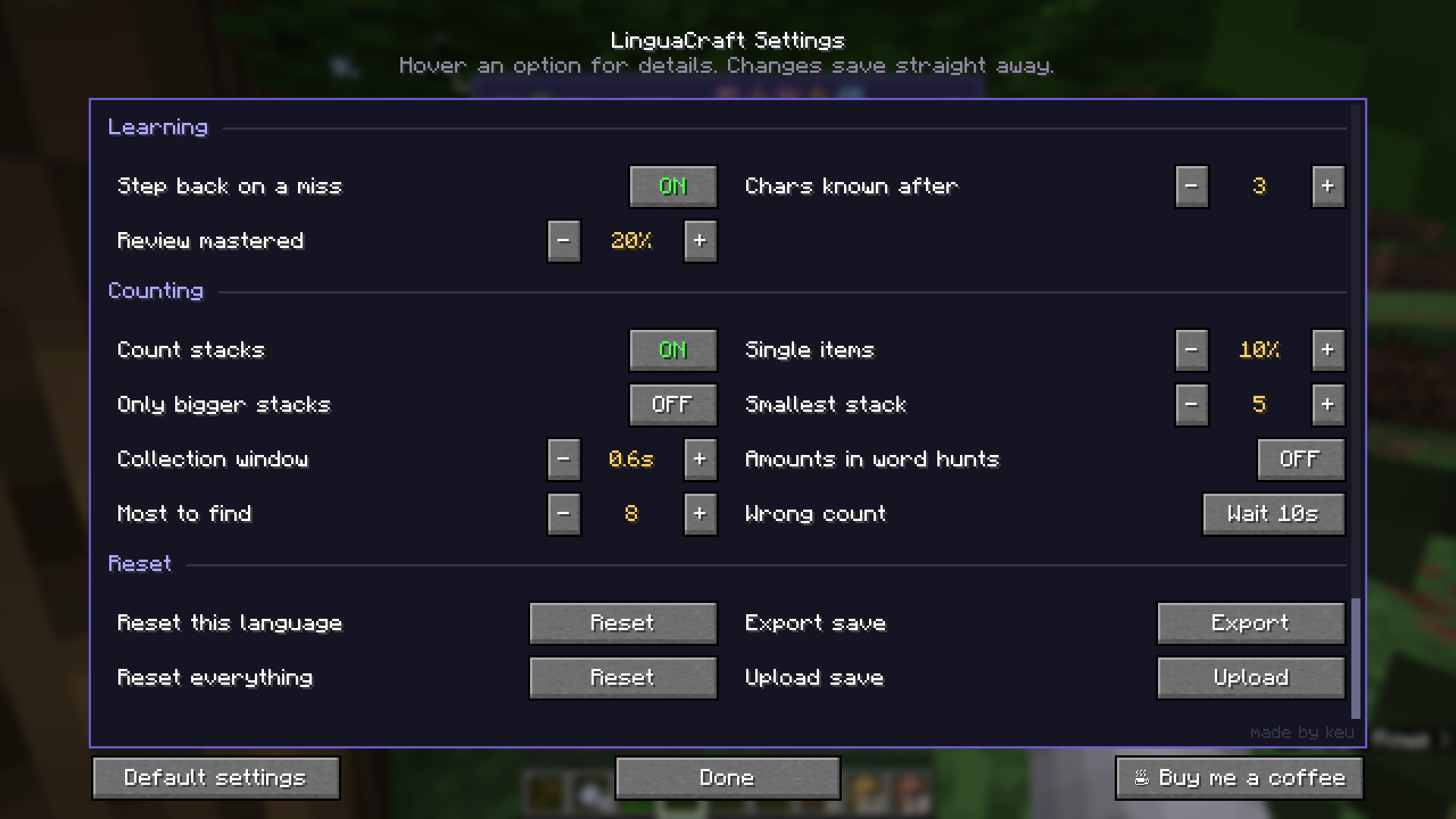
Counting is off in LinguaCraft by default. Installing this add-on switches it on once; after that it’s up to you in Settings → Counting: stacks, how often single items are counted, the smallest amount that’s asked, and amounts in word hunts.
No internet needed
All the audio is in the jar. Nothing is streamed or generated while you play.
Installation
With the CurseForge app: install LinguaCraft and LinguaCraft Voices in a Fabric profile (1.20.1, 1.21.1 or 26.3), then add LinguaCraft Counting to the same profile.
By hand
- Install LinguaCraft, Fabric API and LinguaCraft Voices first.
- Download the latest
linguacraft-counting-x.x.x.jarfrom the Files tab. - Put it in your
.minecraft/modsfolder, next to the others. Nothing to set up.
Compatibility
| Minecraft | 1.20.1, 1.21 / 1.21.1 and 26.3. One jar works on all of them. |
| LinguaCraft | 1.2.0 or newer, with LinguaCraft Voices. |
| Servers | Client only. Nothing to install on a server. |
FAQ
Do I need it to count?
No. LinguaCraft asks for amounts without it; you just won’t hear the numbers. Switch counting on in Settings → Counting.
A number or phrase sounds wrong. What do I do?
Open an issue with the language and the phrase. Fixes go into the next release.
Permissions
The audio is licensed under CC BY 4.0. You may change it, remix it and share it, as long as you credit LinguaCraft Counting by keu and keep the voice credits from NOTICE.txt.
- Modpacks: Yes, add it to your modpack as normal.
- Videos and streams: Go for it, no need to ask.
Support the mod
LinguaCraft is free and always will be. If it’s helped you learn a few words and you’d like to say thanks,
you can buy me a coffee on Ko-fi. It’s never expected, but always appreciated.
Credits
Made by keu
- Voices made with the open text-to-speech models Kokoro and Piper, the same ones as LinguaCraft Voices
- The add-on’s
NOTICE.txtlists the voice used for each language and its licence
LinguaCraft Counting by keu. Audio licensed under CC BY 4.0. NOT AN OFFICIAL MINECRAFT PRODUCT. NOT APPROVED BY OR ASSOCIATED WITH MOJANG OR MICROSOFT.
常见问题
LinguaCraft Counting 支持哪些 Minecraft 版本?
LinguaCraft Counting 支持 Minecraft Java 版 1.20–26.3,共 3 个版本,可用的加载器:Fabric。下载时注意选择和你游戏版本一致的文件。
LinguaCraft Counting 怎么安装?
先用 PCL2 或 HMCL 启动器安装对应版本的 Fabric,再把下载的 .jar 文件放进游戏目录的 mods 文件夹,重新启动游戏即可。开启了版本隔离的,mods 文件夹在 versions/版本名 下面。

评论
登录后评论和评分