LG’s Command Items – Easy Custom Items
This datapack adds a way to add commands directly as a component to items! Great way to add custom items with some additional features like cooldowns!
截图

介绍
🔀 LG’s Command Items datapack
This datapack adds a way to add commands directly to items when triggering a specific event, events stacks meaning you can have a command for Right-Click as well as a command when attacking a mob or getting attacked!
Usage Tutorial
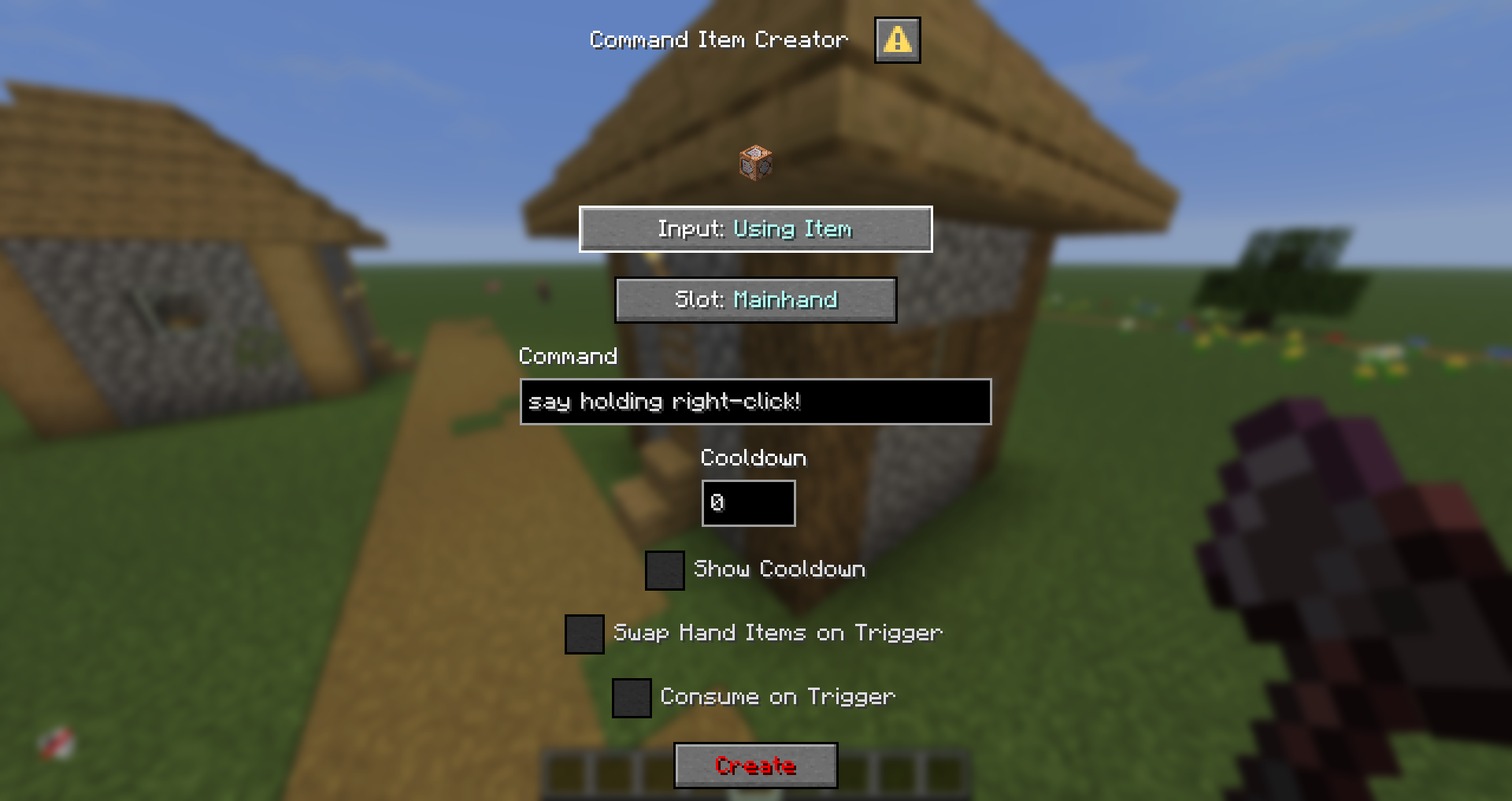
Use /function a:open_menu command, then click Add Commands button, select your input and slot, then confirm with the red “Confirm” button, it will add the command to your selected input + slot combination
Current Triggers & Slots
Triggers
- Tick (20 times per second)
- Use Item (on right-click, requires the item to be consumable, the Item Modifier makes it easy to turn an item into consumable, check commands)
- Using Item (Triggers whenever you’re using the item)
- Player Hurt Entity (whenever player attacks an entity)
- Player Killed Entity (whenever player kills an entity)
- Entity Hurt Player (whenever the player gets damaged)
- Inventory Changed (whenever players’ inventory changes)
Slots
- Mainhand
- Offhand
- Head
- Chest
- Legs
- Feet
Limitations
You can only put one command into each trigger + slot combo, to use several commands, it is recommended to use functions
For any ticking trigger, I recommend not using cooldowns simply for optimization purposes, it won’t fry your ticks if you don’t do so, but with several players using those, it may very likely affect your performance negatively
Other Additions
- Cooldowns – You can easily add cooldowns to your commands, they generate no scoreboards and are bound directly to items
- Swap Hand Items – Simply swaps your mainhand and offhand items
- Show Cooldown – When on cooldown, displays the cooldown on the chat, not recommended to use on ticking triggers so not to flood your chat
- Consume On Trigger – Once triggered, consumes 1 of the used items
⚠️ Important commands!
/function a:open_menu
/function a:copy_item
/function ci:reset_cds
🔴 YouTube Showcase
常见问题
LG’s Command Items – Easy Custom Items 支持哪些 Minecraft 版本?
LG’s Command Items – Easy Custom Items 支持 Minecraft Java 版 1.21.6–26.1.2,共 9 个版本,可用的加载器:Fabric / Forge / NeoForge / Quilt。下载时注意选择和你游戏版本一致的文件。
LG’s Command Items – Easy Custom Items 怎么安装?
先用 PCL2 或 HMCL 启动器安装对应版本的 Fabric / Forge / NeoForge / Quilt,再把下载的 .jar 文件放进游戏目录的 mods 文件夹,重新启动游戏即可。开启了版本隔离的,mods 文件夹在 versions/版本名 下面。运行环境:客户端 / 服务端。
LordGacie 的其他作品
查看全部 →
JoJo Stands
SVM JoJo is a addition to vanilla Minecraft that adds stands and items from JoJos Bizarre Adventure to the game

Super Powers
SVM Powers is a Super Power datapack adding a variety of abilities, new structures, mobs, items and more!

/sit
Adds a command to sit anywhere you'd like to!

Moss Ruins
A vanilla-like datapack adding new content to embrace some parts of the boring birch forest biomes by adding a new set of structures which spawn as small single buildings or big ruined cities
评论
登录后评论和评分